What matters when choosing
Decide whether you can use a built-in screen before comparing components. If you need a separate monitor regardless, include it and every other powered item in your socket plan.
Gaming laptop
Choose it when: You can play on the integrated screen and want the PC and display in one device.
Bear in mind: An external monitor or other mains-powered accessories can add sockets to the setup.
Gaming desktop
Choose it when: You have a fixed place for a tower and display and want the expansion options offered by the model you select.
Bear in mind: A compact tower can save desk space without removing the need to plan power for a monitor.
| Concern | What to check | Who this matters to |
|---|
| Core socket use |
Check whether you will use the laptop screen and what powered accessories you need. Confirm the adapter supplied with the exact configuration. |
If I have one usable outlet, I want to play without adding a separately powered monitor. Around 50% of consumers put the core setup’s socket use first. |
| Game requirements |
Compare the exact PC’s CPU, graphics, RAM and storage with each intended game’s current recommended requirements, allowing space for saves and custom content. |
If I plan to play more than one decorating or renovation game, I do not want to choose a PC solely around The Sims 4. Game suitability is the first concern for around 30% of consumers. |
| Desktop expansion |
Confirm that the tower, display and accessories can be powered safely, then check upgrade and warranty conditions for the exact model. |
If I have a permanent desk, I may value the option to change memory or storage later. Around 20% of consumers put fixed-setup expansion first. |
Gaming laptops on Joybuy
These laptops combine a gaming PC and display for consumers willing to play on the built-in screen. Compare their listed configurations with your games and check the adapter and any additional powered accessories before choosing.
 No image available
Lenovo LOQ Essential 15ARP11 gaming laptop
Consider this if you want to use a built-in screen rather than power a separate monitor for the core setup.
The listed configuration has an AMD Ryzen 7 170, GeForce RTX 5050, 16 GB RAM, a 1 TB SSD and a 15.6-inch 144 Hz FHD display. Check your intended games’ recommended requirements and whether the included adapter suits your setup.
Joybuy
 No image available
Lenovo Legion Pro 7 16IAX10H gaming laptop, 83F5000UUK
Consider this integrated-screen option if you also want substantial listed memory and local storage for your planned games and files.
Its title specifies an Intel Core Ultra 9, GeForce RTX 5090, 64 GB RAM, a 2 TB SSD and a 16-inch display. Compare the full configuration with your games, keep cooling vents unobstructed and confirm the supplied power adapter.
Joybuy
 No image available
THUNDEROBOT Radiant S16 gaming laptop
Consider this if a built-in 16-inch screen fits your desk and you want to keep games and saves on the laptop.
The listed variant has an AMD Ryzen 7 7745HX, GeForce RTX 5060, 16 GB DDR5 RAM, a 1 TB SSD and a QHD+ 240 Hz display. Check game requirements and confirm the included adapter’s plug details.
Joybuy
 No image available
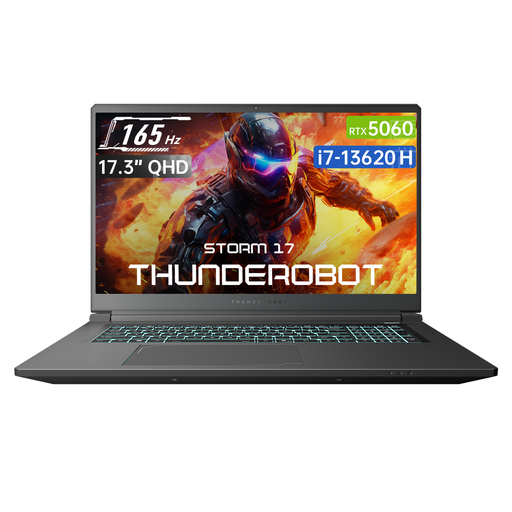
THUNDEROBOT Storm 17 5060 gaming laptop
Consider this if you would rather use a larger built-in screen than add a separately powered monitor.
Its listed configuration includes a Core i7-13620H, GeForce RTX 5060, 16 GB DDR5 RAM, a 1 TB SSD and a 17.3-inch QHD 165 Hz display. Check the games you intend to play and confirm the supplied adapter’s plug details.
Joybuy
 No image available
HP OMEN 17-db1000na gaming laptop
Consider this if you want a 17-inch-class built-in display for decorating games without adding an external monitor to the core setup.
The title lists an AMD Ryzen AI 7 350, RTX 5060, 16 GB RAM, a 1 TB SSD and a 17-inch Full HD display. Compare its specification with your games and confirm the supplied adapter’s plug details.
Joybuy
Frequently asked questions
Should I choose a gaming laptop if I have only one free wall socket?
Assess a laptop first if you are happy to use its built-in screen: the main PC and display are combined. That does not mean every complete setup needs only one socket; count any monitor, speakers, dock or other powered accessories you plan to add.
Are The Sims 4’s requirements enough to choose a PC for decorating games?
No. Electronic Arts’ requirements apply to The Sims 4, not to every decorating or renovation game. Compare the current recommended requirements of each game you intend to play with the exact PC configuration.
Can I connect extension leads together for a desktop gaming setup?
Do not connect one extension lead to another. Buckinghamshire Fire & Rescue Service advises against it, while London Fire Brigade warns about overloaded sockets. Follow the equipment manufacturers’ instructions and arrange power safely before setting up a tower and monitor.
What should I check if I need an extension lead?
Choose a suitable, undamaged lead, check its plug and fuse information, and follow its load and use instructions. The UK Office for Product Safety and Standards has reported a high-risk multi-socket lead with a plug that did not meet BS 1363 requirements; do not assume every lead is suitable for your planned equipment.


