Players short of socket space
If a tower and separately powered monitor would crowd your available sockets, assess a laptop you can use on its own screen. Electrical Safety First advises against solving a socket shortage by chaining extension leads.


Choose a gaming laptop if keeping powered equipment to a minimum is your priority: its built-in screen lets you play without plugging in a separate monitor. A desktop remains worth considering if the PC will stay at one desk and easier upgrades matter more, but plan power for both the tower and display. Whichever format you choose, check your intended games against the exact configuration and avoid overloading or chaining extension leads.
If a tower and separately powered monitor would crowd your available sockets, assess a laptop you can use on its own screen. Electrical Safety First advises against solving a socket shortage by chaining extension leads.
An integrated-screen laptop keeps the computer and display together when you move between rooms or also use the machine for work or study. Compare the exact configuration’s weight, ports and memory rather than relying on a laptop-line name.
If you have room and safely planned power for a tower and monitor, a desktop leaves more scope to replace components later. Easier upgrading is one desktop advantage.
For a desk with few sockets, decide whether you will use a built-in screen before comparing game requirements and future upgrade options. The three concerns below reflect different primary reasons consumers might choose one setup over another.
| Concern | What to check | Who this matters to |
|---|---|---|
| Powered devices | Decide whether you can play on a laptop’s built-in screen. If you want an external monitor, count its power connection separately. | With few free sockets, I want to play without adding a monitor plug; around 50% of consumers put minimising powered devices first. |
| Game requirements | Compare your intended games’ minimum and recommended requirements with the exact PC’s processor, graphics, memory and storage. | If my shortlist includes a first-person 3D puzzle adventure, I want to check that title’s requirements rather than judge by genre; around 30% of consumers prioritise game compatibility. |
| Future upgrades | For a fixed desktop, check component-upgrade options and plan power for the tower, monitor and any accessories. | When the computer will stay at one desk, I may accept more powered equipment to leave room for later component changes; roughly 20% of consumers place upgrade flexibility first. |
A desktop gaming setup commonly needs a separately powered display. A laptop used on its built-in screen does not add that monitor plug.
Sketch the finished desk before buying and count the computer, display and any powered speakers, dock or lighting you intend to use.
Electrical Safety First warns that plugging one extension lead into another can overload and overheat equipment, creating a fire risk.
Use no more than one extension device per wall socket and stay within its marked maximum current rating. If you regularly need more outlets, consider asking a registered electrician about additional wall sockets.
Steam describes Blue Prince as a mix of mystery, strategy and puzzles, while The Talos Principle 2 is a first-person puzzle experience. A genre label alone cannot establish what your chosen games require.
List the games you intend to play and compare their recommended requirements with the exact PC configuration before deciding how much hardware you need.
A laptop listing USB-C power delivery does not, by itself, establish how that laptop performs or charges with a particular USB-C charger or dock.
Check the exact model’s supported charging modes and power limits in its manual before relying on a different charger for gaming.
These laptop lines illustrate features to compare; specifications depend on the exact model and configuration.
The compact G14 line is relevant if you want an integrated display in a smaller laptop.
The Blade 14 is a compact integrated-display option for consumers who expect to move their gaming laptop.
The Legion Slim 5 Gen 8 14-inch model is a portable gaming-laptop example within Lenovo’s wider Legion line.
These gaming laptops have built-in screens, so each can be considered for playing without a separately powered monitor. Their screen sizes and listed configurations differ; compare your own games’ requirements and the supplied power accessories before choosing.
 No image available
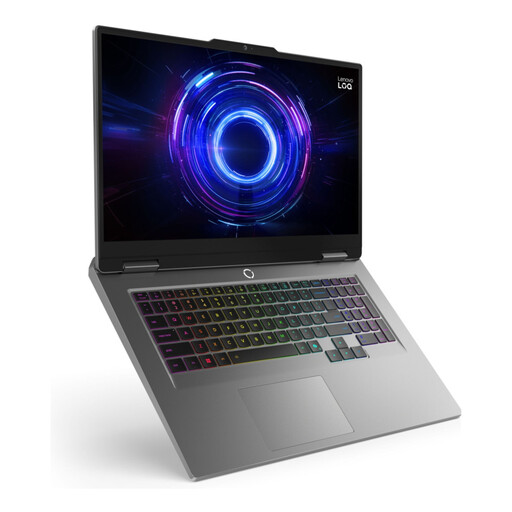
Consider this model if you want to play on a larger built-in screen instead of powering a separate monitor.
The listed configuration has a 17-inch Full HD display, AMD Ryzen AI 7 350, RTX 5060, 16GB RAM and a 1TB SSD.
Compare it with your games’ recommended requirements, and confirm the supplied adapter and UK plug details.
 No image available
Its built-in screen lets you assess this laptop for a desk where another monitor plug would be inconvenient.
The product title lists 24GB RAM and a 1TB SSD. It names an i7-13650H processor, while the accompanying description names an i7-13650HX; confirm the processor for this exact model before buying.
Check your games’ requirements and confirm the supplied adapter and UK plug details.
 No image available
Consider its 14-inch built-in display if you want a smaller screen-and-computer setup without a separate monitor.
The product name specifies a WQXGA+ display, AMD Ryzen AI 9 HX 370, RTX 5070 Ti, 32GB memory and a 2TB SSD.
Check your games’ requirements, and confirm the laptop’s weight and supplied adapter details for this variant.
 No image available
Its integrated 16-inch screen allows play without adding a separately powered monitor.
The product title lists a QHD+ 240Hz display, RTX 4060, 16GB DDR5 RAM and a 1TB SSD.
Confirm the exact processor, ports and supplied adapter for this configuration, then compare it with your intended games’ requirements.
They can share an extension lead only if their combined load stays within its marked maximum current rating. Electrical Safety First advises using just one extension device per wall socket; count every connected item rather than the laptop alone.
No. Electrical Safety First warns that chaining extension leads can overload and overheat equipment. If more sockets are a regular need, consider asking a registered electrician about installing additional outlets.
Start with the minimum and recommended requirements for the games you actually intend to play, then compare them with the exact PC configuration. Steam’s descriptions of Blue Prince and the first-person The Talos Principle 2 show why the puzzle-adventure label alone is not a hardware specification.
Choose an accessory suitable for your UK socket and check its marked current rating against the devices you will connect. Follow its instructions for use; for a cable reel, check whether it must be fully unwound for the intended load.