Built-in-screen enthusiasts
If your laptop will usually stay on a desk, a large or high-resolution screen may matter more to you than a compact chassis. ASUS ROG, Acer and MSI list 18-inch configurations worth comparing for this setup.


Start with the requirements of the fantasy adventures you play and the resolution you want to use, then compare complete laptop configurations rather than GPU names alone. A 16-inch model takes less desk space than an 18-inch model; choose the larger built-in screen if you will use it regularly and can accommodate its footprint. Check the exact GPU, display, memory, storage and connections before deciding.
If your laptop will usually stay on a desk, a large or high-resolution screen may matter more to you than a compact chassis. ASUS ROG, Acer and MSI list 18-inch configurations worth comparing for this setup.
If the laptop must share a desk with work equipment or an external monitor, a 16-inch model gives you a smaller built-in screen and footprint than an 18-inch alternative. Lenovo lists a 16-inch Legion Pro 7 configuration that illustrates this route.
If you expect to play for long sessions, check the particular laptop’s GPU power specification, cooling design, installed memory, storage and display rather than relying on its GPU name. NVIDIA publishes power ranges for its laptop GPUs, while manufacturers specify individual configurations.
Choose it when: You want a built-in gaming screen but need to leave more room for work equipment than an 18-inch laptop would.
Trade-off: The screen gives you less viewing area for landscapes and game interfaces than an 18-inch panel.
Choose it when: The laptop will mostly stay at one desk and its large built-in display will be your main gaming screen.
Trade-off: It occupies more desk space; a higher native display resolution also sets a more demanding graphics target.
| Concern | What to check | Who this matters to |
|---|---|---|
| Graphics headroom | Compare your games’ requirements at your target resolution with the exact GPU and its specified power. | If I want detailed scenes and effects, I need to judge the graphics configuration against the games I actually play; around 31% of consumers put graphics headroom first. |
| Built-in display | Compare screen size and native resolution, particularly if you will not use an external monitor. | For long sessions at one desk, I want enough built-in viewing area for landscapes and game interfaces. Roughly 25% of consumers make the display their primary concern. |
| Desk practicality | Check chassis dimensions, ventilation space and the ports needed for your desk equipment. | My laptop needs to fit alongside work peripherals without obstructing its ventilation; about 25% of consumers prioritise that practical fit. |
| Configuration and ownership | Confirm installed RAM, SSD capacity and the exact listing, including keyboard layout and warranty terms. | I want the delivered configuration to have the capacity and features I chose, rather than assuming a product-family specification applies. Around 19% of consumers put configuration and purchase assurance first. |
NVIDIA lists different subsystem-power ranges for RTX 50 Series Laptop GPUs. A GPU name alone does not identify the power specification or cooling design of a particular laptop.
Check the exact model’s GPU power, display resolution and installed memory and storage before comparing configurations.
A large built-in panel takes up desk space even if you usually play on an external monitor.
Measure the space available, leave room for ventilation and decide which screen will be your main gaming display.
Specifications described as “up to” may apply only to certain configurations, not every laptop in the family.
Check the complete model number, GPU, screen, installed RAM and SSD, keyboard layout, charger and warranty on the listing you intend to buy.
The ROG Strix SCAR 18 is an 18-inch route for a predominantly fixed desk setup.
Legion Pro 7 offers a 16-inch performance route for buyers who do not want an 18-inch chassis.
The Predator Helios 18 AI is another large-screen configuration family to consider for a fixed desk.
Raider 18 models are relevant if an 18-inch system will fit your gaming and work area.
These listings include 14-, 15.6- and 16-inch laptops for home-office gaming setups. Compare each exact configuration with your games’ requirements; they are not interchangeable with the 18-inch models discussed above.
 No image available
Consider this 16-inch model if you want a built-in 2560 × 1600 display and substantial installed memory and storage at your desk.
The title lists an RTX 5080 Laptop GPU, but the technical description also calls it a “Future/Unannounced Component”. Confirm the GPU identity and power specification before choosing it for a particular game.
 No image available
This 15.6-inch Full HD model is worth checking if you want a stated GPU power figure for comparison with your chosen games’ requirements.
The listing specifies an RTX 5050 Laptop GPU at 65 W TGP, a 144 Hz display and a UK keyboard. Its suitability for particular games and settings depends on their requirements.
 No image available
Consider this 16-inch option if built-in screen resolution and room for a large installed game library matter to you.
The listed display is 2560 × 1600 at 240 Hz. Although the title says 5080, the overview says “RTX 5080 (or equivalent)”; confirm the supplied GPU and its power specification before purchase.
 No image available
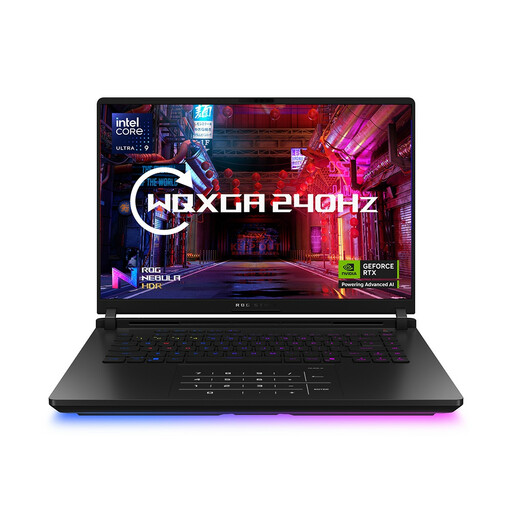
This 16-inch option pairs a WQXGA display with installed memory and storage to compare against your games and workspace needs.
The listing identifies RTX 5060 graphics and HDMI, USB and Ethernet connections. Confirm the GPU power and display refresh rate if either affects your decision.
 No image available
The 14-inch format may suit a desk where space matters or an external monitor will be the main gaming screen.
The title specifies a WQXGA+ display, 32 GB RAM and a 2 TB SSD. Check the exact GPU power and keyboard layout, particularly if you need a UK keyboard; the colour name does not establish the layout.
Choose by the screen you will actually use and the desk space available. A 16-inch laptop leaves a smaller footprint, while an 18-inch model makes more sense if its built-in display will be your main gaming screen; compare native resolution and the exact GPU as well as size.
No. NVIDIA lists ranges of GPU subsystem power for its RTX 50 Series Laptop GPUs, so check the particular laptop’s specified GPU power, cooling information, display and installed memory before drawing a conclusion from its GPU name.
Keep the listing and order confirmation, document the issue and contact the trader. In the UK, section 9 of the Consumer Rights Act 2015 requires supplied goods to be of satisfactory quality; a fault or mismatch should not be treated simply as a change-of-mind return.
Use an appropriate electrical-equipment collection or take-back route rather than putting the laptop in ordinary household waste. Check the retailer’s process or a local collection option, and remove your accounts and personal data before handing it over.