What matters when choosing?
Start with your named software, mods and other tools, then decide how often the laptop must travel. Compare exact configurations rather than assuming that every model in a range has the same components.
| Concern |
What to check |
Who this matters to |
| Sustained use |
Check the exact GPU, its stated power limit and the cooling arrangement. Keep vents unobstructed during use. |
If I work or play for hours at a desk, I want to assess the whole power and cooling configuration, not just the GPU label. Around 36% of consumers put sustained use first. |
| Software capacity |
Compare the program’s published CPU, GPU, memory and storage requirements with the chosen configuration and its upgrade options. |
With a particular simulator, editor or mod set in mind, I need a configuration that meets its documented requirements. For around 29% of consumers, software capacity is the primary concern. |
| Portability and connections |
Check laptop and charger weight, plus the ports needed for your monitor and peripherals. |
If I carry projects between locations, the complete kit must be manageable and still connect to my desk setup. Portability comes first for around 21% of consumers. |
| Visual workspace |
Compare the exact screen size and resolution; check display-output compatibility if you plan to use a monitor. |
When part lists and design controls need room on screen, I care most about the workspace available at my usual desk. Around 14% of consumers prioritise that visual workspace. |
Joybuy product choices
These 16-inch and 18-inch gaming laptops offer different starting points for a spacecraft-design and gaming setup. Compare each exact configuration with your software requirements and with how often you will carry the laptop.
 No image available
MSI Stealth 18 AI Studio A1VGG-001UK, 18-inch
Consider its 18-inch format if your projects usually stay at a desk; check the space and carrying weight your setup allows.
The named configuration includes an Intel Core Ultra 9, NVIDIA GeForce RTX 4070, 32 GB RAM and 2 TB SSD. Confirm its GPU power limit and your software’s requirements before choosing it.
View on Joybuy
 No image available
Lenovo Legion Pro 7 16IAX10H 83F5000UUK, 16-inch
Its 16-inch format is an option if you want an internal design workspace without moving to an 18-inch laptop.
This part number is listed with an Intel Core Ultra 9, NVIDIA GeForce RTX 5090, 64 GB RAM and 2 TB SSD. It is not the same configuration as Lenovo UK’s cited Legion Pro 7i; check the GPU power limit and supplied charger for this unit.
View on Joybuy
 No image available
Stormforce Exobook 16-inch QHD+, Ultra 9, 32 GB, 4 TB, 5080
Consider this configuration if your project files and games make installed storage an important part of the choice.
The product name specifies an Ultra 9 processor, 32 GB memory and 4 TB storage. Confirm the exact graphics configuration, GPU power limit and which adapter is supplied.
View on Joybuy
 No image available
Lenovo Legion Pro 5 LEG P5 R9, 32 GB, 2 TB, 5060
This is another configuration to assess if a 16-inch gaming-and-design laptop fits your desk and travel plans.
The product name specifies a Ryzen 9, 32 GB memory, 2 TB storage and 5060 graphics. Check the exact processor model and graphics power configuration against your software requirements.
View on Joybuy
 No image available
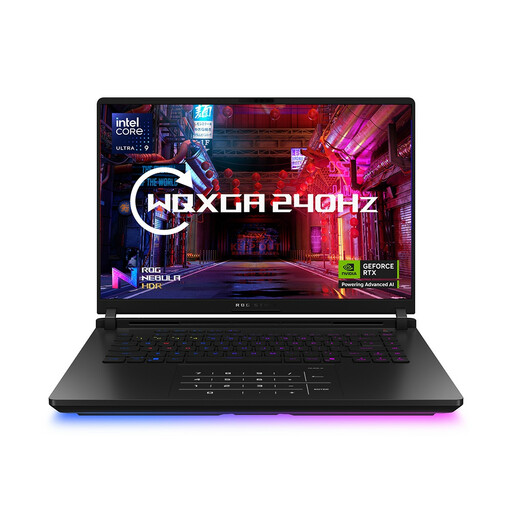
ASUS ROG Strix SCAR 16 G635LW WQXGA, 64 GB, 2 TB
Its 16-inch configuration may suit a setup where memory and project storage are priorities.
The product name specifies an Intel Core Ultra 9, 64 GB RAM and 2 TB SSD. Graphics descriptions for this listing conflict, so confirm the exact GPU and its power limit before assessing suitability.
View on Joybuy
Common questions
What specifications does my spacecraft-design software require?
Start with the requirements published for your named simulator, game or editor, including its version and any mods or tools you plan to run alongside it. Then compare the exact laptop’s processor, graphics, video memory, RAM, storage and relevant connections; the activity alone does not establish a universal minimum specification.
Will a thin laptop perform like an 18-inch model with a similarly named GPU?
The GPU name alone cannot establish that. ASUS ROG UK states a 120 W maximum GPU TGP for the cited Zephyrus G16, while MSI UK lists up to 175 W maximum graphics power with Dynamic Boost for applicable Raider 18 variants. Check the exact configurations and cooling details rather than treating those power ratings as measured performance.
How should I position a laptop for a long session?
Place it on a stable surface and keep its cooling vents unobstructed. The instructions for the cited Joybuy Lenovo Legion Pro 7 listing call for ventilation clearance; follow the instructions for whichever model you use.
Can I cancel an online laptop order after delivery in the UK?
For an eligible UK distance sale, GOV.UK states that you can tell the seller you want to cancel within 14 days of receiving the item. Check the conditions that apply to your order and the seller’s return procedure; cancellation for a change of mind is distinct from remedies if goods are faulty, damaged or misdescribed.


