What matters when choosing?
Start with the work you need to see clearly and run comfortably, then decide how much graphics headroom your other projects require. For shared-office use, assess portability and fan behaviour as part of that choice, not as afterthoughts.
| Concern |
What to check |
Who this matters to |
| Reviewing colour and detail |
Check the exact screen’s panel type, resolution, colour-gamut claim and glare treatment. If colour delivery matters, check how it fits your monitor or calibration workflow. |
If I assess palettes and small sprite details on the built-in screen, refresh rate alone will not settle whether it suits my work. Around 27% of consumers put display-led asset review first. |
| Noise near colleagues |
Check for an accessible quiet profile and assess it while running your editor and usual engine workload, with the vents unobstructed. |
Working beside colleagues, I would rather have restrained routine operation than use maximum performance throughout the day. For around 33% of consumers, office acoustics are the primary concern. |
| Moving between desks |
Consider the laptop and power supply together; check the ports and memory configuration you will need at each workspace. |
If I carry my work between desks and home, the whole setup matters more than chassis dimensions alone. Mobility comes first for around 20% of consumers. |
| Broader game-development work |
Match the exact GPU, memory and storage configuration to your intended 3D scenes, rendering or game tests. |
Tile painting is only part of my workflow if I also run demanding builds on the same machine. Around 20% of consumers primarily need headroom for that wider work. |
Joybuy product choices
These gaming laptops give you configurations to consider for tile creation and, in some cases, more demanding game-development work. Compare each exact display and hardware specification with your own projects, then assess fan behaviour for the shared office.
 No image available
Lenovo LOQ Essential 15ARP11, Ryzen 7 170, RTX 5050, 16GB RAM, 1TB SSD
Consider this configuration if you want a 15.6-inch screen for tile work and also need a specified GPU for gaming or testing. The product name lists a 144Hz FHD display, AMD Ryzen 7 170, GeForce RTX 5050, 16GB RAM and 1TB SSD; check the screen’s colour characteristics and how the laptop sounds during your routine work.
Joybuy
 No image available
Lenovo Legion Pro 7 16IAX10H 83F5000UUK, RTX 5090, 64GB RAM, 2TB SSD
This is a configuration to assess if tile creation sits alongside demanding game testing or 3D work, rather than tile painting alone. Its name specifies a 16-inch model, Intel Core Ultra 9, GeForce RTX 5090, 64GB RAM and 2TB SSD; check display colour characteristics, carry weight and fan behaviour for your office use.
Joybuy
 No image available
Lenovo Legion Pro 5 LEG P5, R9, 32GB RAM, 2TB SSD, 5060
Consider this listed configuration if you need a gaming laptop for tile work and additional engine tasks. Its name identifies the LEG P5 variant with R9, 32GB RAM, 2TB SSD and 5060; confirm the exact screen characteristics and assess fan behaviour if you will work near colleagues.
Joybuy
 No image available
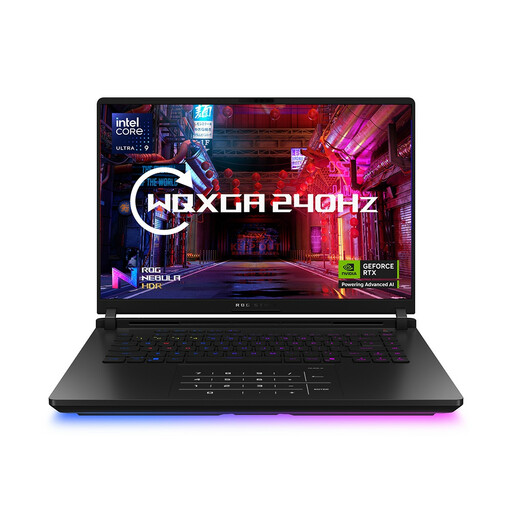
ASUS ROG Strix SCAR 16 G635LW, RTX 5080, 64GB RAM, 2TB SSD
Assess this model for tile creation alongside demanding game testing or other graphics-heavy work, not because tile painting itself calls for its GPU. The name lists a 16-inch WQXGA model with Intel Core Ultra 9, GeForce RTX 5080, 64GB RAM and 2TB SSD; check screen colour characteristics, weight and noise in the operating profile you expect to use.
Joybuy
Common questions
Do I need a high-end gaming GPU to create a 2D tile set?
No requirement for one follows from tilemap editing alone. Unity Technologies describes creating tile assets and painting them onto a tilemap; choose extra graphics capability if your other work includes demanding 3D scenes, rendering or GPU-heavy game tests.
Will a quiet profile keep a gaming laptop quiet in a shared office?
A quiet profile is worth assessing, but its name cannot guarantee how the laptop will sound with your software running. ASUS ROG UK describes Silent mode as lowering power consumption for quieter operation and Performance mode as balancing power and acoustics; try the available profiles with your usual editor and engine workload, keeping the vents clear.
Which display details matter for tile art?
Compare the exact configuration’s resolution, panel type, colour-gamut claim, brightness and glare treatment against how you review and deliver assets. Lenovo UK lists 100% DCI-P3 for a particular Legion OLED configuration, while ASUS UK Store lists 100% DCI-P3 and Pantone validation for the ProArt P16; neither specification applies automatically to other models.
How do warranty terms relate to faulty-goods rights?
A manufacturer’s or seller’s voluntary warranty is separate from statutory rights concerning faulty goods. GOV.UK identifies the Consumer Rights Act 2015 as covering faulty goods, and the legislation states that supplied goods must be of satisfactory quality. Keep your proof of purchase and read the warranty terms for any additional cover they offer.


