What should you check first?
Integrated-graphics laptop
Consider it when: Your intended games and settings have been checked against the exact laptop configuration, and everyday portability matters more than planning for demanding 3D games.
Trade-off: An integrated-graphics label does not establish the settings or experience you will get across different games.
Dedicated-GPU laptop
Consider it when: You expect more demanding 3D games or want to compare options for higher graphics settings while retaining a portable computer.
Trade-off: NVIDIA’s laptop-GPU specifications vary in memory and power range, so the gaming label alone cannot settle which configuration fits your games.
Desktop and monitor
Consider it when: The computer will usually stay in one place and laptop portability offers little practical benefit.
Trade-off: You need room for a separate screen, keyboard and other peripherals rather than one self-contained device.
Start with the games and the space where the computer will be used; then compare complete configurations, not just laptop category names.
| Priority |
What to check |
Your needs |
| Game requirements |
Check each publisher’s recommended CPU, graphics, RAM and free-space requirements. Electronic Arts recommends 8 GB RAM, 1 GB video RAM and 50 GB free space for The Sims 4 on PC, plus at least 1 GB for custom content and saves. |
I want my chosen games to fit the computer’s actual specification, rather than assuming that any laptop sold for everyday use will run them as intended. |
| Graphics configuration |
Identify the exact GPU and graphics memory; for a dedicated laptop GPU, check its configured power range too. SCAN UK highlights the GPU and its memory for gaming, while NVIDIA documents differences between laptop-GPU configurations. |
If I plan to play newer 3D games or use higher settings, graphics capability matters more to my choice than a processor name or a gaming label. |
| Memory and storage |
Compare installed RAM with the games’ recommended figures. Check free storage after accounting for the operating system, other applications, saves and updates—not only the advertised SSD capacity. |
I need room for household files and game content as well as the initial installation. For The Sims 4, Electronic Arts recommends 8 GB RAM rather than its 4 GB minimum. |
| Portability and workspace |
Decide whether the computer must travel. If comparing a desktop, include the monitor, keyboard, mouse and space needed for the complete setup. |
A laptop makes sense if I regularly move the computer; if it stays at one desk, I can consider a desktop-and-monitor setup alongside it. |
Relevant laptop ranges
These manufacturer range descriptions can help you identify models to compare, but the specification of each configuration still determines whether it fits your games.
Lenovo
Lenovo UK describes LOQ as a do-all gaming range and positions Legion as a higher-end gaming range.
- The LOQ and Legion ranges give buyers distinct Lenovo lines to inspect for a multipurpose gaming laptop.
- Range positioning does not establish the GPU, memory or display specification of an individual configuration.
ASUS
ASUS presents TUF Gaming as a portable gaming-laptop range with high-refresh-rate display and GPU options.
- The TUF Gaming range provides configurations to check if a dedicated-graphics laptop is on your shortlist.
- A range description does not show whether a particular model meets your games’ requirements or what its RAM and storage configuration includes.
Acer
Acer describes Nitro as an everyday gaming-laptop range, with components that vary by configuration.
- Nitro is a relevant line to compare for gaming alongside ordinary computer use.
- Acer’s range-level component examples do not establish the graphics, display or cooling specification of every Nitro laptop.
Dedicated-graphics laptops on Joybuy
These laptop options are for considering the dedicated-graphics route while keeping everyday computing in mind. Check the exact configuration and your intended games’ requirements before choosing; a desktop or an integrated-graphics laptop may still better fit how you use the computer.
 No image available
Lenovo Legion Pro 7 16IAX10H, RTX 5090, 64GB RAM, 2TB SSD
For everyday tasks alongside games where you are considering dedicated graphics, this 16-inch Windows 11 Home laptop lists an Intel Core Ultra 9 processor, NVIDIA GeForce RTX 5090, 64GB RAM and a 2TB SSD.
Check the exact GPU power configuration and your games’ recommended requirements before judging gaming fit.
View on Joybuy
 No image available
ASUS ProArt P16 H7606WW-SE006W, RTX 5080 16GB, 64GB RAM
For a multipurpose laptop with a touchscreen, this Windows 11 Home model lists a 16-inch 4K OLED display, AMD Ryzen AI 9 HX 370, NVIDIA GeForce RTX 5080 16GB, 64GB RAM and a 2TB SSD.
Check the configured GPU power range and the requirements of the games and settings you intend to use.
View on Joybuy
 No image available
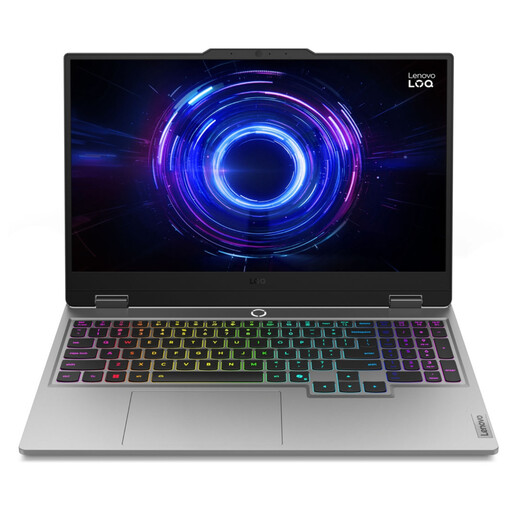
Lenovo LOQ 15IRX10 i5-13450HX, 24GB RAM, 1TB SSD
For a Windows laptop used for household tasks and games, this LOQ 15IRX10 configuration lists an i5-13450HX processor, 24GB RAM, a 1TB SSD and Windows 11 Home.
Confirm its exact graphics configuration, including GPU power range, against the recommended requirements for your games.
View on Joybuy
 No image available
ASUS ROG Zephyrus G14 GA403WR-QS088W, RTX 5070 Ti
For someone considering a 14-inch laptop for everyday use and games, this Windows 11 Home model lists a WQXGA+ display, AMD Ryzen AI 9 HX 370, NVIDIA GeForce RTX 5070 Ti, 32 GB RAM and a 2 TB SSD.
Check the GPU power configuration and confirm the supplied colour variant before ordering.
View on Joybuy
 No image available
HP OMEN 17 17-db1000na, RTX 5060, 16GB RAM, 1TB SSD
For home computing with a larger laptop screen, this Windows 11 Home model lists a 17-inch Full HD display, AMD Ryzen AI 7 350, RTX 5060, 16GB RAM and a 1TB SSD.
Compare its exact GPU configuration and the space you have for a larger laptop with your games’ requirements and where you will use it.
View on Joybuy
Common questions
Do I need dedicated graphics for The Sims 4?
Not categorically: Electronic Arts includes Intel GMA X4500 or better in The Sims 4’s minimum PC graphics requirements, while its recommended specification names 1 GB video RAM and GTX 650 or Radeon HD 7750 reference graphics, or better. Check the exact laptop graphics configuration against the publisher’s requirements and the content you plan to use; neither specification predicts the same experience in every game.
Is 4 GB RAM a sensible target for a laptop that will play The Sims 4?
Use 8 GB as the planning reference for The Sims 4 on PC: Electronic Arts lists 4 GB RAM as its minimum but recommends 8 GB. Check other games separately, alongside the memory needed for your usual applications.
What should I compare between dedicated-GPU laptops?
Compare the exact GPU, its graphics memory and configured power range, then check RAM, storage and display against your intended use. SCAN UK identifies the GPU and its memory as central to gaming, and NVIDIA lists different memory configurations and power ranges for laptop GPUs.
What should I do with the laptop I replace?
For a laptop being replaced in the UK, check retailer take-back arrangements and local authority recycling options; GOV.UK provides guidance on the UK Waste Electrical and Electronic Equipment framework. Back up and erase your personal data before handing the device over.


