Regular multi-location PC gamers
If you play at home and elsewhere, carrying one computer matters more to you than building a permanent setup. Lenovo UK describes portability as a distinction between its Legion laptops and desktops.


Choose a gaming laptop if playing in more than one location is essential; a fixed desktop is worth considering if the computer will mostly stay at one desk and later upgrades matter more. For a laptop, compare the exact configuration with your games’ published requirements, then check its monitor outputs and charging behaviour before planning a home-desk setup.
If you play at home and elsewhere, carrying one computer matters more to you than building a permanent setup. Lenovo UK describes portability as a distinction between its Legion laptops and desktops.
You want a portable computer that can also connect to a monitor and peripherals at home. Check the exact laptop’s video outputs: ASUS notes that a USB-C socket does not necessarily support a display.
You have particular games in mind, so the installed processor, graphics, memory and storage matter more than a gaming label. Microsoft Support cautions that individual apps can require more than Windows’ baseline specifications.
Start with where you will play: a laptop keeps the computer and screen together for travel, while a desktop suits a fixed desk and offers a different upgrade path, as Lenovo UK describes for its Legion ranges. If you choose a laptop, check game requirements before choosing its configuration, then plan the home-monitor connection.
| Concern | What to check | Who this matters to |
|---|---|---|
| Game and configuration fit | Compare the exact laptop’s CPU, graphics, installed RAM and storage with each priority game’s published minimum and recommended requirements; check any operating-system or SSD condition too. | If I have particular games in mind, I need the configuration to meet their requirements rather than relying on its series name. Around 42% of consumers put game fit first. |
| Portability and the fixed-desk trade-off | Consider how often you will carry the computer, including its charger; check its weight and dimensions, and whether later component upgrades matter to you. | If I regularly move between places, carrying one machine is more important than keeping a computer at a permanent desk. Portability comes first for around 33% of consumers. |
| Home-monitor setup | Match a documented laptop video output to the monitor input, cable and desired display mode. Check USB-C video and power-delivery support separately. | When I return to my desk, I need my laptop and monitor to connect as intended without assuming USB-C handles both video and gaming power. Around 25% of consumers prioritise that desk setup. |
ASUS says USB-C connectors can serve different functions; the connector shape alone does not establish external-display support.
Check the exact laptop’s documented video outputs before choosing a USB-C monitor, dock or cable. A supported HDMI or DisplayPort connection may be another option.
A different cable, adapter or connection arrangement may be needed if the planned USB-C route does not work.
ASUS describes 65 W or 100 W USB-C charging on supported ROG notebooks for use without heavy CPU or discrete-GPU loading. That guidance does not establish equivalent operation while gaming.
Check the exact laptop’s USB-C power-input specification and load guidance before leaving its supplied charger behind.
You may still need to carry the supplied charger when you play away from your desk.
HP’s Victus configurations differ in processor, graphics, memory and storage; HP also says graphics wattage and performance vary with configuration, settings and workload.
Compare the exact model and configuration with your games’ published requirements, and check its screen and ports against your intended setup.
A laptop includes its own screen and keyboard, whereas a fixed desktop needs a separate display and input devices. A laptop may also need accessories for the home setup you want.
List what you will use in each location, including the monitor, compatible display cable and any external keyboard or mouse.
A laptop range to examine if you want one portable gaming computer while weighing its configuration against a fixed desktop.
Relevant when carrying the laptop and connecting it to a home display are both important.
A range where comparing individual processor, graphics, memory and storage configurations is particularly important.
A gaming-laptop range for comparing a portable PC with configurable processor and graphics options.
These gaming laptops offer portable PC configurations to compare with your intended games. If you also want a home monitor, confirm the exact model’s video output and the monitor’s compatible input before choosing a connection.
 No image available
Consider this configuration for play across locations, after comparing it with your games’ requirements.
AMD Ryzen 7 170, GeForce RTX 5050, 16GB RAM and 1TB SSD; 15.6-inch FHD 144Hz display.
If you plan to use a home monitor, confirm the required video connection for this exact model.
 No image available
Consider the larger built-in screen if you will use the laptop itself for play in more than one place; check whether its size suits your carrying plans.
AMD Ryzen AI 7 350, RTX 5060, 16GB RAM, 1TB SSD and Windows 11 Home; 17-inch Full HD display.
Match the configuration to your games and confirm the video-output route for any home monitor.
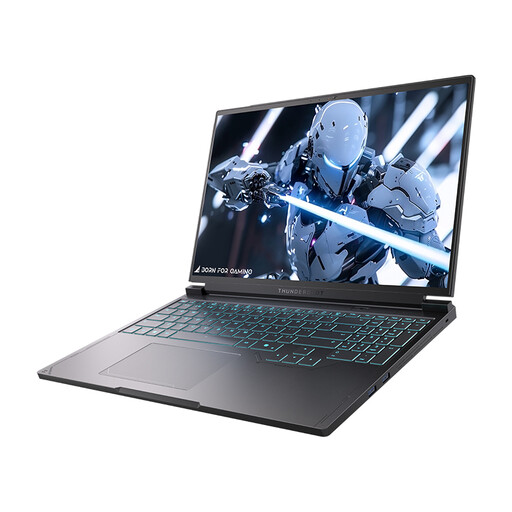 No image available
Its built-in display specification is worth examining if you expect to play on the laptop screen as well as at a desk.
Core i7-13650HX, GeForce RTX 5060, 16GB DDR5 RAM and 1TB SSD; 16-inch QHD+ 240Hz display.
Compare the exact configuration with your games, and check weight, dimensions and monitor connections for your intended locations.
 No image available
A 14-inch option to examine if carrying size matters alongside your games’ configuration requirements.
AMD Ryzen AI 9 HX 370, GeForce RTX 5070 Ti, 32 GB LPDDR5x-SDRAM and 2 TB SSD; 14-inch WQXGA+ display.
Check this variant’s weight and monitor outputs before planning travel or a home display, and confirm its finish if colour matters.
 No image available
Consider this configuration if its installed components and built-in screen match the games you intend to play across locations.
Intel Core Ultra 9, GeForce RTX 5090, 64GB RAM, 2TB SSD and Windows 11 Home; 16-inch display.
Check weight and dimensions for regular carrying, and confirm an appropriate video output before selecting a home monitor.
Compare each game publisher’s minimum and recommended CPU, graphics, memory, storage and operating-system requirements with the exact laptop configuration; check any stated graphics-memory, software-interface or SSD requirement too. Microsoft Support notes that an app can need more than the baseline Windows specification, so meeting that baseline is not a game-performance test.
No: ASUS says not every USB-C connector supports display output. Check the exact laptop’s documented USB-C, HDMI or DisplayPort video capability, then match the supported connection to the monitor input and cable.
Do not assume it can. The laptop must support USB-C power input, and ASUS describes 65 W or 100 W USB-C charging on supported ROG notebooks for use without heavy CPU or discrete-GPU loading; check the exact model’s guidance before relying on that connection for gaming.
For an eligible UK distance purchase, GOV.UK says you can tell the seller you wish to cancel within 14 days of receiving the item and then have a further 14 days to return it. Statutory exceptions and the conditions of the cancellation right matter; a change-of-mind cancellation is separate from remedies for faulty, damaged or misdescribed goods.