What matters when choosing
Settle the power and display arrangement before comparing processor and graphics specifications: a smaller tower still needs a monitor, while a laptop’s screen is built in.
Gaming laptop
Choose it when: One practical outlet and a built-in screen make a complete desk setup easier to arrange.
Allow for: The charger still needs power during sustained play, and you have less freedom to choose or replace the built-in screen.
Compact desktop and monitor
Choose it when: You can fit a tower and monitor on the desk and power both safely; An Acer Nitro N20-100 configuration is listed in a 15-litre case.
Allow for: A compact case saves space, not a monitor connection or a power lead.
| Concern |
What to check |
Who this matters to |
| Game performance and display |
Check the exact game’s target frame rate, resolution, CPU and GPU requirements; match the display’s refresh rate to your intended use. |
If I play ranked matches, I want to choose for my target settings rather than assume that meeting a launch minimum is enough. Around 42% of consumers put game-performance and display headroom first. |
| Sockets and desk space |
Count powered devices and check an extension device’s marked rating; measure the space needed for a tower and monitor. |
With one practical outlet, I need the whole setup to fit without chaining leads or overlooking monitor power. For around 33% of consumers, the safe power arrangement is the primary concern. |
| Background tasks and headroom |
Compare memory and storage capacity, cooling arrangements and available network connections for your workload. |
When voice chat, tabs or recording run alongside a match, I want enough capacity for those tasks too. Broader workload headroom comes first for around 25% of consumers. |
Joybuy laptop choices
These gaming laptops put the screen and keyboard in the main device, making them relevant when a separately powered monitor is awkward to accommodate. Choose between their listed screen sizes and configurations only after checking your exact game and target settings; a high-refresh panel does not establish an in-game frame rate.
 No image available
Lenovo LOQ Essential 15ARP11, Ryzen 7 170, RTX 5050
Consider this built-in-screen option when a separate monitor would complicate your desk power arrangement.
The listed configuration has a 15.6-inch FHD 144 Hz display, 16 GB RAM and a 1 TB SSD. Check performance for your exact game and settings; 144 Hz is the screen specification, not an in-game frame-rate promise.
View on Joybuy
 No image available
THUNDEROBOT Radiant S16, Ryzen 7 7745HX, RTX 5060
The integrated display suits a desk where powering a separate monitor is inconvenient.
This variant lists a 16-inch QHD+ 240 Hz screen, 16 GB DDR5 RAM and a 1 TB SSD. Check the exact game and settings before deciding whether the PC can make use of that refresh rate.
View on Joybuy
 No image available
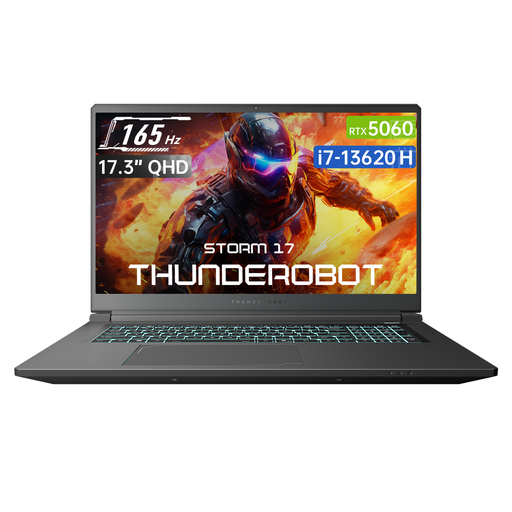
THUNDEROBOT Storm 17 5060, Core i7-13620H
Choose its larger built-in screen only if the laptop itself will fit comfortably on your desk.
The listed configuration has a 17.3-inch QHD 165 Hz display, RTX 5060, 16 GB DDR5 RAM and a 1 TB SSD. Its refresh rate does not guarantee 165 FPS in your game.
View on Joybuy
 No image available
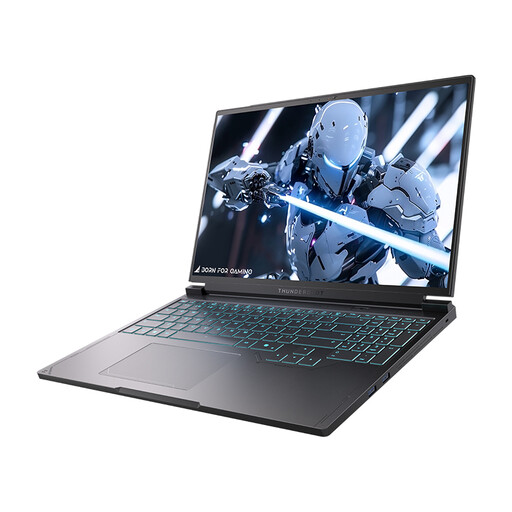
Thunderobot Radiant S16 5060, Core i7-13650HX
This is another built-in-display route for a desk with limited monitor power connections; check its processor variant rather than treating it as the same Radiant S16 configuration above.
It lists a 16-inch QHD+ 240 Hz screen, RTX 5060, 16 GB DDR5 RAM and a 1 TB SSD. Confirm game-specific performance at your intended settings.
View on Joybuy
 No image available
HP OMEN 17-db1000na, Ryzen AI 7 350, RTX 5060
Its built-in display avoids a separate monitor power connection, provided the larger laptop fits your available desk space.
The product name lists a 17-inch Full HD screen, 16 GB RAM and a 1 TB SSD. Check the exact panel specification and game-specific performance before setting a ranked-play frame-rate target.
View on Joybuy
Common questions
Is meeting a game’s minimum PC specification enough for ranked play?
Not if your aim is a higher frame rate than that minimum specifies. Riot Games Support lists distinct 30 FPS minimum, 60 FPS recommended and 144 FPS high-end specifications for VALORANT; check the tiers for your actual game, then assess the PC and display together.
Can a PC, monitor and other desk devices share one extension lead?
Only use an extension device when the combined connected load stays within its own marked rating, and never plug one extension lead into another. Electrical Safety First says extension leads are generally rated at 13 A, although some older ones have a lower rating; check the particular device rather than assuming its capacity.
Does a gaming laptop eliminate the need for a monitor?
Yes, a laptop’s built-in display is enough for the basic playable setup, so a separate monitor is optional. Check the exact laptop variant’s screen size and refresh rate, and remember that the laptop charger still needs a power connection during sustained play.
What matters if I use a cable reel at my gaming desk?
Check its marked rating and the manufacturer’s instructions, and fully unwind it when using its full rated load. Electrical Safety First warns that a wound reel can have a lower usable rating and may overheat; its guidance also advises checking for a thermal cut-out.


