Who this setup suits

Replay reviewers who record clips

If you capture footage while a game, replay tool and other apps are open, check your recording software’s hardware-encoder compatibility as well as the configured memory and storage. The OBS Project explains that hardware encoding moves video-encoding work from the CPU to a specialised component.

Players with a small desk and few free sockets

A laptop is worth assessing first if its screen lets you review replays without a separately powered monitor. Count any dock, speakers and other powered accessories before deciding how many sockets your setup needs.

Players planning later upgrades

If you have room and a safe power arrangement for a tower and monitor, compare the exact model’s storage, memory and component-access options. ASUS ROG describes standard-sized components and tool-less access on its G700 tower; those features should not be assumed for every desktop.

What matters when choosing

Gaming laptop

Choose when: Its built-in screen is adequate for replay review and avoiding a separate monitor matters most.

Bear in mind: An external display, dock or powered speakers can add sockets back to the setup.

Compact gaming PC

Choose when: Desk space matters, but you can accommodate a separately powered display.

Bear in mind: A smaller case does not, by itself, reduce the number of powered devices.

Full desktop tower

Choose when: You have space and safe power for a tower-and-monitor setup and want to assess future component changes.

Bear in mind: Upgrade options depend on the exact tower, and the separate display still needs power.

Concern What to check Who this matters to
Replay capture and multitasking Check the exact GPU’s hardware encoder against your recording software, then confirm the configured RAM and SSD capacity. If I capture clips while playing or keep replay tools open alongside other apps, I need a configuration that fits that workflow. Around 46% of consumers put replay capture and multitasking first.
Sockets and electrical safety Count devices used together and check the extension lead’s marked rating against their combined load. Do not daisy-chain leads. With few free sockets, I want fewer separately powered devices without overloading an extension lead. For around 36% of consumers, safe socket planning is the primary concern.
Gaming and upgrade headroom Compare the exact CPU, GPU, memory and storage configuration; check whether the particular model permits the upgrades you expect. If I expect my game requirements or replay library to grow, I care about the configuration I can use now and the changes I could make later. Upgrade headroom comes first for around 18% of consumers.

Buying pitfalls

  • Assuming a multiway lead can power any setup

    Adding a PC, monitor and accessories without checking their combined load can overheat an extension lead or adaptor and create a fire risk.

    Read the lead’s marked current rating and check the load of devices used together. Electrical Safety First advises against plugging one extension lead into another and says to use only one extension device per wall socket.

  • Equating a smaller PC with fewer plugs

    A compact tower may take up less desk space, but the display and powered peripherals still need to be included in your socket plan.

    List the PC or laptop charger, display and accessories you will run at the same time. Choose a laptop to avoid a separate monitor only if its screen suits your replay-review work.

  • Judging a whole model family by one configuration

    Dell UK lists Alienware 16 Aurora configurations ranging from RTX 3050 with 16 GB of memory and a 512 GB SSD to RTX 5060 with 32 GB and a 1 TB SSD. The family name alone therefore does not identify the specification you are buying.

    Check the exact order code, GPU, memory, storage, display, supplied charger and warranty for your selected configuration.

Brands to consider

Alienware

Dell UK lists both the Alienware 16 Aurora laptop and Aurora desktop, making the range relevant when comparing a built-in screen with a tower-and-monitor setup.

  • Dell UK lists 16 Aurora laptop configurations with different GPUs, memory and storage, while its Aurora desktop offers configurable components.
  • Check the selected configuration and supplied accessories; specifications for one Alienware listing do not apply to the entire range.

HP OMEN

HP UK lists compact OMEN 16L desktops alongside larger OMEN tower ranges for buyers comparing available desk space with desktop configuration choices.

  • HP UK lists OMEN 16L models with up to an RTX 5060 Ti and up to 32 GB DDR5.
  • Those figures are range maximums, not the specification of every unit; check the exact model.

Lenovo Legion

Lenovo UK lists Legion laptops and towers, so buyers can compare individual configurations for a laptop-screen or separate-monitor setup.

  • Lenovo UK’s Legion Pro 5 Gen 10 AMD listing specifies an RTX 5060 Laptop GPU, 32 GB DDR5, a 1 TB SSD and a UK 3-pin 245 W adapter.
  • That listing was marked out of stock when checked. Confirm the current configuration, availability and warranty for the exact item you select.

ASUS ROG

ASUS ROG UK lists compact gaming PCs as well as larger desktops for buyers weighing desk space against component-access options.

  • ASUS ROG describes standard-sized components and tool-less access for the G700 tower.
  • Check the precise model and selected specification; a compact PC still needs power planning for its display and accessories.

Gaming laptops on Joybuy

These gaming laptops offer built-in screens for a replay-review setup where a separate monitor may be difficult to power. Compare their stated configurations and check your recording software and complete desk setup before choosing; this selection does not cover the compact-PC or desktop routes discussed above.

Lenovo Legion Pro 5 LEG P5 R9 32GB 2TB 5060 laptop

Lenovo Legion Pro 5 LEG P5 R9, 32GB, 2TB, 5060

Consider this laptop if reviewing on its built-in screen would remove the need for a powered monitor. The product name identifies an R9, 32GB of memory, 2TB of storage and a 5060; check the exact GPU and recording-software compatibility, plus the supplied adapter and your setup’s combined load.

View on Joybuy

THUNDEROBOT Radiant S16 gaming laptop

THUNDEROBOT Radiant S16, RTX 5060, 16GB, 1TB

Consider its built-in display if you can review replays without an external monitor. The named configuration has a 16-inch QHD+ 240Hz display, AMD Ryzen 7 7745HX, NVIDIA GeForce RTX 5060, 16GB DDR5 and a 1TB SSD. Check encoder compatibility with your software and the adapter’s rating for your power plan.

View on Joybuy
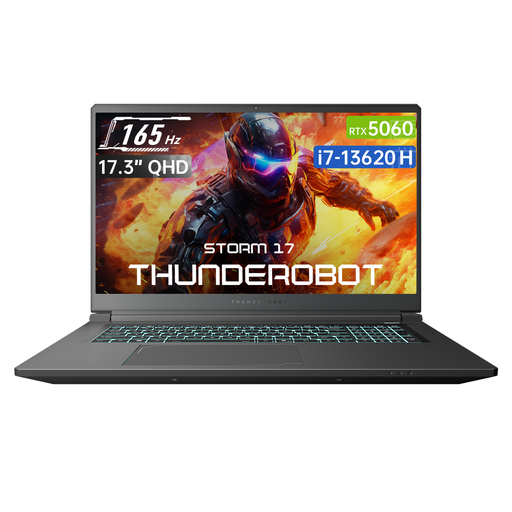
THUNDEROBOT Storm 17 5060 gaming laptop

THUNDEROBOT Storm 17 5060, 16GB, 1TB

If a larger built-in screen suits your replay review, compare this model’s 17.3-inch QHD 165Hz display with your workspace. Its named configuration includes an Intel Core i7-13620H, GeForce RTX 5060, 16GB DDR5 and a 1TB SSD. Confirm software encoder compatibility and the adapter rating before planning shared power.

View on Joybuy

MSI Pulse 16 AI gaming laptop

MSI Pulse 16 AI, RTX 4060, 16GB, 1TB

This is another built-in-screen option if your replay workflow does not require a separate display. The product name specifies a 16-inch QHD+ 240Hz display, Intel Core Ultra 7 155H, NVIDIA GeForce RTX 4060, 16GB DDR5 and a 1TB SSD. Confirm the supplied configuration, encoder compatibility and adapter rating for your setup.

View on Joybuy

Lenovo LOQ Essential 15ARP11 gaming laptop

Lenovo LOQ Essential 15ARP11, RTX 5050, 16GB, 1TB

Consider this laptop if its built-in screen is sufficient and a separate monitor would complicate your socket plan. The product name specifies a 15.6-inch Full HD 144Hz display, AMD Ryzen 7 170, GeForce RTX 5050, 16GB of RAM and a 1TB SSD. Check whether its memory suits your multitasking, whether the encoder works with your software and what adapter is supplied.

View on Joybuy

Common questions

Can a gaming PC, monitor and accessories share one extension lead?

They can share a suitable lead only if their combined load stays within its marked rating. Electrical Safety First says most extension leads are rated at 13 A, but some older leads and many cable reels may be rated at 10 A or less. Do not daisy-chain extension leads, and use only one extension device per wall socket.

Will a gaming laptop solve a shortage of sockets?

A gaming laptop can avoid a separately powered monitor if its built-in screen suits your replay review. It does not eliminate the need to count an external display, dock, speakers or other powered accessories you intend to use.

What should I check before recording replay clips?

Check whether the exact GPU configuration has a hardware encoder compatible with your recording software. The OBS Project explains that hardware encoding moves encoding work from the CPU to a specialised component and documents NVIDIA NVENC, AMD AMF and Intel Quick Sync Video options. Also confirm that the selected memory and storage fit the applications and files you plan to keep open.

Should I rely on a gaming-PC family name for warranty details?

No; check the warranty and supplied accessories for the exact model and retailer listing. For example, Lenovo UK’s Legion Pro 5 Gen 10 AMD listing specified a one-year courier or carry-in warranty, which should not be assumed to apply to other Legion configurations or sellers.