Gamers with one convenient socket
If you can use a laptop screen, an integrated computer and display can simplify a desk with limited plug access. Check the charger and account for any external monitor you plan to add.


When sockets are scarce, start by looking at a gaming laptop if you can play on its built-in screen: the computer and display do not need separate power connections. A desktop remains an option if you want a separate monitor and can power the whole setup safely; either way, compare the exact games you intend to play with the PC’s specifications before choosing.
If you can use a laptop screen, an integrated computer and display can simplify a desk with limited plug access. Check the charger and account for any external monitor you plan to add.
If tower defence is your main use, check the games themselves before choosing hardware. Steam lists different requirements for individual titles, so the genre name alone cannot tell you which configuration you need.
A desktop and separate monitor may fit your plans if you have room and sufficient safely rated electrical capacity. Count every powered device: Electrical Safety First advises keeping the combined load within an extension lead’s maximum current rating.
Choose a format around the screen and power connections you will actually use, then check the requirements of your named games. A laptop’s socket advantage becomes smaller if you add a separately powered monitor.
Consider it when: You can play on the built-in display and want fewer essential powered items on the desk.
Trade-off: The charger still needs a socket for plugged-in play, and adding an external monitor adds another powered item. Check the charger for the exact model.
Consider it when: A separate display and the ability to choose desktop components matter more to you than minimising powered desk items.
Trade-off: Plan power connections for the PC, monitor and other powered equipment; a multiway lead does not increase its stated load limit.
| Concern | What to check | Who this matters to |
|---|---|---|
| Socket use | Decide whether the built-in screen is enough, and check the charger and the rated load of any shared extension lead. | If I have one convenient socket, I want the PC and screen in one unit without overlooking the charger. Around 50% of consumers put reducing essential powered desk devices first. |
| Game requirements | Compare the operating system, processor, RAM, graphics and storage with the published requirements of your intended games. | When I mainly play particular tower-defence games, I want hardware that meets those titles’ requirements rather than relying on the genre label. Around 33% of consumers prioritise that match. |
| Room to expand | Check the exact laptop GPU configuration, display connections and power needs if you plan to add a monitor or play more demanding games. | For a larger display or wider game library, I am willing to plan more powered equipment at my desk. Around 17% of consumers put that flexibility first. |
Requirements vary by title. Steam lists 8 GB RAM and a 2 GB-VRAM GT 1030-class GPU as minimum requirements for Tower Defense: Infinite War; that is not a minimum for the whole genre.
List the games you intend to install and check each game’s published minimum and recommended requirements. A minimum specification is not a promise of your preferred settings.
NVIDIA publishes different power ranges for laptop GPUs and notes that performance varies by laptop model. A shared GPU name therefore does not establish identical performance.
Compare the exact models’ stated GPU power configurations and other specifications, alongside the games you plan to play.
Electrical Safety First warns that exceeding an extension product’s maximum current rating can overheat the lead, adaptor or socket and cause fire.
Check the rating of the extension product and the connected equipment. If the combined load exceeds that limit, reduce what is connected rather than daisy-chaining adaptors; do not use damaged plugs or cables.
An integrated screen reduces the need for a separate monitor, but a gaming laptop still has charging requirements. ASUS and Lenovo UK list compatible gaming-laptop adapters rated at 230 W and 330 W respectively; neither figure describes every laptop.
Confirm the supplied charger and connection for the exact model. Do not assume that a different USB-C charger will work: ASUS UK Support advises checking whether the laptop’s USB-C port supports charging.
Lenovo UK presents Legion and LOQ as different gaming-laptop ranges, giving you configurations to compare if a laptop suits your socket arrangement.
ROG UK lists Zephyrus, Strix and Flow gaming-laptop families for shoppers comparing portable setups.
MSI UK lists gaming laptops, desktop PCs and monitors, making its ranges relevant to either desk format.
These laptops have built-in displays, so they are choices to examine if you want to play without a separately powered monitor. Screen size and listed hardware differ; check each configuration against your games and confirm its charging arrangements before buying.
 No image available
Consider this laptop if its built-in 15.6-inch display suits your desk and you do not need an external monitor.
The listed configuration has 16GB RAM, a 1TB SSD and a 144Hz FHD display. Check your games’ requirements and confirm which charging connection you intend to use.
 No image available
Consider its built-in 17-inch display if you want a larger laptop screen without adding a monitor.
The title lists 16GB RAM, a 1TB SSD and Windows 11 Home. Check your games’ requirements, plus the supplied charger and GPU power configuration for this exact model.
 No image available
Its integrated 16-inch screen may suit a desk where a separate monitor would need another power connection.
The title lists 16GB DDR5 RAM and a 1TB SSD. Confirm the processor variant, operating system and supplied adapter for this exact unit before comparing it with your games’ requirements.
 No image available
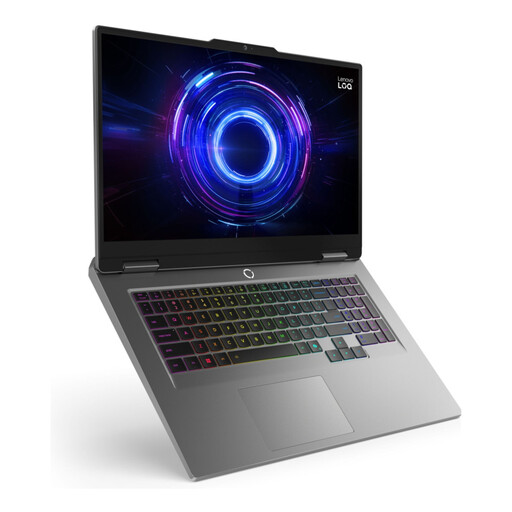
Consider this integrated-screen laptop if you want to avoid powering a separate monitor.
The title identifies the 24GB RAM and 1TB variant. Its processor is described as both i7-13650H and i7-13650HX, so confirm which variant this unit contains; also check the charger and your games’ requirements.
 No image available
Its built-in 16-inch screen lets you plan a laptop-only display setup, though an added monitor would still need its own power connection.
The title lists an Intel Core Ultra 9 processor, 64GB RAM, a 2TB SSD and Windows 11 Home. Compare that configuration with the games you intend to play and check the exact model’s charger and GPU power details.
They can share a lead only if their combined connected load stays within its stated maximum current rating. Electrical Safety First warns that overloading an extension lead or adaptor can cause overheating and fire; check the equipment and lead ratings rather than assuming that extra sockets mean extra capacity.
No: a laptop is a straightforward route when its built-in display meets your needs, but a separate monitor reduces that socket-saving advantage. If you prefer a desktop setup, plan the power connections and check that any shared extension lead is adequately rated.
Check the published requirements for each game you intend to play; there is no single specification for the genre. On Steam, Tower Defense: Infinite War lists 8 GB RAM and a 2 GB-VRAM GT 1030-class GPU as minimum requirements, while recommending 16 GB RAM and a GTX 1060. Those figures apply to that game, not every tower-defence title.
Not necessarily. NVIDIA says laptop performance varies by model and publishes GPU power ranges, so inspect each laptop’s exact power configuration and manufacturer specifications instead of comparing GPU names alone.
Use a charger confirmed as suitable for the exact laptop and charging port, rather than assuming a matching-looking connector or USB-C plug is enough. ASUS UK Support advises checking whether a laptop’s USB-C port supports charging; inspect older plugs and cables for damage before use.