Who this suits

Home-first players planning future upgrades

If you mainly play at one desk and expect to keep the machine for several years, a desktop is worth comparing. Check the case space, cooling arrangement and which parts can be replaced; a self-build still requires compatible components.

Students or workers who also game away from home

If one computer needs to travel between home, campus, work or trips, a gaming laptop keeps the screen and keyboard together. Compare the exact laptop GPU power configuration, cooling and display rather than relying on the GPU family name alone.

First-time gaming-PC buyers wanting less setup work

A pre-built or configured desktop suits buyers who want an assembled computer without choosing and fitting every component. Check the exact CPU, GPU, RAM, storage and warranty terms before ordering.

Buying priorities

Gaming laptop

Choose it when: regular transport matters more than future component swaps.

Trade-off: compare the full laptop configuration, cooling and GPU power rather than its graphics label alone.

Ready-built desktop

Choose it when: you want a fixed home system assembled by the seller.

Trade-off: the tower needs separate display and input equipment, and is not designed for routine travel.

Self-built desktop

Choose it when: you are prepared to select components around current games and future upgrades.

Trade-off: compatibility checks cover the whole parts list, not just the processor and graphics card.

Priority What to check Your needs
Game targets Match the exact game version, resolution, graphics preset and frame-rate target. Compare the complete CPU, GPU/VRAM, RAM, storage and operating-system requirement. I want the computer to suit the settings I actually intend to use, rather than only meeting a minimum requirement.
Portability For laptops, check the exact GPU power information where published, cooling, display, weight, charging arrangement and ports. For desktops, allow for a fixed desk location. I need one computer that can move between home and study or work, or I am happy to keep a more upgradeable system at one desk.
Upgrades and assembly For a desktop, inspect the case, PSU, motherboard, memory support and graphics-card clearance. For a self-build, also confirm sockets, connectors and cooler fit. I may value replacing components later, or I may prefer a seller to assemble the initial system.
Support terms Read the seller’s return, warranty, parts, labour and collection terms. Check how self-installed parts, modifications and maintenance affect support. I want to know what practical support is available if the system arrives faulty or needs attention later.

Common buying mistakes

  • Buying from a GPU name or minimum requirement alone

    Minimum requirements can indicate only that a game runs at a basic level. Epic Games and CD PROJEKT RED publish different targets for higher settings, resolutions, frame rates and ray tracing.

    Write down the resolution, graphics setting and frame-rate target for each chosen game, then compare every required component with the matching official requirement row.

  • Assuming laptops with the same GPU label are interchangeable

    Laptop GPU power ranges and cooling designs can differ, so a GPU family name does not describe the entire implementation. NVIDIA publishes power ranges for laptop GPU models.

    Check the exact model number, published GPU power or TGP where available, cooling information, screen resolution and relevant game benchmarks.

  • Choosing a self-build without checking the complete parts combination

    Processor, motherboard, memory, PSU, graphics card, case, cooler and storage choices are interdependent. A component can be suitable on its own while the complete combination does not fit or connect correctly.

    Create one complete parts list before ordering, use compatibility guidance as an initial check, then confirm dimensions, sockets, supported memory and power connectors against manufacturer specifications.

    A mismatch can delay the build and create extra handling around replacement parts or return shipping.

  • Treating a desktop tower as a complete home setup

    A desktop tower is separate from its display and peripherals, while a laptop has an integrated screen and keyboard. This changes the desk-space and equipment comparison.

    List the monitor, keyboard, mouse, audio, network connection and cables you need, as well as any equipment you already own, before comparing routes.

    A desktop setup may also require more desk space and a separate display arrangement.

Relevant brand references

PCSpecialist

A UK custom-PC seller with configurable gaming desktops and ready-to-ship systems, relevant if you want a builder to assemble a desktop configuration.

  • PCSpecialist says buyers can configure processor, graphics card, memory and storage, alongside ready systems.
  • Confirm the selected motherboard, PSU, cooling, GPU, warranty tier and delivery terms; configuration claims are seller information rather than independent performance validation.

Scan 3XS

A UK system-integrator route for configurable desktops, pre-built systems and gaming laptops, suited to buyers who want professional assembly with more configuration choice than a fixed retail model.

  • Scan says its 3XS range includes custom, pre-built, compact, water-cooled and laptop options with individual component specifications.
  • Its stated warranty and support are brand terms; compare the included components and warranty scope for the exact system.

Lenovo Legion and LOQ

Lenovo UK gaming-laptop lines relevant when portability is central but dedicated graphics and a work or study computer are still needed.

  • Lenovo positions Legion as a higher-end mobile-power line and LOQ as a general-purpose gaming-laptop line.
  • GPU, RAM, display and charging specifications vary by configuration, so compare the exact part number rather than the line name alone.

ASUS ROG

A gaming-laptop range covering portable and higher-performance designs for buyers who need one mobile computer for gaming, study or productivity work.

  • ASUS ROG product listings can identify the CPU, GPU, memory, storage and display configuration for a specific model.
  • Confirm the model number, graphics power information, warranty and weight for the exact laptop rather than generalising from the range.

Joybuy product options

Joybuy product options for gaming at home with study, work or travel needs, including gaming laptops and a home-based pre-built desktop.

ASUS ROG Zephyrus G14 GA403WR-QS088W gaming laptop

ASUS ROG Zephyrus G14 GA403WR-QS088W, Ryzen AI 9 HX 370, RTX 5070 Ti

A compact gaming-laptop option for regular movement between home, study or work.

14-inch WQXGA+ display, Ryzen AI 9 HX 370, RTX 5070 Ti Laptop GPU, 32 GB LPDDR5x RAM, 2 TB SSD and Wi-Fi 7.

Check the GPU power or TGP, weight, UK keyboard layout, UK warranty terms and the official requirements for your chosen games before buying.

Joybuy

Lenovo LOQ Essential 15ARP11 gaming laptop

Lenovo LOQ Essential 15ARP11, Ryzen 7 170, RTX 5050

A laptop route for study or work away from home alongside gaming.

15.6-inch 144 Hz FHD display, Ryzen 7 170, RTX 5050 Laptop GPU with 8 GB GDDR7, 16 GB RAM, 1 TB SSD, 65 W GPU TGP, Wi-Fi 6 and Ethernet.

The listing states 16 GB as the maximum memory for this configuration. Confirm warranty coverage and whether USB-C charging suits your travel routine; the supplied 135 W adapter uses the dedicated charging connection.

Joybuy

Lenovo Legion T7 34IAS10 gaming tower PC

Lenovo Legion T7 34IAS10, Core Ultra 7 265K, RTX 5070 Ti

An assembled desktop option for a fixed home gaming and productivity setup with future upgrade considerations.

Core Ultra 7 265K, RTX 5070 Ti 16 GB, 32 GB DDR5 RAM, 1 TB PCIe 4.0 SSD, 34 L tool-less chassis, 850 W PSU, Wi-Fi 6E, Ethernet and Thunderbolt 4.

This 18 kg tower is not practical for routine travel. Confirm the monitor, keyboard, mouse, audio and cables needed for the complete desk setup.

Joybuy

THUNDEROBOT Radiant S16 gaming laptop

THUNDEROBOT Radiant S16, Ryzen 7 7745HX, RTX 5060

A self-contained laptop for gaming at home and occasional study or work travel.

16-inch QHD 240 Hz display, Ryzen 7 7745HX, RTX 5060 Laptop GPU, 16 GB DDR5 RAM, 1 TB NVMe SSD, Wi-Fi 6, HDMI, Mini DisplayPort, RJ-45 and USB-C.

Check the weight, battery capacity, GPU power or TGP and keyboard layout before relying on it for frequent travel. Use it on a hard, ventilated surface during high-load use.

Joybuy
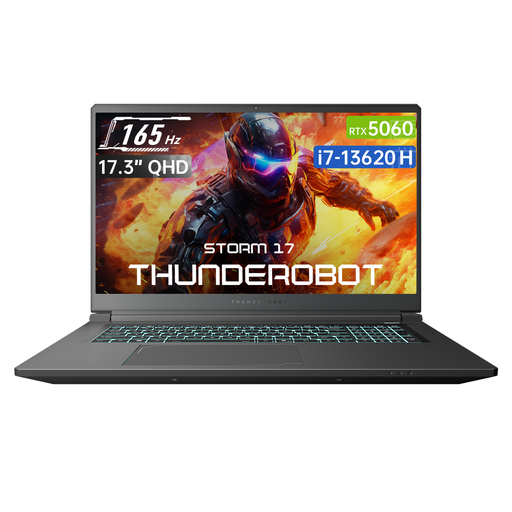
THUNDEROBOT Storm 17 gaming laptop

THUNDEROBOT Storm 17, Core i7-13620H, RTX 5060

A larger-screen laptop option for one integrated computer used for gaming, work or study.

17.3-inch QHD 165 Hz display, Core i7-13620H, RTX 5060 Laptop GPU, 16 GB DDR5 RAM, 1 TB NVMe SSD, Wi-Fi 6, Ethernet, HDMI, USB-A and USB-C.

Check the weight, dimensions, battery capacity, GPU power or TGP, cooling performance and keyboard layout. The 17.3-inch format may be less convenient for regular carrying.

Joybuy

Frequently asked questions

How should I check whether a gaming computer will run my games?

Start with each game publisher’s official PC requirements and use the row that matches your intended result, not merely the minimum row. Epic Games lists separate Fortnite targets, while CD PROJEKT RED provides Cyberpunk 2077 requirements for different resolutions, frame rates and ray-tracing settings; compare the complete CPU, GPU/VRAM, RAM, storage and operating-system requirement with the exact computer configuration.

Does the same RTX Laptop GPU name guarantee the same performance in every laptop?

No. NVIDIA publishes power ranges for laptop GPU models, and power, heat and cooling are linked design constraints. Check the exact laptop’s GPU power or TGP where published, cooling design and relevant game benchmarks rather than treating laptop and desktop GPU names as identical.

Should I buy a pre-built desktop or build one myself?

Choose a pre-built or configured desktop if you want an assembled computer ready to use. Build one yourself only if you are prepared to select and check compatible parts, including the CPU and motherboard, RAM, case and cooler clearances, graphics-card dimensions, PSU capacity and connectors, and storage support.

Can I rely on a custom-built PC having the same cancellation rights as an ordinary online purchase?

Do not assume so. GOV.UK states that distance-selling customers generally have a 14-day cancellation notification period, but personalised or custom-made items can be exceptions. Ask the seller before ordering whether the configuration is treated as custom-made and obtain the applicable cancellation, return and fault-remedy terms in writing.

What should I compare in a gaming-PC warranty?

Compare the parts period, labour period, collection or return arrangements, technical-support period and exclusions rather than treating a headline duration as equivalent across sellers. PCSpecialist’s published terms, for example, distinguish parts, labour and collection coverage and list exclusions for incorrectly installed goods and dust-related overheating; those are that seller’s terms, not universal conditions.