What matters when choosing?
Decide what your games require before choosing a portable or fixed setup. These routes answer different needs; a monitor or other peripheral can accompany either computer rather than replace it.
Gaming laptop
Choose when: You regularly need the same computer in different places and its exact configuration meets your games' requirements.
Trade-off: Its integrated screen and keyboard make it movable, but replacing graphics hardware is less flexible than choosing components for a desktop.
Prebuilt desktop
Choose when: The PC can stay at a desk and you would rather select a complete, specified computer than source its parts yourself.
Trade-off: Check what comes with the particular system: a tower may need a separate display and input devices.
Custom or configurable desktop
Choose when: You have a fixed space and want to select components for a defined game target, either yourself or through a builder.
Trade-off: Confirm component compatibility and who supports the finished machine, especially if you plan to install parts later.
Refurbished desktop
Choose when: An individually specified unit meets the current requirements of your chosen games at settings you would accept.
Trade-off: Its condition, included accessories and future component options need checking for that unit; a warranty does not establish gaming suitability.
| Concern | What to check | Who this matters to |
|---|
| Game requirements |
Compare the exact CPU, GPU, RAM, supported operating system and available SSD space with each game's current requirements at your intended resolution and settings. |
If I am replacing a laptop to play particular games, I want the new machine to meet the settings I actually intend to use, not just open the game at its minimum tier. Around 36% of consumers would put game-requirement fit first. |
| Portability and space |
Decide how often the computer must move and whether you have room for a permanent screen, tower and peripherals. |
If I need to move my computer regularly, a fixed desk setup would not suit how I use it; if it stays put, I can plan around that space. For around 29% of consumers, portability or workspace would be the primary concern. |
| Condition and upgrades |
For a refurbished unit, check its exact components and condition. For any planned upgrade, check physical access and the applicable support terms. |
When replacing an older PC, I want to know whether this particular machine remains suitable for my games and what I could repair or change later. Condition and upgrade options would come first for around 21% of consumers. |
| Complete setup and support |
Check which display, input devices and cables are included, and identify the service arrangements for the chosen computer. |
If I need a working setup rather than just a computer, missing equipment or an unclear repair route could complicate the switch. Around 14% of consumers would make setup and support their main concern. |
Joybuy product choices for home PC gaming
These gaming laptops and prebuilt desktops offer different ways to replace an everyday computer for home PC gaming. Compare each exact configuration with your games' requirements; for desktops, check whether the equipment needed to use them is included.
 No image available
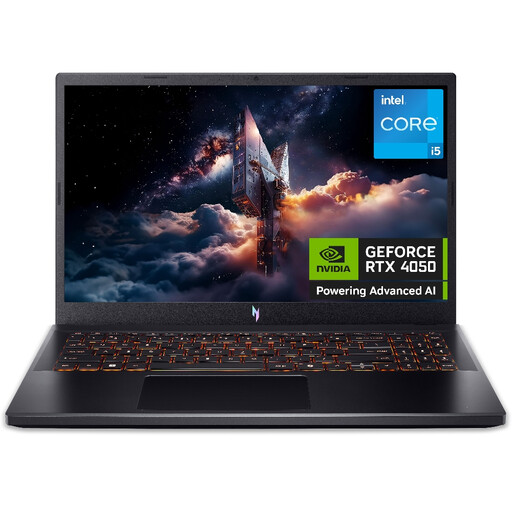
Acer Nitro V 15 ANV15-52, 15.6-inch gaming laptop
Consider this movable setup if its configuration matches the games and settings you intend to use.
Intel Core i5-13420H, NVIDIA RTX 4050, 16GB RAM and 512GB SSD; Full HD (1920 × 1080) display.
Confirm the display refresh rate for this exact configuration before buying, as the stated rates conflict.
View on Joybuy
 No image available
Lenovo LOQ Essential 15ARP11 gaming laptop
Consider this laptop if you need a movable computer and its exact specification meets your game targets.
AMD Ryzen 7 170, GeForce RTX 5050, 16GB RAM and 1TB SSD; 15.6-inch 144Hz FHD display.
If future changes matter, confirm the memory limit and storage-upgrade options for this configuration.
View on Joybuy
 No image available
HP OMEN 17-db1000na gaming laptop
This is a laptop route for someone who wants a built-in 17-inch-class display and still needs to move the computer.
AMD Ryzen AI 7 350, RTX 5060, 16GB RAM, 1TB SSD and Windows 11 Home; 17.3-inch Full HD display.
Compare the complete configuration with your chosen games and check memory and storage serviceability if upgrades matter.
View on Joybuy
 No image available
CyberPowerPC JOYB1004 desktop PC bundle
Consider this fixed-desk bundle if you need a monitor and input devices with the PC.
AMD Ryzen 5 7500F, NVIDIA GeForce RTX 5060 8GB, 16GB DDR5, 1TB NVMe SSD and Windows 11 Home; the bundle includes a monitor, keyboard, mouse, headset and mousepad.
Confirm the monitor model and its display specifications for the bundle you select, as those details can vary.
View on Joybuy
 No image available
CyberPowerPC JOYB1013 desktop PC
Consider this fixed-desk PC if its specified components match your game and display targets and you have the necessary separate equipment.
AMD Ryzen 7 9800X3D, NVIDIA GeForce RTX 5080 16GB, 32GB DDR5, 2TB NVMe SSD and Windows 11 Home.
A monitor and peripherals are not included. Check upgrade options and the applicable support terms if you expect to change components later.
View on Joybuy
Common questions
How can I tell whether a PC will run the games I want?
Compare each game's current official requirements with the exact PC configuration, including its supported operating system, CPU, GPU, RAM and available storage. If you want the publisher's recommended resolution and settings, compare with that tier rather than assuming the minimum tier describes the same experience.
Should I replace my everyday laptop with a gaming laptop or a desktop?
Choose a gaming laptop if you regularly need to move the computer and its configuration meets your game targets. If it will stay at a desk, a desktop lets you consider a fixed display arrangement and component choices instead; neither format alone establishes compatibility with a particular game.
What should I check on a refurbished gaming desktop?
Check the individual unit's CPU, graphics card, RAM, storage, operating system and condition against the games you intend to play. Also confirm the included accessories and the seller's warranty and returns terms; a commercial warranty is separate from statutory rights and does not prove game suitability.
Can a computer meet a game's hardware requirements but still have problems running it?
Yes: check the game's supported operating system as well as its hardware requirements. Steam Support also notes that outdated graphics drivers can affect performance even when video hardware meets the stated requirements; identify the exact graphics model before selecting a driver from the appropriate manufacturer support route.


