What matters when choosing?
Start with your most demanding planned game, then narrow the configurations by headphone connection and day-to-day ownership needs. The checks differ if Anno 1800 is your main game rather than Cities: Skylines II.
| Concern |
What to check |
Who this matters to |
| Demanding simulations |
Compare the exact CPU, laptop GPU, graphics memory and installed RAM with your game’s recommended requirements. Paradox Interactive lists 16 GB RAM and desktop Core i5-12600K or Ryzen 7 5800X processors, alongside RTX 3080 (10 GB) or RX 6800 XT (16 GB) graphics, for Cities: Skylines II; similarly named laptop parts are not an automatic match. |
If I plan to spend most of my time in Cities: Skylines II, I want the configuration assessed against that game rather than an easier title. Around 36% of consumers put demanding-simulation performance first. |
| Moderate-requirement games |
Check your intended game, resolution and the laptop GPU’s comparable performance before choosing a configuration. Ubisoft’s recommended Anno 1800 target is 1080p at 60 fps with 8 GB RAM and GTX 970- or R9 290X-class graphics. |
When my library centres on Anno 1800, I would rather choose for those requirements than assume I need a configuration aimed at a more demanding game. Avoiding unnecessary performance spend comes first for around 29% of consumers. |
| Headphone connection |
Match a wired headset’s plugs to the exact laptop’s documented audio port. For wireless headphones, confirm Bluetooth support and how the headset handles microphone use. |
I use a headset whenever I play, so an unsuitable connection would affect every session. Headphone compatibility is the primary concern for around 21% of consumers. |
| Practical ownership |
Check the laptop’s weight and dimensions, installed RAM and SSD capacity, and any documented upgrade options for its exact model. Keep the product description for the configuration you order. |
If I carry the laptop or expect my game library to grow, I need its size, storage and upgrade options to suit that use. Around 14% of consumers prioritise these practical ownership needs. |
Brands to consider
These model examples provide specifications to check against your shortlist; they do not establish what every laptop in a brand’s range includes.
ASUS ROG
The ROG Strix G16 G615 is a useful reference when a documented wired-headset connection matters.
- ASUS ROG lists a 3.5 mm combo audio jack for the G615.
- Check the exact ROG model and configuration rather than applying the G615 port list across the range.
Lenovo Legion
The Legion 5 Gen 10 is one model to examine if carrying a gaming laptop is part of your decision.
- Lenovo describes the Legion 5 Gen 10 as a 15.1-inch laptop and says it is 13% thinner than its predecessor.
- Check the configuration’s installed components and headphone connections separately.
Alienware
Dell identifies the Alienware 16 Aurora as model AC16250, giving buyers a specific model to compare.
- Dell presents configurable specifications for the Alienware 16 Aurora.
- Use the selected configuration’s technical specifications, not the model-family name, to check performance components and ports.
HP OMEN
The OMEN Transcend 14 provides a smaller-format model to examine alongside your game and carrying requirements.
- HP describes the OMEN Transcend 14 as a 14-inch model, with configurations offering up to an RTX 4070 Laptop GPU and up to 32 GB LPDDR5 memory.
- Those configuration limits do not establish how a selected variant meets Cities: Skylines II’s requirements or which headphone ports it has.
Joybuy gaming laptops
These gaming-laptop configurations offer different listed memory, storage and graphics options for the city-building games discussed here. Check each exact laptop against your most demanding game and your headphones before choosing; a matching memory figure alone does not establish game performance.
 No image available
Acer Nitro V 15 ANV15-52, Core i5-13420H, RTX 4050, 16 GB RAM, 512 GB SSD
Consider this configuration if you want to assess a wired-headset setup alongside games that list 16 GB RAM as recommended. Its title specifies a 15.6-inch Full HD (1920 × 1080) display, Intel Core i5-13420H, NVIDIA RTX 4050, 16 GB RAM and a 512 GB SSD.
Confirm the headset connection and exact display refresh rate before ordering. Compare the laptop CPU and GPU with the requirements of your most demanding game rather than treating the memory figure as proof of suitability.
View on Joybuy
 No image available
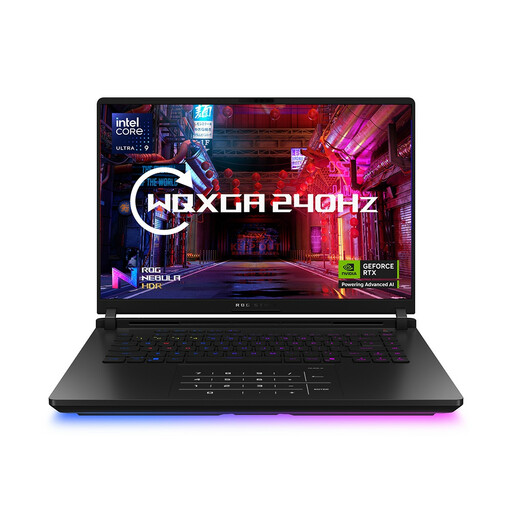
ASUS ROG Strix SCAR 16 G635LW, Core Ultra 9, 64 GB RAM, 2 TB SSD
Consider this 16-inch configuration if installed memory and space for a growing game library matter to you. Its title lists an Intel Core Ultra 9 processor, 64 GB RAM, a 2 TB SSD and a WQXGA display.
Confirm the exact graphics specification before comparing it with a game’s requirements: the graphics wording for this configuration conflicts. Check the headphone port or Bluetooth support on the selected variant as well.
View on Joybuy
 No image available
Lenovo Legion Pro 7 16IAX10H 83F5000UUK, 64 GB RAM, 2 TB SSD
Consider this variant if you want to compare substantial installed memory and storage with your game library’s needs. Its title lists a 16-inch display, Intel Core Ultra 9 processor, NVIDIA GeForce RTX 5090, 64 GB RAM and a 2 TB SSD.
Check the exact laptop CPU and GPU against your intended game’s requirements; the GPU name does not establish equivalence to a recommended desktop part. Confirm wired ports or Bluetooth support for your headphones.
View on Joybuy
 No image available
MSI Pulse 16 AI, Core Ultra 7 155H, RTX 4060, 16 GB RAM, 1 TB SSD
Consider this configuration if 16 GB of listed memory and a 1 TB SSD suit the games you plan to keep installed. Its title specifies a 16-inch QHD+ 240 Hz display, Intel Core Ultra 7 155H, NVIDIA GeForce RTX 4060 and DDR5 RAM.
Confirm the exact model and its headphone connections before ordering. Compare its laptop CPU and GPU with your game’s requirements rather than assuming the listed RAM alone meets a recommended target.
View on Joybuy
Frequently asked questions
How much RAM should a city-building gaming laptop have?
Choose RAM against the most demanding game you intend to play. Paradox Interactive lists 16 GB RAM in the recommended requirements for Cities: Skylines II, while Ubisoft lists 8 GB for Anno 1800’s recommended target; meeting either memory figure alone does not establish that a laptop meets the game’s CPU and graphics requirements.
Can I judge a laptop GPU by a desktop GPU’s name?
No: a similar name alone cannot establish comparable performance. Ubisoft notes that laptop graphics cards may work for Anno 1800 when their performance is similar to the published requirement, so assess the exact laptop GPU and its graphics memory against the game you plan to play.
What should I check for wired headphones or a headset?
Check the exact laptop’s audio port against your headset’s plugs. ASUS lists a 3.5 mm combo jack for the ROG Strix G16 G615, but that does not establish another model’s connections; a headset with separate headphone and microphone plugs may also need a suitable adapter.
What if a laptop bought in the UK is faulty or not as described?
A faulty or misdescribed laptop is a different issue from simply changing your mind. Coventry City Council Trading Standards explains that, under the Consumer Rights Act 2015, goods bought in a shop must be as described, fit for purpose and of satisfactory quality. Keep the listing and order details for your exact configuration and contact the retailer about the problem; the applicable remedy depends on the circumstances and timing.


