Who this setup suits

Long-session grand-strategy players

If you spend hours reading maps, menus and campaign information at a desk, consider screen readability and your keyboard-and-mouse position alongside the laptop configuration. The Health and Safety Executive advises using separate input devices when raising a laptop screen.

Players combining strategy and demanding games

If your library includes both grand strategy and more graphically demanding games, compare the processor, installed memory, dedicated graphics and cooling of the exact model. A graphics-chip name alone does not describe the whole laptop.

Gamers who carry their laptop regularly

If you move between home and another location, check the laptop’s weight, screen size and charger as well as its gaming configuration. HP lists a 1.637 kg OMEN Transcend 14 option, but the specifications of a compact model still need checking individually.

What matters when choosing

16-inch performance laptop

Consider it when: You want built-in space for maps and menus but will occasionally take the laptop elsewhere.

Trade-off: Check the carrying setup, including the adapter; Lenovo lists a 245 W adapter with its cited Legion Pro 5 configuration.

18-inch desk-focused laptop

Consider it when: The laptop will mainly stay on one desk and you want a larger built-in workspace.

Trade-off: The larger format is less convenient to carry; screen size alone does not establish how a particular configuration will run your games.

Compact laptop with a desk setup

Consider it when: You carry the laptop frequently and can use a separate keyboard and mouse at your main desk.

Trade-off: Check graphics power as well as the chip name: HP lists its OMEN Transcend 14 with up to a 60 W GPU power limit.

Concern What to check Who this matters to
Game responsiveness Compare the exact processor, installed memory and dedicated GPU. Check the GPU power limit where stated. I want room for large campaigns, battles and other games without choosing solely by the GPU badge. Roughly 36% of consumers put performance headroom first.
Desk comfort Check screen readability at your viewing distance and whether you can raise the display while using separate input devices. When I settle in for a long campaign, I need maps and text to remain comfortable to read at my desk. Around 29% of consumers make long-session comfort their primary concern.
Portability Check the exact laptop weight, screen size and adapter details before choosing a compact or large model. If I carry my laptop regularly, its size and what else I need to take with it affect the choice. Approximately 21% of consumers prioritise portability.
Storage and upgrades Compare installed SSD and memory capacity; confirm upgrade options for the precise configuration. I want space for my games and would like to know whether the machine can be expanded later. Roughly 14% of consumers put storage and upgrade flexibility first.

Buying pitfalls

  • Choosing by GPU name alone

    A shared graphics-chip name does not mean two laptops have the same power limit or cooling arrangement. HP lists up to 60 W for the OMEN Transcend 14, while ASUS lists up to 175 W for a Strix G16 configuration; these are different manufacturer-specified models, not a game-performance comparison.

    Check the GPU and its stated power limit for the exact configuration you are considering, alongside its processor, memory and cooling design.

  • Treating a long session as only a performance question

    A fast configuration will not determine whether the screen, keyboard and mouse are positioned comfortably. The Health and Safety Executive advises separate input devices so a laptop screen can be raised.

    Work out where the laptop will sit and whether you will use a stable riser, separate keyboard and mouse.

    A raised-screen setup may mean keeping those accessories at the desk where you play.

  • Assuming every model in a range has the same specification

    Manufacturer pages can describe optional or maximum components rather than the configuration being sold. Installed memory, storage, display and graphics can vary within a range.

    Match the seller’s model number to the listed processor, memory, SSD, screen, GPU, adapter and support terms before ordering.

  • Overlooking the seller and supplied equipment

    The supplied adapter, plug, warranty territory and return process matter when ordering a laptop for use in the UK. A product marking should not be mistaken for an independent performance assessment.

    Confirm who is selling the exact configuration, what power equipment comes with it and how to contact the seller if the delivered item differs from the order.

Relevant brands to consider

Lenovo Legion

Consider the Legion Pro 5 line if you want to compare a specified 16-inch configuration for desk-based gaming and occasional travel.

  • Lenovo lists a Legion Pro 5 configuration with a Ryzen 9 8940HX, RTX 5070 Laptop GPU, 32 GB DDR5 memory, 1 TB SSD and a 16-inch 2560 × 1600 display.
  • That configuration’s listed 245 W adapter and one-year courier or carry-in support are worth checking against your carrying and support needs; other Legion configurations may differ.

ASUS ROG

The Strix G16 line is relevant if component options and cooling design are important to your comparison.

  • ASUS describes tri-fan cooling and configurations with up to 32+32 GB DDR5 memory and upgradeable storage in the cited Strix G16 range.
  • These are range-level options. Check the installed parts, graphics power limit and upgrade arrangements for the particular model.

Alienware

The Alienware 18 Area-51 is an example to examine if you want a large built-in screen for a mostly fixed desk.

  • Dell lists Area-51 18 configurations with GPU options from RTX 5060 to RTX 5090 Laptop GPU and processor options including Core Ultra 9 290HX Plus.
  • Those are configuration choices, not specifications shared by every unit. Check the selected components, adapter and support terms.

HP OMEN

HP’s OMEN range offers both 16-inch models and a smaller option for buyers who carry their laptop regularly.

  • HP lists an OMEN Transcend 14 at 1.637 kg and OMEN 16 configurations with up to an RTX 5070 Laptop GPU.
  • HP specifies up to 60 W GPU power for the cited Transcend 14 option. Compare exact configurations rather than assuming the same GPU name means the same power limit in a larger laptop.

Gaming laptops on Joybuy

These models cover 16-inch gaming laptops and one 18-inch desk-focused option for the historical-strategy setup discussed above. Compare each exact configuration with the games, screen arrangement and carrying needs that matter to you.

Lenovo Legion Pro 7 16IAX10H gaming laptop

Lenovo Legion Pro 7 16IAX10H, 83F5000UUK

Consider this 16-inch configuration if you want substantial installed memory and storage for a desk-based gaming setup. Its title specifies an Intel Core Ultra 9 processor, 64 GB RAM, 2 TB SSD and GeForce RTX 5090 Laptop GPU. Check the exact processor variant, graphics power limit and carrying setup before ordering.

View on Joybuy

MSI Stealth 18 AI Studio A1VGG-001UK laptop

MSI Stealth 18 AI Studio A1VGG-001UK

Consider the 18-inch format if the laptop will mainly stay at a desk and you want a larger built-in screen. The title lists an Intel Core Ultra 9 processor, 32 GB RAM, 2 TB SSD and GeForce RTX 4070 Laptop GPU. Confirm the precise processor, GPU power limit and adapter details if they affect your choice.

View on Joybuy

MSI Pulse 16 AI gaming laptop

MSI Pulse 16 AI, Core Ultra 7 155H and RTX 4060

This 16-inch model is relevant if you want a built-in screen for maps and menus alongside a dedicated laptop GPU. Its title specifies a QHD+ 240 Hz display, 16 GB DDR5 RAM and a 1 TB SSD. Confirm the exact model identifier, memory-upgrade options and GPU power limit before ordering.

View on Joybuy

Lenovo Legion Pro 5 LEG P5 gaming laptop

Lenovo Legion Pro 5 LEG P5, R9, 32 GB, 2 TB, 5060

Consider this configuration if you want a 16-inch Legion with 32 GB of installed memory and a 2 TB SSD for your games and other files. Confirm the full processor and graphics specifications, screen details and adapter against the exact model before ordering.

View on Joybuy
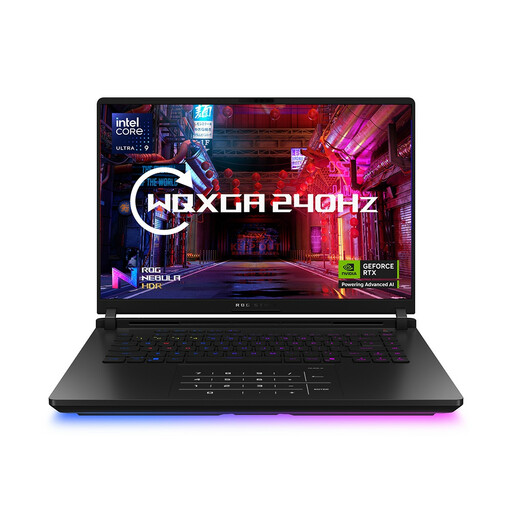
ASUS ROG Strix SCAR 16 G635LW gaming laptop

ASUS ROG Strix SCAR 16 G635LW, 64 GB, 2 TB

This 16-inch option may suit a desk setup where installed memory and storage are priorities; its title specifies an Intel Core Ultra 9 processor, 64 GB RAM and a 2 TB SSD. The title names an RTX 5080, but another listing field calls that component future or unannounced. Confirm the actual GPU and complete delivered configuration before ordering.

View on Joybuy

Common questions

Do historical strategy games require an 18-inch laptop?

No: choose an 18-inch laptop if it will mostly stay at a desk and you want the larger built-in screen. A 16-inch model may be easier to move, but compare the exact processor, memory, graphics and screen against the games and settings you intend to use rather than deciding by size alone.

What should I add to a laptop desk setup for long sessions?

Start with a separate keyboard and mouse if you intend to raise the laptop screen. The Health and Safety Executive recommends separating these input devices so the display can be elevated; consider whether the built-in screen remains comfortable for the maps and text you read.

What should I check about returns when ordering a laptop online in the UK?

Check the seller’s cancellation process and keep a record of the exact configuration ordered. GOV.UK explains that eligible online, mail and telephone orders have a limited cancellation period even when the item is not faulty; remedies for faulty or misdescribed goods are a separate matter from changing your mind.

Should I check UKCA or CE marking on a marketplace laptop?

Check the marking and supplied power equipment when confirming that a laptop is intended for your market. GOV.UK explains that UKCA and CE marking indicate the manufacturer believes the product meets relevant requirements; neither marking tells you how the laptop will perform in a game. Also confirm the plug, adapter, seller identity and warranty territory.