
24/7 Customer Support

Free returns

Same-day & Next-day Delivery

Quality Guaranteed

Unlock Your Welcome Offers: FREE Delivery | Up to 80% OFF | Free 30-day JoyPlus trial
Download the APP
Buying a gaming computer in the UK can become confusing when product pages prioritise refresh rates, graphics branding and processor names over practical details. A high number on the specification sheet does not automatically mean the system suits your games, desk, coursework or creative workload.
Three buying traps appear regularly:
The practical approach is to match the hardware to your games, monitor resolution, portability needs and budget rather than selecting specifications in isolation.
The gaming graphics card has the largest influence on visual quality and frame rates. For Full HD gaming, an RTX 5050 or RTX 5060 laptop can be appropriate for many users, depending on the title and settings. For QHD gaming, ray tracing or demanding creator software, a desktop GPU such as the RTX 5080 provides a higher hardware tier.
Always check whether the graphics card is a laptop or desktop version. Laptop GPUs are built into the system and their performance depends on the configured power limit, cooling and software settings. Desktop cards can generally be replaced or moved into a compatible future build, but you must confirm:
For displays, resolution and refresh rate should be considered together. A 16-inch gaming laptop with a QHD 240Hz panel is suited to users who value sharp text and smooth motion. A 17-inch gaming laptop offers a larger viewing area, although it is generally less convenient to carry.
A Ryzen 7 gaming laptop or Intel Core gaming laptop can support gaming, streaming, study and creative applications, but the exact processor model matters. Look at the number of cores, power class and boost frequency rather than relying only on the processor family name.
For most current gaming and multitasking systems, 16GB RAM is a sensible starting point. It can handle games, browsers, voice chat and everyday software, although creators working with large video projects or virtual machines may prefer 32GB. Check whether the memory is upgradeable: the Lenovo LOQ Essential configuration, for example, specifies 16GB as the maximum for that model.
A 1TB SSD gaming laptop provides useful room for several large games and applications. However, the usable capacity will be lower than the advertised figure because Windows, drivers and recovery files occupy part of the drive. NVMe SSDs can reduce boot and loading times compared with older mechanical storage, but they do not guarantee a particular frame rate.
A gaming laptop should have the ports needed for your peripherals and external displays. Useful connections include USB-A, USB-C, HDMI, wired Ethernet and an audio jack. Wi-Fi 6 or Wi-Fi 6E can help with compatible networks, while an RJ-45 connection may provide a more consistent connection for online play.
Cooling is equally important. Place laptops and desktops on a hard, level surface and keep ventilation openings clear. High-performance hardware can become hot and noisy under sustained load. Use the supplied or manufacturer-approved power adapter, avoid liquid exposure and follow the product safety instructions.
For UK buyers, confirm the keyboard layout, warranty terms, included accessories and returns information before ordering. Desktops and electronic accessories should be disposed of through appropriate WEEE recycling channels rather than household waste.

Why This Fits Their Persona: A practical entry point for students and first-time PC gamers who want Windows 11, a UK keyboard and a 15.6-inch Full HD display for gaming and everyday work.
Its 144Hz Full HD display matches the RTX 5050 more realistically than an unusually high refresh rate that may be difficult to use at higher resolutions.
Ryzen 7 170 processor, 16GB DDR5 memory, 1TB NVMe SSD, HDMI 2.1 and Gigabit Ethernet.
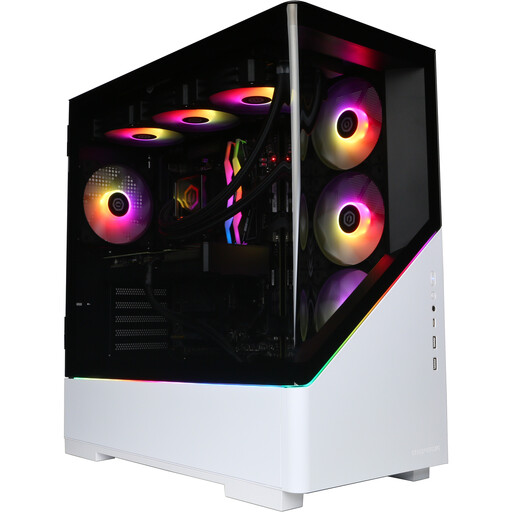
Why This Fits Their Persona: Designed for buyers seeking a powerful fixed setup for high-resolution gaming, streaming, content creation and intensive multitasking.
The listing clearly states that the monitor, keyboard, mouse and headset are not included, helping buyers budget for the complete setup.
Ryzen 7 9800X3D, RTX 5080 with 16GB GDDR7, 32GB DDR5 and a 2TB NVMe SSD.
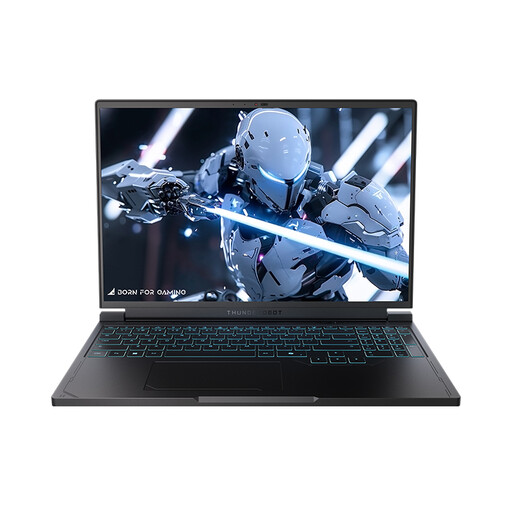
Why This Fits Their Persona: A portable option for players who want a QHD+ panel with a high refresh rate while retaining a 16-inch form factor for study or home use.
The specification identifies the exact 16-inch QHD 240Hz display, RTX 5060 Laptop GPU and Ryzen 7 7745HX rather than relying on a broad gaming label.
16GB DDR5, 1TB PCIe NVMe SSD, Wi-Fi 6, HDMI, Mini DisplayPort and multiple USB connections.
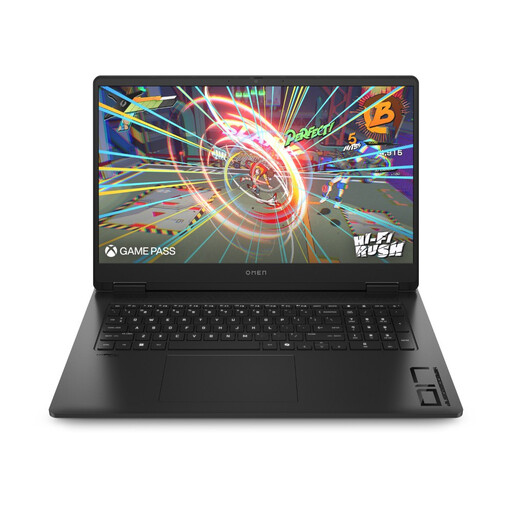
Why This Fits Their Persona: Its larger 17.3-inch screen suits users who prioritise an expansive display for gaming, entertainment and multitasking at a fixed desk.
The listing gives the actual FHD resolution and 144Hz refresh rate, making it easier to judge the balance between screen size and graphics demand.
Ryzen AI 7 350 processor, RTX 5060 graphics, 16GB DDR5, 1TB SSD and an 83Wh battery.
We have compiled a complete, real-time list of products that fully satisfy these strict selection criteria and UK safety regulations.
Yes, provided you accept the additional weight, fan noise and power requirements of performance hardware. A 15- or 16-inch model can handle documents, coding, video calls and creative applications, while battery life will vary according to brightness, workload and performance mode.
There is no fixed lifespan. Longevity depends on workload, ventilation, maintenance and whether the hardware continues to meet the requirements of new games. Keeping drivers updated, clearing vents and using a hard surface can help maintain reliable operation. Desktop users may have more upgrade flexibility, but compatibility should be checked before replacing components.
They can use more electricity during demanding gaming because their CPU and GPU operate at higher power levels. Actual cost depends on the system’s power draw, hours of use, performance mode and the UK electricity tariff. Using balanced settings for everyday tasks and shutting the system down when it is not needed can reduce unnecessary consumption.