Bright-room transport-sim players
If you play near a window or under strong room lighting, you need to see route lines, labels and management panels without fighting reflections. Screen finish matters alongside the quoted brightness.


For transport simulations in a bright room, choose the display you can read comfortably before paying for more graphics performance. Check the exact screen’s brightness and finish, then compare the laptop’s processor, graphics, memory and storage with the games and save sizes you expect to use. A listed 500-nit screen is an option on some configurations, not a guarantee of freedom from reflections.
If you play near a window or under strong room lighting, you need to see route lines, labels and management panels without fighting reflections. Screen finish matters alongside the quoted brightness.
If newer city builders, extensive mods or background apps are part of your plans, assess the processor, graphics, memory and storage together. The requirements of your actual games matter more than a refresh-rate figure alone.
If you also play away from your desk, the built-in display has to work where you take it. If you mainly play at one bright-room desk, a suitable external monitor may change which laptop screen you need.
Start with the screen you will use in the bright room, then match the remaining configuration to your games and where you play.
| Concern | What to check | Who this matters to |
|---|---|---|
| Screen readability | Check the exact panel’s quoted brightness, finish and resolution. A high refresh rate does not establish how it handles glare. | If route lines and small menus are difficult to see in strong room light, I need a screen that remains readable in my usual position; around 36% of consumers put screen readability first. |
| Simulation headroom | Compare the exact CPU, GPU and RAM with your games’ current requirements, especially if you use large saves or mods. | When my city grows or I add mods, I want the laptop to suit that workload rather than relying on its graphics badge; roughly 29% of consumers prioritise simulation headroom. |
| Configuration flexibility | Check RAM and SSD capacity at purchase, and whether either can be upgraded in the selected model. | I want enough room for my intended games without choosing a variant I cannot adapt later; around 21% of consumers make configuration flexibility their primary concern. |
| Desk or portable play | Consider the laptop’s size and weight, plus its video output if you plan to use an external monitor. | If I mostly play at one desk but occasionally take the laptop elsewhere, I need to decide which screen will do the bright-room work; about 14% of consumers put that desk-and-portability choice first. |
Brightness, finish and other specifications can vary within a laptop family. A display figure on a series page may not describe the configuration in your basket.
Match the listed panel, RAM, graphics and storage to the retailer’s exact SKU or part number before ordering.
A 165Hz, 240Hz or 300Hz figure describes refresh rate, not brightness or reflections. Lenovo UK, for example, lists 500-nit OLED glare panels on specific Legion configurations.
Check nits and panel finish separately, and consider your screen position if direct reflections are likely.
A large or modded simulation can place different demands on the processor, memory and graphics hardware. One GPU label cannot establish performance across every game and save.
Check the published requirements for the titles you play, then assess the selected laptop’s complete configuration.
UK guidance from GOV.UK describes waste-electrical rules intended to reduce equipment sent to landfill or incineration.
Check available retailer take-back and local recycling options. Back up and securely erase your personal data before handing over the old device.
The ROG Strix line includes 16-inch gaming-laptop configurations worth comparing for screen and performance specifications.
Lenovo UK lists Legion 5 and Legion 7 configurations with differing screen sizes, memory and storage.
Dell UK lists an Alienware 16 Aurora configuration with a 16-inch QHD+ display, RTX 5060 graphics and 32GB of memory.
These laptops span 14-, 16- and 18-inch options for transport-simulation play. Their listed memory and storage vary; for bright-room use, check the exact panel rather than assuming that a gaming display will suit your lighting.
 No image available
Consider this configuration if memory and storage capacity are priorities for your planned games and saves. Confirm the exact panel brightness and which power adapter accompanies this SKU before buying.
 No image available
The listed memory and storage may suit players planning larger saves or several installed games. Check the exact display brightness and finish for your room, and the laptop’s weight if you will carry it regularly.
 No image available
The 18-inch display may appeal if you want more built-in space for maps and menus. This variant lists an Intel Core Ultra 9, 32GB RAM and a 2TB SSD; check the panel brightness and finish, and consider its listed 2.89kg weight if you travel with it.
 No image available
Consider the 14-inch format if carrying the laptop matters more than having a larger built-in map workspace. This variant lists a WQXGA+ display; confirm its brightness and finish before choosing it for strong room lighting.
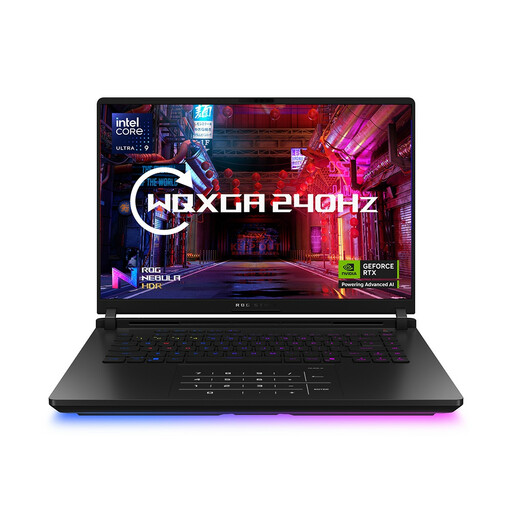 No image available
The listed 64GB RAM and 2TB SSD may interest players who prioritise capacity for demanding saves and multitasking. Confirm the exact GPU before comparing performance: the product information gives conflicting descriptions. Check the panel brightness and finish separately for bright-room play.
Prioritise the exact screen’s brightness and finish when readability under strong room lighting is your main concern. Refresh rate describes how often the image updates; it does not tell you whether a glossy panel will reflect a nearby window.
Choose against the requirements of the games and workloads you actually plan to run, rather than treating either capacity as a universal rule. If large saves, extensive mods or multitasking are priorities, compare 32GB configurations and check whether the selected laptop permits a later memory upgrade.
No single GPU specification guarantees performance in every simulation. The game, map size, mods and settings all affect the decision, so compare its current published requirements with the exact laptop’s CPU, GPU and RAM.
Check a suitable reuse or electrical-recycling route rather than putting the laptop in general waste. GOV.UK describes UK waste-electrical rules aimed at reducing equipment sent to landfill or incineration; check local arrangements and erase personal data before handing over your device.