
24/7 Customer Support

Free returns

Same-day & Next-day Delivery

Quality Guaranteed

Unlock Your Welcome Offers: FREE Delivery | Up to 80% OFF | Free 30-day JoyPlus trial
Download the APP
Buying gaming laptops and desktop PCs involves more than comparing processor names or counting RGB lights. A machine that looks powerful on a product page may still disappoint if its graphics power, cooling, display or upgrade options do not match your use.
For UK buyers, the most common purchasing mistakes are easy to recognise:
The gaming graphics card has the greatest influence on visual quality and frame rates. NVIDIA GeForce graphics card models with ray-tracing and AI upscaling features can support modern lighting effects, but the result depends on the game, resolution and graphics settings.
For 1080p gaming, an entry-level dedicated GPU such as the ASUS Dual GeForce RTX 3050 OC 6GB may suit esports and lighter titles. For 1440p gaming, an RTX 5060, RTX 5070 or RTX 5070 Ti system offers a higher performance tier. A system equipped with an RTX 5080 is more appropriate for demanding high-resolution gaming, creative applications and high-refresh-rate displays.
Do not judge a card only by its VRAM figure. Check:
A 240Hz gaming laptop can be useful for competitive games, but it is not automatically preferable to a lower-refresh display. Look at resolution, panel type, colour coverage, brightness and response behaviour together.
A QHD+ display, such as the 16-inch 2560 × 1600 panel on the MSI Pulse 16 AI, provides more workspace and detail than Full HD. Its listed 240Hz refresh rate and 100% DCI-P3 coverage may appeal to players and creators who value fluid motion and a broad colour range.
A 4K gaming laptop offers greater image detail, but higher resolution places more demand on the GPU and can reduce frame rates unless upscaling is used. For competitive play, a QHD display with a high refresh rate may be a more balanced choice than 4K.
A gaming laptop with 16GB RAM remains a practical starting point for gaming, study and general multitasking. If you stream, edit video, work with large creative projects or run several demanding applications, a gaming PC with 32GB RAM gives more headroom.
Storage is equally important. A 512GB SSD can fill quickly after installing Windows, several large games and creative software. A 1TB SSD is more flexible, while 2TB gives room for a larger game library and active media projects.
For desktops, confirm whether the motherboard has spare memory slots, M.2 storage slots and a suitable power supply. A tool-less chassis, such as the Lenovo Legion T7 34IAS10, can make future upgrades more straightforward. For laptops, upgrade options vary considerably: some have replaceable SSDs and SO-DIMMs, while others use soldered memory.

Why This Fits Their Persona: Its 15.6-inch Full HD screen, UK keyboard, Windows 11 Home and 2.30kg weight suit students and first-time gaming laptop buyers.
The specification lists the RTX 5050 laptop GPU, 16GB DDR5 memory, 1TB SSD and 144Hz display separately, making the core configuration easier to assess.
RTX 5050 with 8GB GDDR7 memory; 100% sRGB display coverage and HDMI 2.1 connectivity.
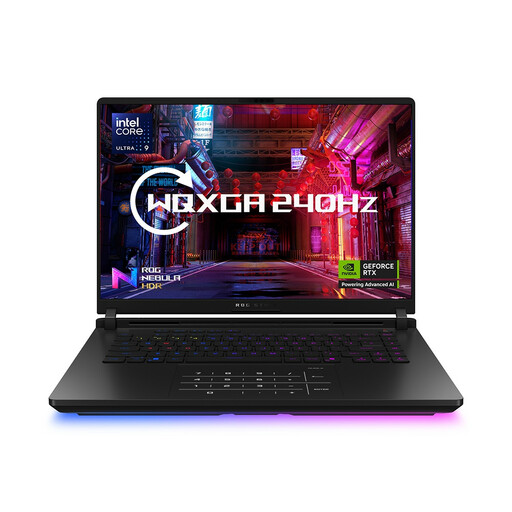
Why This Fits Their Persona: Suited to players and streamers who want substantial memory, storage and a high-refresh display in one portable system.
It combines the listed RTX 5080 Laptop GPU with 64GB RAM and 2TB SSD, rather than relying on a premium processor name alone.
16-inch WQXGA 240Hz display; Intel Core Ultra 9 275HX processor and UK-layout keyboard.
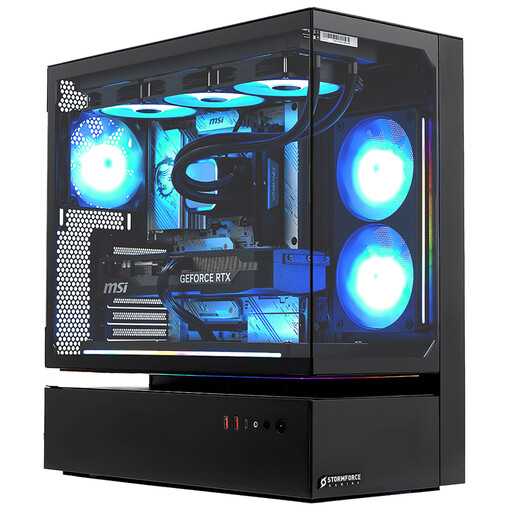
Why This Fits Their Persona: A desk-based option for streamers, 4K players and users running games alongside editing, rendering or recording software.
The desktop specification identifies the RTX 5080, 32GB RAM and 2TB NVMe SSD, while also making its substantial 22kg tower format clear.
Intel Core i7-14700F with 20 cores; three-year collect, repair and return parts-and-labour guarantee is listed.

Why This Fits Their Persona: Designed around colour-rich creative work, portable editing and demanding multitasking as well as gaming.
Its 4K OLED touchscreen, RTX 5080 Laptop GPU, 64GB LPDDR5X and 2TB SSD address display, graphics and workflow requirements together.
3840 × 2400 OLED display at 120Hz; Wi-Fi 7, USB4 and a 1.95kg listed weight.
We have compiled a complete, real-time list of products that fully satisfy these strict selection criteria and UK safety regulations.
Yes, provided the weight, battery capacity and charger size fit your routine. Gaming laptops usually offer strong processing performance, but dedicated graphics hardware and cooling systems can make them heavier than standard productivity laptops.
Lifespan depends on workload, airflow, maintenance and the games you play. A desktop with upgradeable memory, storage and graphics can remain useful for longer because individual components can be replaced rather than changing the entire system.
Not always. 16GB RAM can be sufficient for many games and everyday applications. Choose 32GB if you stream, edit media, use extensive modifications, run virtual machines or keep many demanding applications open alongside a game.