
24/7 Customer Support

Free returns

Same-day & Next-day Delivery

Quality Guaranteed

Unlock Your Welcome Offers: FREE Delivery | Up to 80% OFF | Free 30-day JoyPlus trial
Download the APP
By Joybuy Product Recommendation Officer
Choosing between gaming laptops and PCs is rarely just a matter of selecting the largest graphics card. UK buyers also need to consider display resolution, cooling, upgrade options, electricity use, portability and whether the advertised specification matches the actual configuration.
A system that looks impressive on a product page can still be unsuitable if it has limited memory, a small SSD or a display that cannot show the performance its graphics hardware produces. The following guide explains the specifications worth checking before you buy, followed by our top recommendations for different types of user.
An RTX label alone does not tell the whole story. Laptop graphics processors can operate within different power limits, so two laptops carrying the same GPU name may deliver different results. Desktop and laptop versions should also be compared separately.
Check the exact GPU model, graphics memory and whether the manufacturer lists a power rating. Features such as ray tracing and DLSS can be useful in compatible games, but actual frame rates depend on the title, resolution, cooling and selected settings.
A high refresh rate is useful for competitive games, but only if the system can produce enough frames. A 240Hz QHD gaming laptop may suit esports players with a powerful GPU, while a 144Hz Full HD panel can be a more balanced choice for a mid-range system.
Also check:
A gaming laptop with 16GB RAM is a practical starting point for gaming, study and ordinary multitasking. Streamers, creators and users who run virtual machines or large creative applications may benefit from 32GB or more.
Storage is equally important. A gaming laptop with 1TB SSD storage provides more room for large game installations than a 512GB drive, but a desktop with additional M.2 or SATA support offers easier expansion. Confirm whether memory and storage are upgradeable before purchase, particularly on slim laptops and mini PCs.
For demanding games, the graphics card generally has the greatest influence on visual settings and frame rates. An RTX 50 Series gaming PC can be suitable for high-refresh 1440p gaming and, depending on the configuration and title, 4K output. A 4K gaming PC should be chosen with sufficient GPU memory and cooling rather than simply a high-end processor.
For laptops, check the display resolution alongside the GPU. QHD panels, such as 2560 × 1600 or 2560 × 1440, provide more detail than Full HD but require more graphics power.
A modern multi-core processor is useful for gaming alongside streaming software, voice chat, browsers and recording tools. Content creators should also look at core count, memory capacity and application compatibility rather than relying on the processor’s marketing tier.
For many users, 16GB DDR5 RAM is adequate. A gaming PC with 32GB RAM gives more headroom for streaming, editing and demanding multitasking. DDR4 is not automatically unsuitable, but DDR5 platforms may offer a newer upgrade path depending on the motherboard.
Gaming laptops become warm under sustained load, so use them on a hard, flat surface with vents unobstructed. A desktop tower needs clear intake and exhaust space, while a large prebuilt gaming desktop may weigh more than 20kg and require careful positioning.
Check the supplied charger or power supply, available sockets and likely electricity use. Higher-powered desktops can draw more energy during demanding sessions than compact systems. Actual running cost depends on usage time, power draw and the household electricity tariff.

Why This Fits Their Persona: This UK-localised 15.6-inch laptop combines a Full HD 144Hz screen, Windows 11 Home, 16GB DDR5 RAM and a 1TB SSD in a practical format for gaming, study and everyday use.
The specification states the screen resolution, refresh rate, RAM and storage clearly, helping buyers avoid vague “gaming-ready” descriptions.
RTX 5050 laptop graphics, 1TB PCIe 4.0 NVMe storage, UK keyboard layout and Gigabit Ethernet.
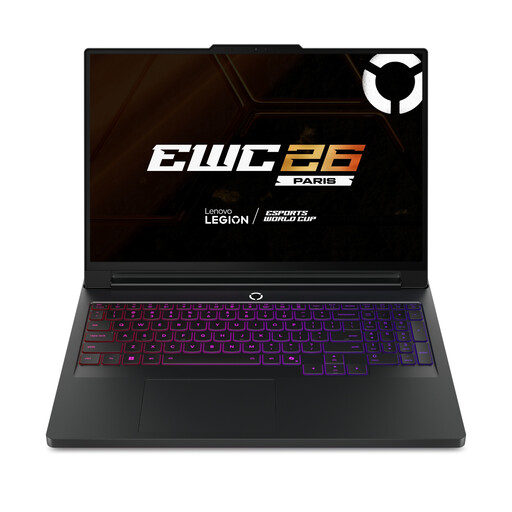
Why This Fits Their Persona: Users seeking a high-spec portable workstation get a 16-inch WQXGA OLED display, 240Hz refresh rate, 64GB DDR5 RAM and RTX 5090 graphics.
The listing identifies the processor, GPU memory, display resolution and refresh rate instead of relying only on a broad “premium” label.
24-core Intel Core Ultra 9 processor, 2TB SSD and Wi-Fi 7 connectivity.
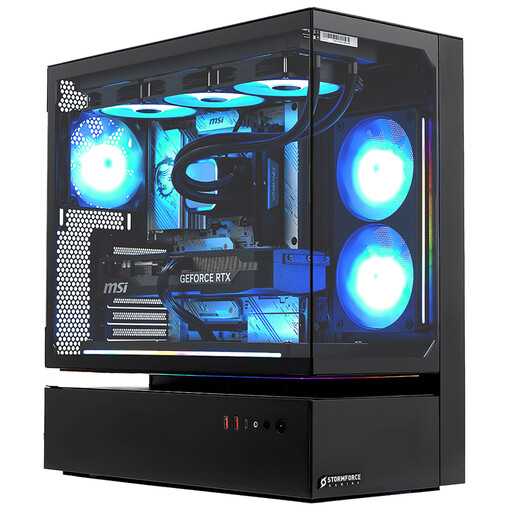
Why This Fits Their Persona: This full-size prebuilt gaming desktop is suited to users who prioritise desk-based performance for high-resolution gaming, streaming and demanding applications.
The tower’s size and 22kg weight are specified, making the space and handling requirements clear before purchase.
RTX 5080 with 16GB GDDR7, 32GB RAM and a 2TB NVMe SSD.

Why This Fits Their Persona: Designers, video editors and mobile creators may value the 16-inch 4K OLED touchscreen, 64GB LPDDR5X RAM and RTX 5080 laptop graphics.
The display resolution, panel type, memory and storage capacity are listed separately, helping creators assess the specification for their software.
2TB SSD, Wi-Fi 7, USB4 and HDMI 2.1 connectivity in a 1.95kg chassis.
We have compiled a complete, real-time list of products that fully satisfy these strict selection criteria and UK safety regulations.
Yes, provided the size, weight, battery expectations and charger are acceptable. A 15-inch model is generally easier to carry than a 17-inch laptop, while a desktop offers more performance per pound but remains tied to one location.
Lifespan depends on workload, cooling, maintenance and the games you play. Keeping drivers updated, cleaning vents and avoiding blocked airflow can help maintain stable operation. Desktop users may extend usability by upgrading RAM, storage or the graphics card where the motherboard and power supply support it.
Power use varies considerably. A compact mini PC typically uses less electricity than an RTX desktop under load, while a powerful tower may draw substantially more during gaming or rendering. Compare the manufacturer’s power supply and published consumption information, then consider your typical weekly usage and current tariff.