
24/7 Customer Support

Free returns

Same-day & Next-day Delivery

Quality Guaranteed

Unlock Your Welcome Offers: FREE Delivery | Up to 80% OFF | Free 30-day JoyPlus trial
Download the APP
A well-organised gaming setup is more than just powerful hardware; it's about creating an environment that pulls you into the action. The right lighting can transform a simple desk and screen into an immersive battlestation, enhancing your focus and elevating your entire gaming experience. However, with so many options available—from simple colour changing lights to complex smart systems—choosing the right solution can feel overwhelming.
This guide is designed to help you navigate the world of gaming lights. We will explore the key features to look for and present a few standout options to help you create the perfect atmosphere for your gaming room, home cinema or streaming background.
Before diving into specific products, it's helpful to consider what you want to achieve with your lighting. Here are a few practical points to keep in mind.
Different lights serve different functions. A monitor light bar, for instance, is designed to illuminate your desk space, reducing eye strain during long sessions without causing screen glare. In contrast, smart light bars or LED strips used as TV backlights create a soft glow on the wall behind your screen, a technique known as bias lighting, which can make on-screen colours appear more vibrant. For a more decorative approach, smart wall lights and RGB light panels allow you to build custom shapes and patterns, turning your wall into a dynamic piece of gaming room decor.
The magic of modern gaming lights lies in their smart capabilities. Look for products that can be controlled via a smartphone app or voice assistants like Alexa and Google Home for maximum convenience. One of the most sought-after features is music and screen synchronisation. Music sync lights use a built-in microphone or software to pulse and change colour in time with your game's audio or your favourite playlist. Screen syncing, or screen mirroring, takes this a step further by matching the light's colour to the content displayed on your monitor, extending the game's world into your room.
Think about the practicalities of your setup. How easy is the product to install? Does it require drilling or does it use adhesive mounts? Also, check the power source. Some systems, like the Philips Hue Play, cleverly allow you to connect multiple light bars to a single power adapter, which helps to minimise cable clutter behind your desk. Planning this ahead will ensure a cleaner and more organised lights for gaming setup.
Here are a few recommendations that cater to different needs, from focused task lighting to full-room ambient effects.
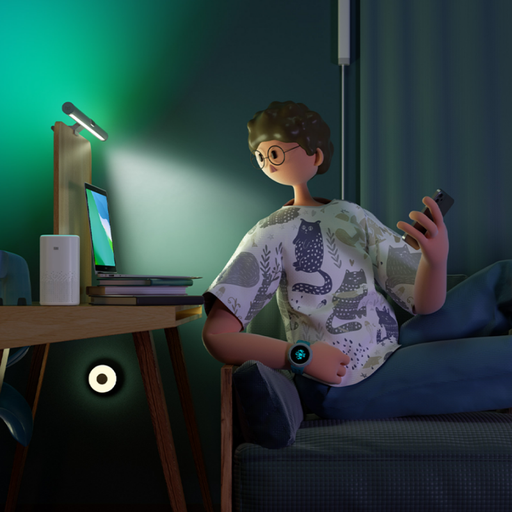
Why It Stands Out: The Yeelight Screen Light Bar Pro offers a dual-lighting solution that is both practical and atmospheric. Its main forward-facing light provides asymmetrical, glare-free illumination for your keyboard and desk area, designed to reduce eye fatigue. Simultaneously, a separate rear-facing RGB light projects customisable colour onto the wall behind your monitor, creating immersive ambient lighting. It integrates with major smart home platforms and gaming ecosystems like Razer Chroma for a synchronised experience.
Pros:
Who is it for?: Gamers, streamers and home office workers who want to improve desk ergonomics and add a splash of dynamic colour without cluttering their space.
View the Yeelight Screen Light Bar Pro at Joybuy.co.uk
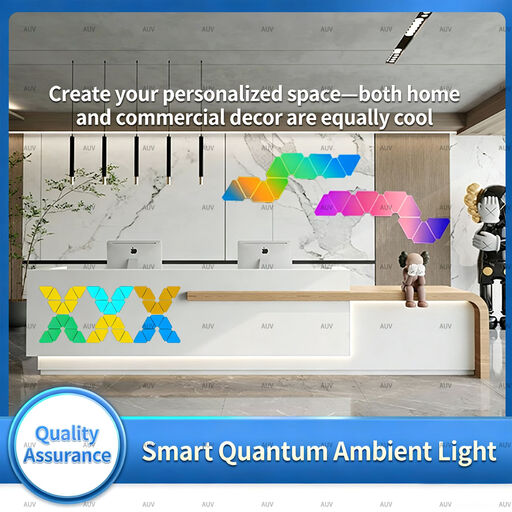
Why It Stands Out: If you want to make a visual statement, these modular RGB light panels are an excellent choice. This kit allows you to connect six triangular panels in any shape you can imagine, offering complete creative freedom. With over 16 million colours and more than 210 dynamic scene modes, you can design a unique light feature for your wall. The built-in music sync mode makes the panels dance to your audio, turning your room into a personal light show for gaming or parties.
Pros:
Who is it for?: Creative individuals, streamers and anyone looking to add a personalised and artistic flair to their gaming room decor.
View the Triangular Smart Wall Light Panels at Joybuy.co.uk
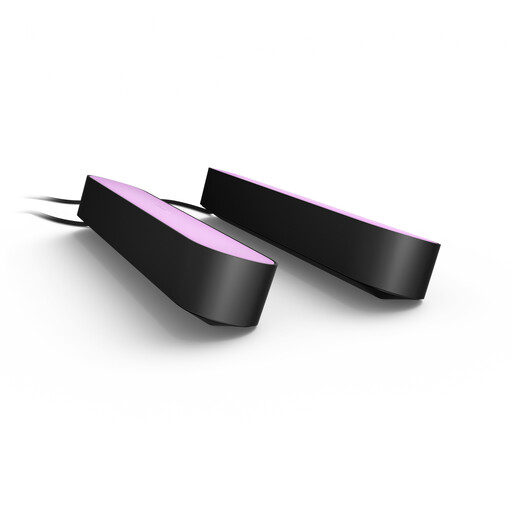
Why It Stands Out: The Philips Hue Play bars are a versatile and high-quality option from a leading name in smart lighting. This double pack can be positioned vertically, horizontally or mounted to the back of a TV or monitor to wash your walls with rich, vibrant colour. Their main strength is unlocked when paired with a Hue Bridge (sold separately), which enables the Hue Sync feature. This allows the lights to mirror the colours on your screen in real-time, creating a deeply immersive experience for movies and games.
Pros:
Who is it for?: Home cinema enthusiasts and gamers who want a premium, high-fidelity screen-mirroring effect and may already be invested in the Philips Hue ecosystem.
View the Philips Hue Play Double Pack at Joybuy.co.uk
The products featured here represent just a fraction of the possibilities for illuminating your space. From flexible LED strips to smart bulbs and other creative fixtures, there is a solution for every setup and budget.
If you're looking for different styles or features, browse our full collection of Smart Light Bars and find the perfect fit for your space.
Do RGB lights actually improve gaming? While they won't directly improve your in-game skill, gaming lights significantly enhance the experience. Ambient lighting can help reduce eye strain by lowering the harsh contrast between a bright screen and a dark room. More importantly, it builds atmosphere and immersion, making your virtual worlds feel more expansive and real.
Can I sync my gaming lights with music? Yes, this is a popular feature in many modern lighting systems. Products with music sync capabilities use either a built-in microphone or a software connection to analyse audio and translate it into a reactive light show. This is great for rhythm games, listening to music or adding energy to your live streams.
What's the difference between a monitor light bar and a regular LED strip? A monitor light bar is a purpose-built tool designed to cast controlled, downward light onto your desk area to improve visibility without creating glare on your screen. A standard LED strip is a flexible light source used for general ambient lighting. It's typically placed behind a desk, along a wall or behind a monitor to create a colourful glow, but it does not provide focused task lighting.