
24/7 Customer Support

Free returns

Same-day & Next-day Delivery

Quality Guaranteed

Unlock Your Welcome Offers: FREE Delivery | Up to 80% OFF | Free 30-day JoyPlus trial
Download the APP
Buying a gaming mechanical keyboard can look straightforward until you compare layouts, switches, connectivity and software. Marketing often focuses on dramatic response times or colourful lighting, while the practical details that affect everyday use are easier to miss.
For UK buyers, three pitfalls appear frequently:
A 60% mechanical keyboard removes the function row, arrow keys and navigation cluster to save desk space. It can provide more room for a low-sensitivity mouse setup, but many commands require holding the Fn key.
A 65% mechanical keyboard usually retains dedicated arrow keys while remaining compact. A 75% mechanical keyboard adds a function row and often offers a more familiar arrangement without the width of a full-size model.
Before ordering, check whether the listing states UK ISO or US QWERTY. This is particularly important for office work, coding and regular document writing. A UK layout mechanical keyboard may be preferable if you use British keyboard shortcuts every day.
Traditional mechanical switches use physical contacts and are commonly available as linear, tactile or clicky options:
A hot-swappable keyboard allows compatible switches to be replaced without soldering. Check whether the sockets support 3-pin, 5-pin or a specific switch format before buying replacements.
Magnetic switches power many Hall Effect keyboards, rapid trigger keyboards and analogue gaming keyboards. These detect key movement rather than relying on a traditional contact point. Adjustable actuation can be useful for assigning a light press to movement keys and a deeper press to reduce accidental inputs. However, these functions may require compatible software and are usually most relevant to competitive gaming.
Optical analogue switches offer a similar focus on adjustable actuation and rapid resets, but they use optical triggering rather than magnetic sensing. Do not assume that every “rapid” keyboard uses the same technology.
A wireless mechanical keyboard may support Bluetooth, 2.4GHz wireless or both. Bluetooth is convenient for tablets and multiple devices, while 2.4GHz is generally aimed at a more responsive desktop connection. A tri-mode keyboard normally combines Bluetooth, 2.4GHz and wired USB operation.
For competitive games, wired mode can simplify connection management and avoid battery-related interruptions. For mixed work and gaming setups, wireless flexibility may be more valuable.
Also check the internal construction. Gasket mounting and multiple foam layers can alter the feel and sound, but “thocky” or “creamy” descriptions are subjective. Look for specific details such as the number and type of padding layers instead of relying on acoustic labels alone.
PBT keycaps, particularly double-shot or dye-sublimated versions, are commonly selected for their resistance to surface wear compared with many ABS alternatives. RGB lighting is mainly a visual feature, so do not treat an RGB gaming keyboard as automatically more responsive or durable.
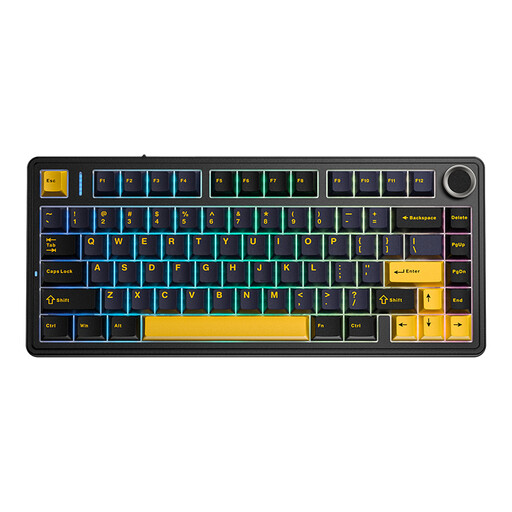
Why This Fits Their Persona: The 75% format keeps arrow and function keys while reducing its footprint, making it suitable for a first compact keyboard used for gaming, study and general desktop work.
Its specification lists wired USB, Bluetooth and 2.4GHz connectivity, so buyers are not restricted to a single connection method. The listing also clearly identifies the US QWERTY layout, allowing UK shoppers to check compatibility before ordering.
Five-layer internal padding, a 4,000mAh battery, RGB lighting, a control knob and full-key hot-swap sockets.

Why This Fits Their Persona: This compact wired model suits UK gamers who want magnetic-switch adjustment, dedicated arrow keys and a native UK ISO layout in a refined desktop setup.
The product information specifies UK ISO layout, adjustable 0.1–4.0mm actuation and 8,000Hz polling. These details help buyers judge the keyboard by measurable features rather than vague speed claims.
Hall Effect magnetic switches, Rapid Trigger, dual USB-C connectivity, five-layer dampening and double-shot PBT keycaps.

Why This Fits Their Persona: This wired 60% model is aimed at competitive PC players who value adjustable input behaviour, a minimal desk footprint and onboard profiles for moving between setups.
The specification separates optical analogue switches from Hall Effect designs and states the adjustable actuation range. Its onboard memory also means selected settings can be retained without relying solely on software.
Adjustable 0.1–4.0mm actuation, Rapid Trigger, six onboard profile slots, double-shot PBT keycaps and detachable USB-C cable.
We have compiled a complete, real-time list of products that fully satisfy these strict selection criteria and UK safety regulations.
It can be, particularly for users who prefer a small-footprint keyboard. However, the missing arrow, function and navigation keys may slow spreadsheet work or shortcut-heavy tasks. A 65% or 75% layout is generally easier for mixed gaming and office use.
Rapid Trigger changes how a key resets, allowing it to register a new input with less upward movement on compatible switches. It may help with repeated or directional inputs, but the benefit varies by game, settings and player technique. It does not replace a stable connection or suitable PC performance.
Many are suitable for everyday gaming, especially when using a dedicated 2.4GHz receiver. Wired mode remains a straightforward choice for tournaments or users who do not want to monitor battery levels. Always check the connection modes, charging method and included accessories before purchase.