
24/7 Customer Support

Free returns

Same-day & Next-day Delivery

Quality Guaranteed

Unlock Your Welcome Offers: FREE Delivery | Up to 80% OFF | Free 30-day JoyPlus trial
Download the APP
Navigating the world of gaming mechanical keyboards can feel overwhelming. With endless marketing terms and technical specifications, it's easy to overspend on features you don't need or, worse, end up with a keyboard that fails to deliver on its promises. As a PC gamer or tech enthusiast in the UK, you want a keyboard that enhances your experience, whether you're in a competitive match or typing up a report.
This guide cuts through the clutter. We'll highlight the common pitfalls that lead to buyer's remorse and break down the essential features that truly matter, helping you make a confident and practical choice.
Before diving into features, let's address the most frequent issues buyers face. Being aware of these can save you both money and frustration.
custom mechanical keyboard is used frequently, but not all are created equal. A key feature for customisation is having hot-swappable sockets, which allow you to change mechanical switches without soldering. Many keyboards are marketed as customisable but have soldered switches, locking you into the factory feel and making repairs difficult.wireless mechanical keyboard offers a clean, cable-free setup, but performance can vary dramatically. Relying on a high-latency Bluetooth connection for fast-paced gaming can lead to noticeable input lag. For a responsive experience, a keyboard with a dedicated 2.4GHz wireless dongle or a tri-mode option is far more suitable.To find a keyboard that will serve you well for years, focus on these core parameters. They determine the feel, sound and longevity of your device.
The physical layout of your keyboard, or its form factor, dictates its size and functionality. Choosing the right one depends on your desk space and how you use your keyboard.
compact gaming keyboard layout that keeps the function row and arrow keys but squashes them together. It's a great balance of function and form for most users.The typing experience is the heart of a mechanical keyboard. It's defined by a combination of three components.
How your keyboard connects to your devices is a crucial consideration, especially for multi-device users.
mechanical keyboard for Mac setup) and a tablet.Based on these practical criteria, here are a few keyboards that offer a solid combination of features for different types of users.
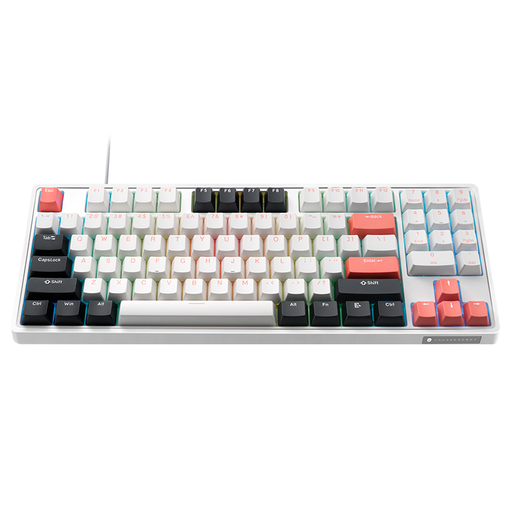
Why This Fits Their Persona: This keyboard is an excellent entry point for anyone new to the mechanical scene. It provides high-end features like hot-swappable switches and durable PBT keycaps in a practical, wired TKL format, all without the premium price tag. It's a no-nonsense board focused on core performance.
It directly counters the "customisation illusion" by offering genuine 3/5-pin hot-swap support, allowing users to experiment with different switches without needing to buy a new keyboard.
Features durable double-shot PBT keycaps that resist shine and wear. The compact 80% layout saves desk space while retaining essential keys.
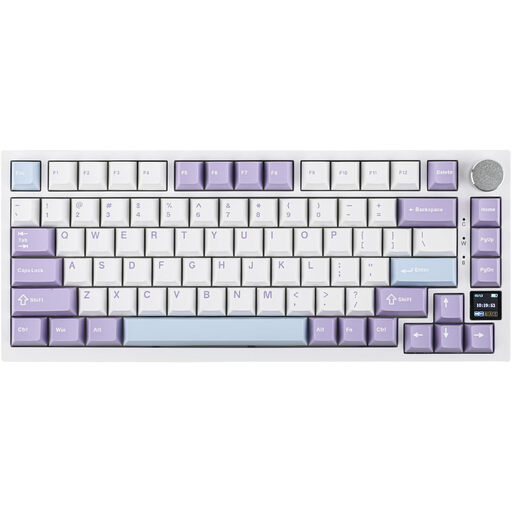
Why This Fits Their Persona: Perfect for the user who switches between a gaming PC and a work laptop (including Mac). The tri-mode connectivity, compact 75% layout and onboard TFT screen for status monitoring make it a powerhouse for productivity and play. The screen allows for quick switching between Windows and macOS layouts.
It solves the "connectivity compromise" by offering reliable 2.4GHz wireless for lag-free gaming and Bluetooth 5.1 for convenient multi-device pairing, backed by a large 4000mAh battery.
The interactive TFT screen provides at-a-glance info on battery, connection mode and OS. It also features a premium gasket-mount structure for a cushioned, quiet typing experience.

Why This Fits Their Persona: This keyboard is built for those who spend hours typing or gaming. The 96% layout retains a number pad in a compact form, while the five-layer sound-dampening structure and hot-swappable sockets cater to enthusiasts seeking a specific sound and feel. The huge 8000mAh battery ensures it can handle long wireless sessions with ease.
It avoids the "gaming tax" by focusing on substantive internal construction—like its multi-layer foam—rather than just external aesthetics, delivering a genuinely premium typing experience.
Features an exceptionally large 8000mAh battery for extended wireless use. The five-layer sound dampening system significantly reduces unwanted noise for a refined acoustic profile.
We have compiled a complete, real-time list of products that fully satisfy these strict selection criteria and UK safety regulations.
A quality mechanical keyboard is a long-term investment. The switches themselves are typically rated for 50 to 100 million keystrokes, which translates to many years of heavy use. The overall lifespan also depends on build quality. Keyboards with durable PBT keycaps will resist wear better than those with standard ABS caps. Furthermore, a hot swappable keyboard has a potentially indefinite lifespan, as you can simply replace a failing switch instead of the entire board.
While a gasket mount keyboard won't necessarily make you a better gamer in terms of raw performance, it can significantly improve comfort during long gaming sessions. The cushioned, flexible typing feel reduces finger fatigue and impact. Many gamers and typists prefer the deeper, quieter sound profile it produces. Ultimately, it's a matter of personal preference for feel and acoustics rather than a competitive necessity.
Not always. Many RGB mechanical keyboard models come with pre-programmed lighting effects and brightness controls that can be accessed via key combinations (e.g., Fn + arrow keys). This is often sufficient for users who want a bit of flair without complex setups. However, if you want to create custom per-key lighting schemes, synchronise colours with your games or program macros, you will need to install the manufacturer's companion software.