
24/7 Customer Support

Free returns

Same-day & Next-day Delivery

Quality Guaranteed

Unlock Your Welcome Offers: FREE Delivery | Up to 80% OFF | Free 30-day JoyPlus trial
Download the APP
Navigating the world of gaming mechanical keyboards can feel like a minefield of technical jargon and flashy marketing. Many UK gamers and professionals invest in a new keyboard expecting a leap in performance and comfort, only to be disappointed by laggy wireless connections or a typing feel that’s no better than their old office board. The problem often isn't the technology itself, but the misleading claims that obscure what truly matters.
As a Joybuy Product Recommendation Officer, my role is to help you sidestep these common purchasing pitfalls. This guide will break down the essential features to look for and help you identify a keyboard that genuinely matches your needs, whether for competitive gaming, marathon typing sessions or a clean, customisable desk setup.
Before we look at what makes a great keyboard, let's highlight the most common traps that catch out unwary buyers.
To make an informed choice, focus on these three fundamental aspects that determine performance, comfort and longevity.
How your keyboard connects to your PC is critical, especially for gaming.
The internal mounting style of a keyboard dramatically affects its typing feel and sound. Most standard keyboards use a "tray mount," where the main circuit board (PCB) is screwed directly into the case. This creates a stiff, rigid typing experience.
Enthusiasts, however, often prefer a gasket mount keyboard. In this design, the PCB and plate assembly is suspended between soft, porous gaskets, isolating it from the case. This results in:
Keyboard layouts are no longer one-size-fits-all. Choosing the right one can free up valuable desk space for mouse movement.
Instead of a generic list, we've matched specific keyboards to different user needs, ensuring you get the right features for your setup.

Why This Fits Their Persona: This keyboard is built for one purpose: speed. For UK players of Valorant, CS2 or Apex Legends, every millisecond counts. The magnetic switches with Rapid Trigger allow for instant key resets, giving a tangible advantage in movement and counter-strafing.
It sidesteps the "wireless latency lie" by being a wired-only board focused entirely on performance. Its features, like the 8000Hz polling rate and adjustable actuation are tangible performance upgrades, not just marketing fluff.
Rapid Trigger (RT) technology for instant key resets. The compact 65% layout frees up maximum desk space for large mouse movements.
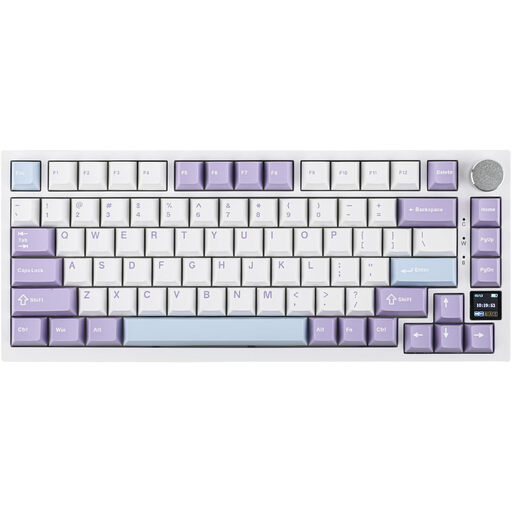
Why This Fits Their Persona: For the UK hobbyist who loves to tinker, this keyboard is a dream. It offers the core features of a high-end custom mechanical keyboard UK build—gasket mount, hot-swap sockets and sound-dampening foam—in a ready-to-use package. The TFT screen for GIFs and status info is a unique touch.
It avoids the "illusion of customisation" by offering true hot-swappable sockets compatible with both 3-pin and 5-pin switches. The gasket mount structure is a genuine construction upgrade, not just a marketing term.
Features a gasket-mounted structure for a premium typing feel and sound. The interactive TFT screen adds a layer of useful, customisable functionality.

Why This Fits Their Persona: Perfect for the user who splits their time between a work laptop and a gaming PC. The 96% layout retains the crucial number pad for productivity in a small footprint, while the tri-mode keyboard connectivity allows seamless switching between devices. The large 8000mAh battery means less time tethered to a cable.
This keyboard delivers on the promise of wireless freedom without compromise. It includes a high-performance 2.4GHz mode for lag-free gaming, avoiding the trap of relying on slower Bluetooth for everything.
Excellent versatility with its 96% layout and tri-mode connectivity. The 8000mAh battery provides substantial wireless usage time.
We have compiled a complete, real-time list of products that fully satisfy these strict selection criteria and UK safety regulations.
Yes, for several reasons. Mechanical switches actuate faster and more consistently than rubber dome (membrane) keys. They also support features like N-Key Rollover (NKRO), which ensures every single keypress is registered, even when multiple keys are pressed simultaneously. The ability to choose switches (linear, tactile or clicky) also allows you to tailor the keyboard's feel to your preference, which can improve comfort and performance.
While many of the keyboards featured are excellent for UK users, it's important to note they often use the standard ANSI (US) layout. The main physical differences are a smaller, rectangular 'Enter' key and a longer left 'Shift' key. The keycap legends also differ, with symbols like '@', '"', '#' and '?' in different positions. Your Windows or macOS setting can be set to 'UK' to type these symbols correctly, but the physical keycap will show the US legend. This is a common standard in the custom mechanical keyboard UK scene.
A quality mechanical keyboard is a long-term investment. The switches are typically rated for 50 to 100 million keystrokes, far outlasting the 5-10 million of a typical membrane keyboard. Models with durable PBT keycaps are also resistant to the shine and fading that plagues cheaper ABS plastic. A well-built mechanical keyboard can easily last for a decade or more.