
24/7 Customer Support

Free returns

Same-day & Next-day Delivery

Quality Guaranteed

Unlock Your Welcome Offers: FREE Delivery | Up to 80% OFF | Free 30-day JoyPlus trial
Download the APP
Navigating the market for a new gaming mechanical keyboard can feel like a competitive sport in itself. With endless marketing buzzwords and flashy designs, it's easy to end up with a keyboard that looks the part but fails to deliver where it counts. As a Product Recommendation Officer, my role is to help you sidestep the common purchasing traps and focus on the features that genuinely enhance your gaming and typing experience.
Many buyers find themselves disappointed after a few months, and it often comes down to a few recurring issues. Let's look at the most common pitfalls:
To make an informed choice, it's crucial to understand the technology behind the marketing. Here are the core parameters you should always check before adding a keyboard to your basket.
The switches beneath the keycaps define how your keyboard feels, sounds and performs. While traditional mechanical switches (often categorised by colour) are a great starting point, recent innovations offer significant advantages for gamers.
How the switch plate is mounted inside the keyboard's case has a massive impact on acoustics and comfort.
The right size and connection type depend entirely on your setup and needs.
Based on these critical factors, we've matched a few standout models to different user profiles to help you find your ideal fit.

Why This Fits Their Persona: This keyboard is built for one purpose: performance. Its 60% layout maximises desk space for wide mouse movements, a critical factor in competitive FPS games. The optical switches with adjustable actuation and Rapid Trigger provide a tangible speed advantage that serious players demand.
It sidesteps the "gaming tax" by delivering genuine, tournament-grade technology. The focus is on speed and precision through its advanced optical switches, not just aesthetics. The wired connection guarantees zero latency, avoiding the wireless pitfall entirely.
Adjustable Actuation (0.1–4.0 mm) & Rapid Trigger: Allows for unparalleled customisation of key sensitivity and responsiveness. Compact 60% Form Factor: Provides maximum room for mouse movement on your desk.
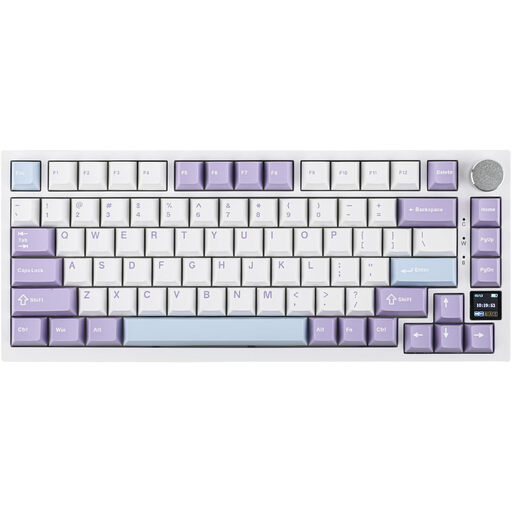
Why This Fits Their Persona: This keyboard is a tinkerer's dream. It combines a gasket-mounted structure for a premium typing feel with hot-swappable sockets, inviting users to experiment with different switches. The tri-mode connectivity and customisable TFT screen offer a high degree of personalisation for any setup.
It directly counters the "hollow echo chamber" with its gasket mount and multi-layer sound-dampening foam, delivering a satisfyingly deep sound profile. The hot-swap feature provides genuine customisation, moving far beyond the superficial "gaming" aesthetic.
Gasket Mount & Sound Dampening: Provides a cushioned, quiet and premium typing experience. Tri-Mode Connectivity & TFT Screen: Offers ultimate versatility with 2.4GHz, Bluetooth and wired options, plus at-a-glance status info and GIF support.

Why This Fits Their Persona: This model strikes an excellent balance between gaming performance, typing comfort and everyday usability. The 75% layout is compact but functional, while the tri-mode connectivity makes it perfect for a multi-device setup. It packs premium features into a package that is accessible to a wider audience.
It avoids the "wireless latency myth" by including a reliable 2.4GHz connection for gaming, and the "hollow echo" trap by incorporating a five-layer padded gasket structure. This provides a high-quality feel and sound without the exclusive price tag.
Five-Layer Padding & Gasket Structure: Delivers a creamy, satisfying sound and comfortable typing feel. Full-Key Hot-Swap & Media Knob: Offers great customisation potential and convenient on-the-fly volume control.
We have compiled a complete, real-time list of products that fully satisfy these strict selection criteria and UK safety regulations.
Yes, absolutely. A hot-swappable keyboard provides an excellent entry point into customisation without requiring technical skills like soldering. It allows you to easily try different switch types (e.g., linear for smooth gaming, tactile for typing) as your preferences evolve, extending the life and versatility of your initial investment.
For gaming, 2.4GHz wireless is the preferred choice. It uses a dedicated USB dongle to create a direct, low-latency connection to your PC, offering performance that is virtually indistinguishable from a wired keyboard. Bluetooth is more versatile for connecting to various devices like tablets and laptops and consumes less power, but it generally has higher latency, which can be noticeable in fast-paced games.
Most standard mechanical switches are rated for 50 million keystrokes or more, while optical and magnetic switches often carry ratings of up to 100 million. For the average user, this translates to many years of reliable service, making a quality mechanical keyboard a durable, long-term purchase.