
24/7 Customer Support

Free returns

Same-day & Next-day Delivery

Quality Guaranteed

Unlock Your Welcome Offers: FREE Delivery | Up to 80% OFF | Free 30-day JoyPlus trial
Download the APP
A gaming keyboard can improve desk space, comfort and control, but product listings often make similar models look interchangeable. The important differences are usually hidden in the specification panel: some compact keyboards remove navigation keys, some “mechanical feeling” models use membrane technology, and wireless features may vary considerably between Bluetooth and 2.4GHz connections.
For UK buyers, the practical choice depends on how you play, whether you also work or study at the same desk, and how much customisation you genuinely need. Use this guide to compare gaming mechanical keyboards without paying for features that do not suit your setup.
Terms such as “mechanical feeling” or “imitation mechanical” describe the key response rather than the internal switch technology. A membrane keyboard may feel more defined than a basic office keyboard, but it does not offer the same switch construction or customisation as a true mechanical model.
Check whether the listing clearly states mechanical switches, magnetic switches or membrane technology. This distinction affects feel, maintenance and whether replacement switches are possible.
A 60% mechanical keyboard typically removes the dedicated function row, arrow keys and navigation cluster. These functions may still be available through Fn shortcuts, but this can be inconvenient for spreadsheets, coding, creative software or everyday office work.
A 65% gaming keyboard usually retains arrow keys while remaining compact. A 75% mechanical keyboard commonly adds the function row, making it a useful compromise for gaming and productivity. If you frequently use a number pad, a full-size mechanical keyboard remains the more practical format.
An 8,000Hz polling rate means the keyboard can report input at a higher frequency than a 1,000Hz model, but the difference may not be noticeable in every game or system. It also does not replace a suitable switch, stable software or a reliable connection.
Similarly, RGB lighting changes appearance rather than automatically improving gameplay. Prioritise layout, switch behaviour, key rollover and connection stability before lighting effects.
Traditional linear, tactile and clicky switches offer different key sensations:
A Hall Effect keyboard uses magnetic sensing rather than conventional mechanical contacts. Selected models allow adjustable actuation, while a rapid trigger keyboard can reset a key based on movement rather than requiring it to return to a fixed position. These features may appeal to competitive FPS players, but they are less important for casual gaming, general typing or study.
Measure the available desk width and consider mouse movement. Compact formats leave more room for a low-sensitivity mouse setup, while larger keyboards provide dedicated controls.
Common formats include:
Also check whether the product uses a QWERTY US layout keyboard. US and UK layouts differ in punctuation, the position of some symbols and the shape of the Enter key. A US layout can still work in the UK, but your operating system must be configured correctly for accurate symbol input.
A wired USB connection provides consistent power without charging. For a wireless gaming keyboard, distinguish between:
A tri-mode keyboard supports all three. Check the stated battery capacity and whether the figure applies with RGB switched on or off. If you want to change switches without soldering, look for a hot-swappable keyboard with compatible sockets. A detachable USB-C cable can also make storage and transport easier.
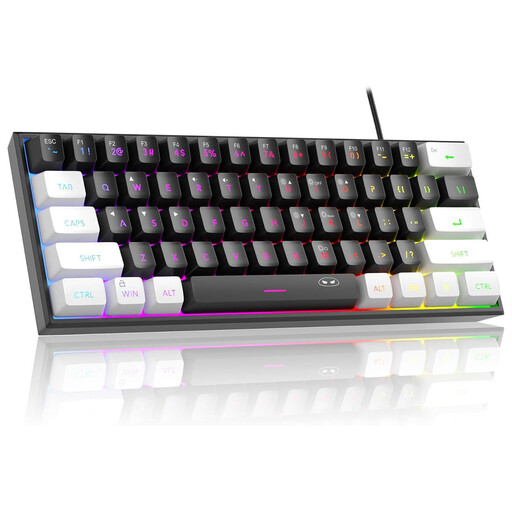
Why This Fits Their Persona: A small, wired option for first-time buyers, students and UK desk setups where space is limited. It works with PC, Mac, PS4 and Xbox One according to the listing.
The listing identifies it as membrane technology with mechanical feel, so buyers can set realistic expectations rather than assuming it contains mechanical switches.
61-key 60% format, adjustable RGB modes and an IPX4-rated circuit board. The USB connection itself is not waterproof.

Why This Fits Their Persona: Suitable for enthusiasts who want a neat desk, wireless flexibility and a more customisable typing experience for gaming and home working.
Its 75% layout retains the function row and arrow keys, while the three connection modes reduce dependence on a single wireless method.
4000mAh battery, Bluetooth/2.4GHz/wired connectivity, full-key hot-swap sockets, RGB lighting and double-shot PBT keycaps.

Why This Fits Their Persona: Designed for players who specifically want adjustable magnetic switches and rapid trigger functionality in a compact wired format.
The listing specifies Hall Effect magnetic switches, adjustable actuation and rapid trigger rather than using vague performance wording.
68-key layout, 8,000Hz polling rate, RGB backlighting and a stated 0.01mm adjustable actuation specification.
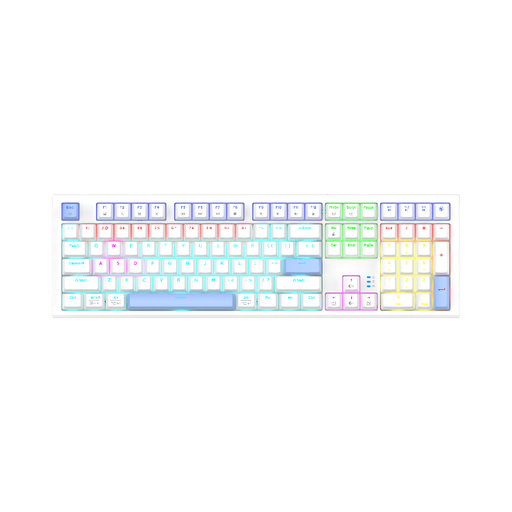
Why This Fits Their Persona: A practical choice for users who combine gaming with spreadsheets, accounting, study or frequent number entry at a fixed desk.
The 104-key format avoids the missing-key problem found on compact models and uses a wired USB-A connection without battery charging.
Full-size QWERTY US layout, wired USB-A connection, RGB lighting and a stated clicky mechanical typing feel.
We have compiled a complete, real-time list of products that fully satisfy these strict selection criteria and UK safety regulations.
A 2.4GHz wireless gaming keyboard can provide a direct connection through its receiver, while Bluetooth is generally more suited to laptops and everyday use. For the most predictable setup, choose a model that also supports wired USB operation.
Lifespan depends on switch construction, usage, cleaning and accidental liquid exposure. Mechanical models may allow switch or keycap replacement, particularly when they use hot-swap sockets. Keep drinks away from the USB port and follow the manufacturer’s cleaning instructions.
Wired keyboards draw a small amount of power from the computer. Wireless models use more battery when RGB brightness is high, so advertised battery figures should always be checked against the stated lighting conditions. Turning down brightness or disabling RGB can extend time between charges.