
24/7 Customer Support

Free returns

Same-day & Next-day Delivery

Quality Guaranteed

Unlock Your Welcome Offers: FREE Delivery | Up to 80% OFF | Free 30-day JoyPlus trial
Download the APP
A new keyboard can transform a gaming desk, but product pages often place attention on headline figures rather than everyday usability. For UK buyers, the important question is not simply whether a model advertises rapid triggering, RGB lighting or wireless connectivity. It is whether the keyboard suits your games, desk, typing habits, operating system and preferred layout.
Before choosing from the available gaming mechanical keyboards, watch for three common purchasing pitfalls.
An 8000Hz polling rate means the keyboard can report input at a higher frequency than a 1000Hz model, with a listed reporting interval of 0.125 milliseconds. However, this figure does not automatically make every keystroke feel faster. Your computer, game settings, USB connection and software configuration also affect the overall experience.
For most players, a stable connection and reliable key registration matter more than selecting the largest number on a product page.
A 60% gaming keyboard saves desk space but normally removes the function row, arrow keys and navigation cluster. A 65% mechanical keyboard usually restores dedicated arrow keys, while a 75% mechanical keyboard commonly includes the function row in a compact arrangement.
These layouts can provide more room for a mouse, particularly in FPS games, but they may require function shortcuts for everyday work. Programmers, office professionals and content creators should check the exact key arrangement before ordering.
A wireless mechanical keyboard may connect through Bluetooth, 2.4GHz wireless or both. Bluetooth is useful for tablets and general productivity, while 2.4GHz is commonly selected for lower-latency desktop use. Wired USB remains the simplest option for consistent performance and avoids battery charging.
Also check whether a model includes a receiver, supports simultaneous device pairing and allows wired use while charging. Battery capacity alone does not confirm runtime, especially when RGB lighting is enabled.
Traditional mechanical keyboards use physical switches with a fixed actuation point. Linear switches offer a smooth press, tactile switches provide a noticeable bump and clicky switches produce an audible click that may be unsuitable for shared rooms or open-plan offices.
A magnetic switch keyboard, also called a Hall Effect keyboard, detects changes in magnetic position rather than relying solely on a physical contact point. Many models allow adjustable actuation, such as 0.2mm to 4.0mm. Shorter settings may feel quicker but can also increase accidental presses if set too sensitively.
A rapid trigger keyboard resets a key as soon as it moves upwards by a configured amount. This can be useful for repeated taps and directional changes in games, but it is not essential for casual gaming. Look for software support, adjustable settings and a clear explanation of whether the function works on every key.
For UK residents, a UK layout keyboard normally uses British key positioning, including a different Enter key shape and symbol arrangement from a US layout keyboard. A German QWERTZ layout changes the position of Y and Z and may not match your familiar typing pattern.
If you regularly use spreadsheets, a full-size model with a number pad may be preferable. If your desk is narrow, consider a 65%, 75% or 96% layout. Check product photographs carefully because product titles can contain multiple layout descriptions.
A hot-swappable keyboard allows compatible switches to be replaced without soldering. Confirm whether the sockets support 3-pin, 5-pin or a stated switch standard before buying replacements. Hot-swap support is valuable for enthusiasts, but it does not mean every switch is universally compatible.
Useful construction details include an aluminium top plate, PBT keycaps, stabiliser design and internal sound-dampening layers. RGB mechanical keyboard lighting is mainly an aesthetic feature; it can also affect battery life on wireless models. Detachable USB-C cables make storage and transport easier, while onboard memory can preserve profiles when moving between computers.
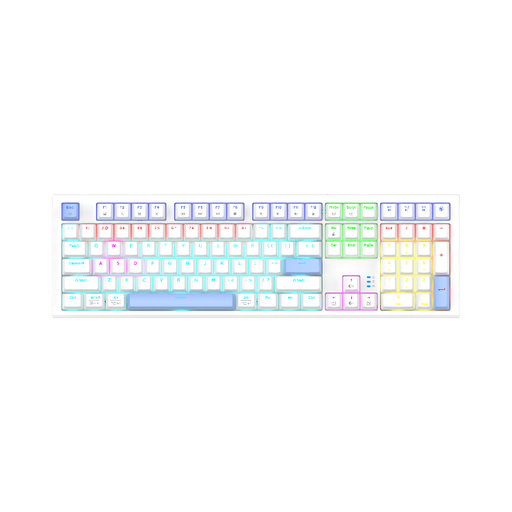
Why This Fits Their Persona: A straightforward choice for first-time mechanical keyboard buyers who want a full-size US QWERTY board for gaming and general desktop use.
Its wired USB-A connection avoids battery management, while the full-size format makes the available keys clear rather than hiding functions behind shortcuts.
104-key layout, RGB backlighting, wired USB-A connection and stated clicky mechanical switches.

Why This Fits Their Persona: Suitable for users who want a compact desk footprint without giving up arrow keys and a function row, with flexibility for both work and gaming.
The 75% arrangement balances desk space and accessibility, while tri-mode connectivity provides wired, Bluetooth and 2.4GHz options.
4000mAh battery, full-key hot-swap sockets, PBT keycaps, gasket structure and a media control knob.

Why This Fits Their Persona: A compact wired option for FPS players who prioritise adjustable magnetic input and a smaller footprint for wide mouse movements.
It states the use of Hall Effect magnetic switches, adjustable actuation and Rapid Trigger rather than relying only on an unspecified “gaming” label.
68-key compact layout, 0.01mm adjustable actuation listed, Rapid Trigger, 8K polling and RGB lighting.

Why This Fits Their Persona: A portable option for users moving between a Windows PC, Mac, tablet or phone who want a compact board with a distinctive appearance.
It offers Bluetooth 5.1 and USB-C wired modes, so users can select portability or a direct connection instead of depending on one wireless method.
68-key layout, 2000mAh battery, white LED effects, USB-C connectivity and compatibility with Windows, macOS, iOS and Android.
We have compiled a complete, real-time list of products that fully satisfy these strict selection criteria and UK safety regulations.
Yes, provided the switch and layout suit both environments. Linear switches are often quieter than clicky types, while gasket-mounted boards with sound-dampening layers may reduce resonance. If colleagues or family members are nearby, check the manufacturer’s switch description and consider using a wired or Bluetooth mode for work.
Lifespan depends on switch construction, keycap material, cleaning and usage. Mechanical switches are commonly specified by keystroke ratings, but the rating is not a guarantee of the complete keyboard’s service life. Keep liquids away, use a soft dry cloth for cleaning and avoid forcing keycaps or switches during removal.
Potentially. A keyboard reporting at 8000Hz sends input updates more frequently than one operating at 1000Hz, which may create additional USB and processor activity. Most users should confirm that their computer and chosen software support the selected rate. If stability is more important than maximum reporting frequency, a lower setting may be practical.