
24/7 Customer Support

Free returns

Same-day & Next-day Delivery

Quality Guaranteed

Unlock Your Welcome Offers: FREE Delivery | Up to 80% OFF | Free 30-day JoyPlus trial
Download the APP
Choosing among gaming mechanical keyboards is not simply a matter of picking the brightest RGB lighting or the highest polling-rate figure. UK buyers also need to consider layout, desk space, switch feel, software support, connectivity and whether the keyboard is practical for everyday typing.
Several marketing traps can make an attractive keyboard frustrating after purchase. A compact model may save space but remove arrow keys. A wireless mechanical keyboard may offer flexibility but require regular charging. Meanwhile, a rapid trigger keyboard can provide extensive adjustment controls that are useful mainly to competitive players rather than every gamer.
This guide explains the specifications that matter and matches different use cases with suitable options available through Joybuy.
A 60% gaming keyboard usually removes the dedicated function row, arrow keys and navigation cluster. Layers and shortcuts can replace them, but this may slow down spreadsheet work, editing or general office tasks.
A 65% gaming keyboard generally retains arrow keys while keeping a compact footprint. A 75% mechanical keyboard usually adds a function row and offers a more familiar arrangement, although some models still use compact spacing.
Full-size keyboards provide a number pad, but they take more room and may reduce space for low-sensitivity mouse movements. Check the key count and layout illustration rather than relying only on labels such as “compact” or “pro”.
Polling rate measures how frequently the keyboard reports input to the computer. Some current models specify 8000Hz, but the practical difference depends on the computer, game, display refresh rate and software configuration.
Magnetic switch keyboards and optical analogue models can offer adjustable actuation and rapid trigger functions. These allow the key to reset with a shorter upward movement, which may suit fast repeated inputs. However, very sensitive settings can also increase accidental presses. Buyers should treat these controls as customisation features, not guaranteed improvements.
A mechanical keyboard with UK layout uses ISO positioning, including a different-shaped Enter key and dedicated £ key. A mechanical keyboard with US layout normally uses ANSI positioning and may place symbols differently.
If you regularly switch between a laptop and desktop, selecting the wrong layout can cause typing errors. Check the product title, keycap legends and operating-system settings before ordering. A US keyboard can still work in the UK, but its physical key arrangement will not match a UK ISO board.
Traditional mechanical switches use physical contacts and are commonly available in linear, tactile or clicky versions. Linear switches are smooth, tactile switches provide a bump and clicky switches produce an audible click. Sound can travel through a desk or shared accommodation, so consider your room and household before choosing.
A hot-swappable keyboard allows compatible switches to be replaced without soldering. Confirm whether the sockets support the switch type you plan to use, as not every socket accepts every pin arrangement.
Hall Effect keyboards use magnetic sensing rather than conventional metal contact points. Their adjustable actuation can be useful for competitive games, while a standard mechanical board may be more straightforward for mixed gaming and typing.
Measure the available width and check whether you need a number pad, dedicated function keys or arrow keys. A 60% board is useful for travel and large mouse movements, while a 65% board adds navigation keys without a major increase in size. A 75% board is often a practical compromise for study, work and gaming.
Also check keyboard height, wrist position and cable routing. A compact board is not automatically more comfortable if it forces your hands into an awkward angle.
Wired USB keyboards provide consistent power without battery management. Tri-mode keyboards typically combine USB, Bluetooth and 2.4GHz wireless, allowing one board to move between a gaming PC, laptop or tablet.
For wireless models, check the battery capacity and whether lighting reduces operating time. RGB lighting is primarily an aesthetic feature; per-key effects may consume more power than a plain backlight. Rechargeable products should be kept away from moisture, excessive heat and open flames, following the supplied safety instructions.
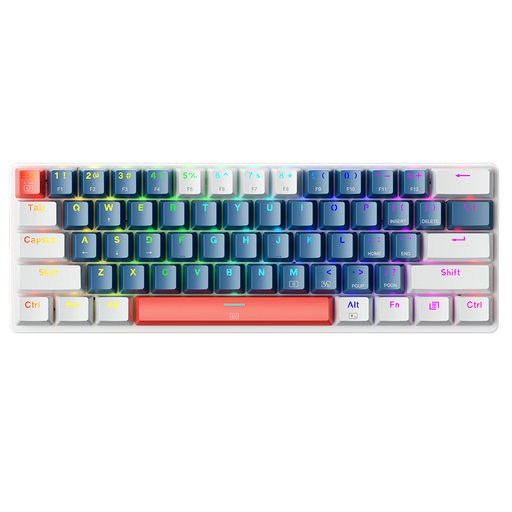
Why This Fits Their Persona: A wired 60% board suits students, first-time buyers and PC gamers who want a small footprint without paying for wireless hardware.
The wired connection avoids battery upkeep, while the 60% format is clearly identified so buyers can plan for missing dedicated navigation keys.
60% layout, US QWERTY arrangement and brown mechanical switches with RGB lighting.

Why This Fits Their Persona: Competitive UK players and enthusiasts get a compact ISO board with adjustable controls and a dual-USB-C wired design.
Its product information specifies a UK ISO layout, 65% form factor and adjustable 0.1–4.0mm actuation range.
ROG HFX magnetic switches, Rapid Trigger support, 8000Hz polling rate and five-layer dampening.

Why This Fits Their Persona: FPS players who use titles such as Valorant, CS2 or Apex Legends may value adjustable actuation and rapid trigger controls in a compact 68-key board.
The adjustable 0.2–4.0mm range lets users choose a less sensitive setting instead of accepting one fixed actuation point.
Linear Hall Effect magnetic switches, 8000Hz polling specification, RGB lighting and detachable Type-C cable.

Why This Fits Their Persona: Streamers, home-office users and gamers who move between a PC and other devices may prefer a 75% tri-mode keyboard.
It combines wired, Bluetooth and 2.4GHz modes, so users can select a cable connection for gaming and wireless for flexible everyday use.
4000mAh battery, full-key hot-swappable sockets, RGB backlighting, PBT keycaps and a media control knob.
We have compiled a complete, real-time list of products that fully satisfy these strict selection criteria and UK safety regulations.
Yes, but switch choice matters. Linear switches are often quieter than clicky switches, while sound-dampening materials can reduce resonance. A 75% or full-size layout may also be more convenient if you use function keys or a number pad regularly.
A 2.4GHz wireless connection can be suitable for gaming, but check the specified connection modes and use wired USB when you want to avoid battery management. Bluetooth is generally more useful for general typing and multi-device convenience than latency-sensitive play.