
24/7 Customer Support

Free returns

Same-day & Next-day Delivery

Quality Guaranteed

Unlock Your Welcome Offers: FREE Delivery | Up to 80% OFF | Free 30-day JoyPlus trial
Download the APP
A mechanical keyboard can transform a gaming desk, but choosing one by appearance alone can lead to costly compromises. RGB lighting, “ultra-fast” switches and compact designs often dominate product listings, while practical details such as layout, connectivity and software support receive less attention.
For UK buyers, three common pitfalls are worth checking before you order:
Keyboard percentages describe how many standard keys remain compared with a full-size model.
Always confirm the key count and regional layout. A product described as compatible with Windows or Mac may still have US legends, and switching between UK and US keyboard settings can affect symbols such as quotation marks, the @ symbol and the £ sign.
Traditional mechanical switches are commonly described as linear, tactile or clicky. Linear red switches provide a smooth keypress, tactile switches offer a noticeable bump, and clicky blue switches produce an audible sound that may be unsuitable for shared rooms or streaming microphones.
A hot-swappable keyboard lets you replace compatible switches without soldering. Check whether it accepts 3-pin, 5-pin or both switch types before buying replacement parts.
Competitive players may consider a rapid trigger keyboard, Hall Effect keyboard or optical mechanical keyboard. These technologies can support adjustable actuation and rapid key reset, but the advertised measurement range is only useful if the software or onboard controls allow you to configure it reliably. Optical switches and magnetic switches use different sensing methods, so compare the available adjustment range, profiles and compatibility rather than treating one technology as automatically superior.
A wired gaming keyboard provides a direct USB connection and avoids battery management. It can be a sensible choice for tournament desks or fixed PC setups. A wireless model is more flexible for laptops, tablets and tidy workspaces, particularly when it offers tri-mode Bluetooth, 2.4 GHz and USB connectivity.
For long-term value, look for:
RGB is mainly a personalisation feature. An RGB mechanical keyboard can improve visibility and desk presentation, but lighting does not determine switch quality, durability or input accuracy.
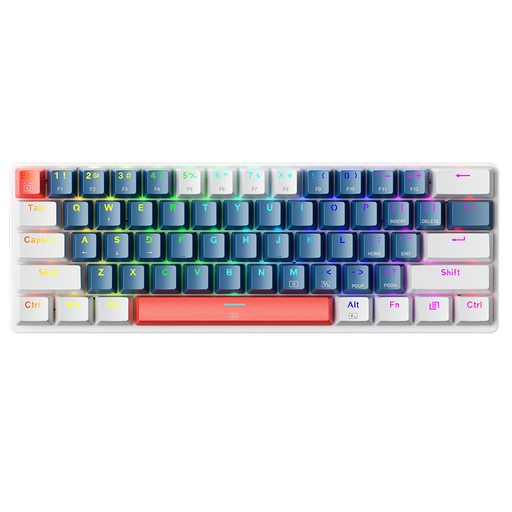
Why This Fits Their Persona: A compact wired option for someone starting with mechanical keyboards and wanting RGB lighting without adding wireless charging to the setup. Its US QWERTY layout should be checked before purchase.
The wired USB-C connection avoids battery management, while the 60% format makes the reduced key selection clear before ordering.
Wired USB-C connection, RGB backlighting and hot-swappable blue mechanical switches.

Why This Fits Their Persona: Designed for PC players who prioritise adjustable actuation, Rapid Trigger controls and onboard profiles over a full set of dedicated keys.
Its listed 0.1–4.0 mm adjustable actuation range and onboard memory provide specific controls rather than relying only on speed-focused wording.
Optical analogue switches, detachable USB-C cable, six onboard profile slots and per-key RGB lighting.

Why This Fits Their Persona: A wired choice for competitive users interested in magnetic switches, Rapid Trigger mode and a high polling-rate specification.
The product listing identifies magnetic switches, adjustable actuation and Rapid Trigger mode, allowing buyers to compare actual functions rather than vague responsiveness claims.
Hot-swappable magnetic switches, RGB lighting and an advertised 8,000 Hz polling rate.

Why This Fits Their Persona: A practical fit for streamers, programmers and office workers who want dedicated arrow and function keys alongside gaming connectivity.
The 75% layout avoids the missing-key issue associated with smaller boards, while tri-mode connectivity provides a wired fallback when the battery needs charging.
Bluetooth, 2.4 GHz and wired modes, a 4,000 mAh battery, full-key hot-swap sockets and a volume knob.
We have compiled a complete, real-time list of products that fully satisfy these strict selection criteria and UK safety regulations.
Yes, they generally work with Windows, macOS and other compatible systems. However, confirm whether the board has a UK ISO or US ANSI layout and select the matching keyboard language in your operating system. A US QWERTY model can function normally on a UK PC, but several key legends and symbol positions differ.
They can be, particularly when using a dedicated 2.4 GHz receiver or wired mode. Bluetooth is convenient for tablets and general work but may not offer the same connection characteristics as a direct cable or gaming receiver. Check the manufacturer’s stated modes and use wired connectivity if consistency is your priority.
Lifespan depends on the switch design, build quality, usage and maintenance. Some listings specify figures such as 50 million or 100 million keystrokes, but this is a component rating rather than a guarantee that every part will remain perfect for that period. Keeping the board dry, cleaning it with appropriate tools and replacing compatible switches can help extend its practical service life.