Fast-aim arena competitors
If matches involve repeated swipes, tracking and quick target changes, you may prefer low mouse mass, a straightforward button layout and a gaming-oriented wireless connection.


Start with a shape and control layout you can use consistently in online arena matches. A lightweight symmetrical or compact wireless mouse suits players focused on frequent swipes, while a right-handed asymmetrical shape offers a different fit. Choose a button-heavy layout when you will regularly use several thumb-accessible commands; its controls take more setup than a simpler esports layout.
If matches involve repeated swipes, tracking and quick target changes, you may prefer low mouse mass, a straightforward button layout and a gaming-oriented wireless connection.
If a standard shell feels unwieldy, a compact shape may suit your hand size or grip. Right-handed players who prefer an asymmetrical shell have a separate fit option; neither shape suits every hand.
If you repeatedly use abilities or pings, thumb-accessible controls may be worth configuring. Check that you can reach the buttons reliably rather than choosing by button count alone.
For online arena matches, settle the shell shape and the commands you need on the mouse before comparing polling options and wireless runtime.
| Concern | What to check | Who this matters to |
|---|---|---|
| Low mass and aim control | Compare the stated weight of the exact variant and whether its control layout leaves enough buttons for your commands. | When I make frequent swipes and lifts, I want a mouse that feels manageable without sacrificing the controls I use. Around 36% of consumers put aim-focused control first. |
| Hand fit | Compare compact, symmetrical and right-handed asymmetrical shapes against your hand size and grip. | For a long match, I need a shell I can hold and control comfortably; a smaller or handed shape might make the difference. Hand fit comes first for around 29% of consumers. |
| Ability access | Count the commands you would actually map to reachable side buttons, and check the game's rules before using macros. | If I trigger several abilities or pings repeatedly, I want those commands within reliable thumb reach. Roughly 21% of consumers prioritise ability access. |
| Wireless setup and runtime | Check the receiver and charging arrangements, plus the settings under which a battery figure applies. | When I play regularly without a cable, I want to know which connection to use and how often I may need to charge. For around 14% of consumers, wireless setup and runtime are the primary concern. |
A higher polling option does not fix an awkward shell or a shortage of usable buttons. Razer presents the potential benefit of higher polling in the context of a high-refresh-rate monitor.
Choose the shape and layout first, then check the polling mode and the receiver required by the exact model.
Logitech G states that the PRO X SUPERLIGHT 2c SE needs a separately sold receiver for its quoted up-to-8-kHz option.
Extra controls are useful only if your recurring commands can be assigned and reached reliably. A crowded side layout may add configuration work you do not need for aim-focused play.
List the abilities and pings you would place under your thumb. If you use only a couple of side bindings, compare simpler layouts too.
Corsair describes Bluetooth as suited to everyday computing tasks and distinguishes its receiver-based 2.4 GHz connection for gaming.
For a Corsair SCIMITAR wireless model, check the included receiver and use the gaming-oriented connection for arena matches when your setup supports it.
Razer positions the Viper V3 Pro as an ultralight wireless esports mouse. Its UK specifications list 54 g, eight programmable controls and up to 95 hours of battery life.
Logitech G offers distinct shapes in its PRO X SUPERLIGHT 2 family: the standard 60 g model, the compact 53 g 2c SE and the right-handed asymmetrical 60 g DEX.
Corsair's SCIMITAR ELITE WIRELESS SE is a control-heavy option with 16 customisable buttons and an adjustable 12-button side panel.
SteelSeries lists the Aerox 5 Wireless at 66 g with nine programmable buttons, including a five-button side panel.
These mice cover lightweight wireless play and options for mapping more arena-game commands. Compare each shell and its usable controls against your own grip and bindings; a product's presence here does not settle which design suits you.
 No image available
Consider its simpler layout for frequent swipes when you do not need a large thumb-button grid.
Razer specifies a 54 g design, eight programmable controls and up to 95 hours of battery life for the Viper V3 Pro. Treat the listed 8 kHz polling option as a setup-dependent consideration rather than a substitute for fit.
 No image available
Consider this model if low mouse mass and a charging base matter more to you than a large thumb-button layout.
The product title states 56 g, a PAW3950 sensor, 8 kHz polling and 2.4 GHz or wired operation. Confirm the connection modes for this exact variant before buying, as its connectivity descriptions differ.
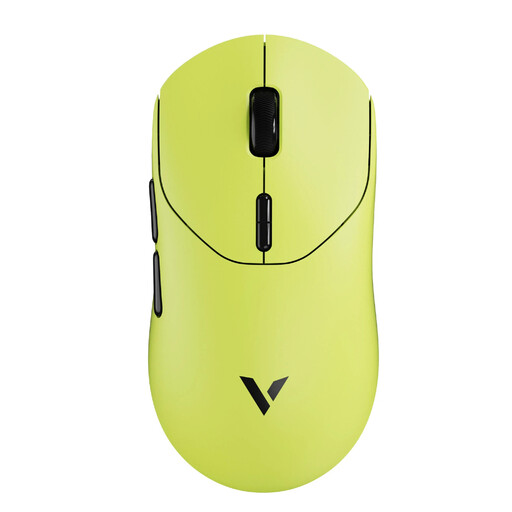 No image available
Consider it if you want to map several arena-game commands while keeping the stated mouse weight low.
The product title lists 53 g, 10 programmable buttons and an 8 kHz wireless polling option. Check whether its shell fits your grip. Its quoted battery figure applies at 1,000 Hz and requires a driver update for low-power mode.
 No image available
Consider its wireless, aim-focused route if extra ability bindings are not your main reason for choosing a mouse.
The title identifies the 8K-Blue 3395 variant. If you need mouse-button remapping, check the controls and configuration options for this exact model before buying.
 No image available
Consider this model if reaching several mapped commands matters more to you than choosing solely by low mouse mass.
Check the side-button positions against the commands you use, and confirm the mouse-only weight before choosing it for frequent swipes. If your computer does not run Windows 10 or Windows 11, check compatibility with your setup.
Choose a shell and button layout you can use consistently before prioritising polling rate. Razer describes higher polling as particularly relevant alongside a high-refresh-rate monitor, but it cannot resolve poor hand fit or provide missing ability bindings.
Plan the commands you will use, configure their button assignments and check which profiles you can save. For a compatible SCIMITAR wireless model, Corsair distinguishes receiver-based 2.4 GHz gaming use from Bluetooth, which it describes as suited to everyday computing.
For a UK distance sale, GOV.UK says you can normally tell the trader you are cancelling within 14 days of receiving the item, then have another 14 days to return it. Check the seller's process and assess fit promptly: handling comparable to checking a mouse in a shop differs from extended use, for which a deduction may apply. Rights concerning faulty or misdescribed goods are separate from a change-of-mind cancellation.
Check your local authority's electrical-waste collection instructions or a retailer's current take-back arrangements. GOV.UK identifies the Waste Electrical and Electronic Equipment Regulations 2013, as amended, as the UK framework for electrical-waste obligations; the collection route to use depends on the services available to you.