Choose a dense 12-button side panel if you have many game actions you will bind and use regularly. If map navigation and everyday PC tasks matter more, consider several programmable controls with flexible scrolling; if you prefer a lighter conventional mouse, weigh that against having fewer thumb-accessible commands. In a bright room, prioritise grip, buttons you can distinguish by feel and how the mouse works on your desk surface rather than assuming RGB lighting or a particular sensor will solve a problem.
Who these mice suit
Players with many planned shortcuts
If you repeatedly use game actions or interface shortcuts, a dense side-button layout is worth considering when you are willing to learn and reuse its bindings. If only a few actions belong on the mouse, extra buttons may add little value.
Map-navigation and mixed-use players
If you spend time moving through large maps or menus and also use the mouse for everyday PC tasks, scroll-wheel behaviour and a manageable set of controls may matter more than the largest possible thumb grid.
Players at brightly lit desks
If strong room lighting makes decorative illumination less important to you, focus on a comfortable grip and controls you can identify by touch. Check how the mouse behaves on the surface you intend to use rather than assuming lighting or sensor specifications settle the choice.
What matters when choosing
For colony-management play at a bright desk, start with the actions you want to assign to the mouse, then consider scrolling and grip. These needs describe what may take priority for consumers choosing for this setting; they do not make one layout right for everyone.
| Concern |
What to check |
Who this matters to |
| Reachable shortcuts |
List the actions you will bind, then check button reach and remapping options. |
If I use many repeated commands, I want them within thumb reach without pressing the wrong button. Around 40% of consumers put reachable shortcuts first. |
| Scrolling and handling |
Compare notched and free-spin scrolling, and assess the grip and wheel controls for long sessions. |
When I move through maps and menus for long stretches, I need scrolling that feels controllable without giving up a comfortable hold. Around 30% of consumers make navigation and handling their main concern. |
| Bright-desk usability |
Check button recognition by feel, grip, cable or receiver placement, and tracking on your intended surface. |
At a brightly lit desk, I care more about finding the controls and using the mouse comfortably than seeing its lighting. For around 30% of consumers, practical desk comfort comes first. |
Buying pitfalls
-
Choosing the largest button grid without a binding plan
A 12-button side panel offers room for more commands, but closely spaced buttons take practice to distinguish and may be unnecessary if you use only a few shortcuts.
Write down the actions you intend to assign. Consider a dense panel if you can comfortably reach its buttons and expect to use those bindings regularly.
-
Expecting RGB to solve bright-room usability
Configurable lighting does not establish that the controls will be easier to see or use under your room lighting.
Treat lighting as a visual preference. Give more weight to grip, button placement and the mouse surface you will actually use.
-
Overlooking wireless setup
A wireless mouse needs charging, and connection modes can serve different purposes. CORSAIR describes 2.4 GHz use for gaming on its SCIMITAR ELITE WIRELESS SE, while describing Bluetooth for everyday computing.
Check where the receiver will sit, plan charging and confirm which connection mode you intend to use for gaming.
-
Putting a replaced mouse in household rubbish
GOV.UK advises that unwanted electrical products and batteries should not go in household rubbish.
Use an appropriate electrical-waste collection point or check the available retailer take-back arrangements when replacing a mouse.
Relevant brands to consider
CORSAIR
The SCIMITAR ELITE WIRELESS SE is relevant if your main requirement is a dense, adjustable side-button layout.
- CORSAIR states that this model has 16 programmable buttons and a repositionable 12-button side panel; iCUE supports button remapping.
- The grid takes a binding plan and practice to use well, while wireless use requires charging.
Razer
The Basilisk V3 is an option for players who want several controls and flexible scrolling without a 12-button thumb grid.
- Razer specifies 10+1 programmable buttons and tactile, free-spin and automatic scroll switching on the Basilisk V3.
- Its configurable RGB is a visual feature, not an established bright-room gameplay benefit.
Logitech G
The wired G502 X is relevant if you prefer a conventional control layout and want to consider mouse weight alongside scrolling.
- Logitech G states a weight of 89 g for the wired G502 X and describes a reversible, removable DPI-shift button and free-spin, ratcheted and tilt-wheel controls.
- It does not provide a dedicated 12-button thumb panel, and its cable needs a suitable place on the desk.
Joybuy mouse options
These gaming mice offer different ways to approach a colony-game setup, including models whose titles specify multiple programmable buttons and options with wired or wireless connections. Check each model’s control layout against the shortcuts you plan to use; the products here are not a comparison of every mouse layout discussed above.
 No image available
Rapoo VT7 MAX wireless gaming mouse, white
Consider this model if you plan to assign several game actions to mouse buttons and prefer a wireless design.
Its title specifies 10 programmable buttons, macro support and a stated weight of 53 g. Check whether the button positions suit your grip; the stated battery-life figure depends on a particular polling-rate and driver configuration.
Joybuy
 No image available
RAPOO VT2 MAX wireless gaming mouse, white
This is another wireless option to assess if your binding plan calls for several mouse controls.
Its title specifies 10 programmable buttons, macro support and a stated weight of 53 g. Check button reach for your hand; its stated battery-life figure depends on a particular polling-rate and driver configuration.
Joybuy
 No image available
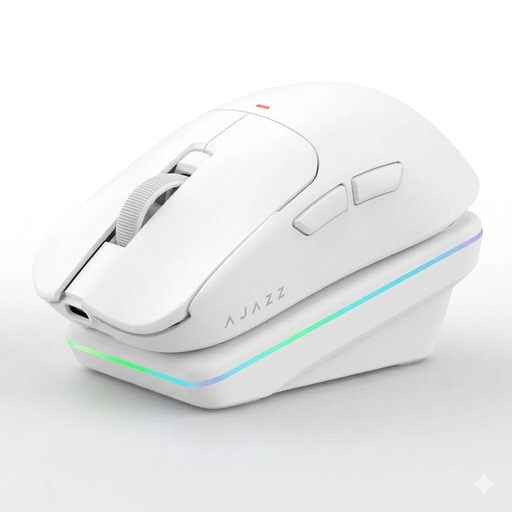
AJAZZ AJ200 AI MC wireless gaming mouse with charging dock
Consider this model if connection choice and a charging dock matter to your desk setup.
Its title lists Bluetooth, 2.4 GHz and USB-C connection modes. If shortcut capacity or low weight is central to your decision, confirm the number of remappable buttons and the exact weight before choosing it; also check the fit if you use a smaller-hand grip.
Joybuy
 No image available
HyperX Pulsefire Fuse wireless gaming mouse
This wireless model is worth assessing if you want to assign some game actions to the mouse.
Before building a larger shortcut plan around it, confirm the number and position of programmable buttons. Check the grip shape for your hand rather than assuming that an ergonomic description guarantees a comfortable fit.
Joybuy
 No image available
ONIKUMA CW905 wired gaming mouse
Consider this wired option if you prefer not to plan around wireless charging and have space to route its cable.
The title mentions programmable buttons and RGB lighting. Confirm which controls you can remap for your game; do not rely on the lighting to make the mouse easier to use in a bright room.
Joybuy
Common questions
Do colony-management games call for a 12-button mouse?
A 12-button mouse makes sense when you have many repeated actions to bind and can reliably use a dense thumb grid. CORSAIR specifies a repositionable 12-button side panel on the SCIMITAR ELITE WIRELESS SE; if you need only several shortcuts, consider a less crowded layout instead.
What should I set up before using a wireless multi-button mouse for gaming?
For the CORSAIR SCIMITAR ELITE WIRELESS SE, charge the mouse before first use, connect its USB receiver for 2.4 GHz use and set your button assignments in iCUE. CORSAIR describes its 2.4 GHz connection for gaming and Bluetooth for everyday computing, so choose the mode that matches your intended use.
How should I dispose of an old gaming mouse in the UK?
Take an unwanted electrical mouse to an appropriate electrical-waste collection point rather than putting it in household rubbish. GOV.UK also describes retailer take-back when replacing an old like-for-like electrical item; check the collection arrangements available for your purchase.


