Start with a shape that suits your grip and controls you can reach without shifting your hand. Extra assignable buttons can suit frequent team commands, while configurable lighting is a preference for the dark-room setup rather than proof that controls will be easier to find. Choose wireless if a cable-free desk is worth managing power; choose wired if you would rather avoid that task.
Who is this choice for?
Players with frequent team commands
If you regularly use push-to-talk, pings, a map or equipment commands, consider whether you can reach assignable mouse controls without changing your grip. PCMag UK discusses extra controls for in-game tools; the placement still needs to work for your hand.
Dark-room setup customisers
If adjustable lighting is part of your desk setup, check both the mouse lighting and its configuration software. Logitech G describes LIGHTSYNC settings and button assignments in G HUB, but the options depend on the model.
Fit- and handedness-first players
If grip comfort or left-handed use comes before lighting, inspect the shape and the position of the side controls. SCAN UK emphasises comfort when choosing a gaming mouse; Corsair describes its M75 WIRELESS as a true ambidextrous design.
What should you check?
Check fit and reachable controls first. Then decide how much lighting customisation you want and whether a cable or wireless power management suits your desk.
| Concern | Buying check | Who this matters to |
|---|
| Grip and handedness |
Check the shape against your grip and whether side controls are reachable with your playing hand. |
If a mouse feels awkward over a long session, lighting will not make up for the fit. Around 45% of consumers put grip or handedness first. |
| Commands and lighting |
Check reachable assignable buttons and the exact model’s lighting and software options. |
When I use pings and equipment commands repeatedly, I want controls I can reach without losing my grip, alongside lighting I can adjust for my desk. Around 33% of consumers prioritise this combination. |
| Cable and power |
For wireless, check connection modes and battery conditions; for wired, consider cable routing. |
A cable-free desk appeals if I am willing to manage charging or batteries; otherwise I would keep continuous wired power. Roughly 22% of consumers put this setup decision first. |
Buying pitfalls
-
Choosing maximum DPI before checking fit
A high sensor setting cannot tell you whether a shape or button position suits your hand. SCAN UK places particular emphasis on comfort when choosing a gaming mouse.
Start with grip and handedness, then consider which controls you can reach without adjusting your hold.
-
Comparing wireless battery figures without their conditions
Connection and lighting settings can change the basis of a battery-life rating. Corsair gives different M75 WIRELESS ratings for 2.4 GHz and Bluetooth, both with RGB off.
Compare ratings using the connection and lighting settings you expect to use, and check how the exact mouse is powered.
-
Assuming every RGB setting works without software
Lighting, button assignments and profiles can depend on companion software. Logitech G documents these controls in G HUB for supported devices.
Check the exact mouse model’s software features and operating-system support before relying on a particular setup.
-
Equating a symmetrical shell with left-handed controls
A symmetrical outline does not establish that the side buttons are equally usable from either hand.
If you play left-handed, confirm the button placement and whether the controls can be configured for that use.
Brands to consider
Logitech G
The G502 X PLUS is a wireless route for players interested in configurable lighting and controls.
- Logitech G lists an active 8-LED LIGHTSYNC RGB array for the G502 X PLUS and describes DPI, assignment and lighting settings in G HUB.
- Those features do not establish whether the G502 X PLUS shape suits your grip; check fit and software support for your intended setup.
Razer
The Basilisk V3 Pro 35K is a right-handed route for players considering an ergonomic shape and numerous controls.
- Razer lists 11 programmable buttons and RGB lighting for this model.
- Razer lists the Basilisk V3 Pro 35K at 112 g; consider that stated weight and the right-handed layout if movement feel or left-handed use is a priority.
Corsair
The M75 WIRELESS offers a route for players seeking a true ambidextrous design with wireless connectivity.
- Corsair lists seven programmable buttons, two-zone RGB and an 89 g weight for the M75 WIRELESS.
- Its stated button and lighting-zone counts are lower than those listed for the Basilisk V3 Pro 35K; check whether the M75 WIRELESS layout covers your commands.
Joybuy product choices
These mice cover different approaches to the same co-op setup: an ergonomic esports shape, wireless models, and wired options with lighting or assignable controls. Check the individual layout and lighting rather than assuming every mouse suits left-handed play or has configurable RGB.
 No image available
Razer DeathAdder V3 Ergonomic Esports Mouse
Consider this if an ergonomic esports shape is your starting point. Check how its controls sit under your fingers, and confirm mouse lighting before choosing it for an illuminated setup.
View on Joybuy
 No image available
ASUS TUF Gaming M4 Wireless Gaming Mouse, Black
Consider this wireless model if you want to assess a mouse for left-handed use. Check side-button reach and whether the mouse itself provides the lighting you want.
View on Joybuy
 No image available
AJAZZ AJ200 AI MC Gaming Mouse with Charging Dock
Consider this model if you want a charging dock and a choice of connections. Its title lists a PAW3311 sensor, up to 24,000 DPI and Bluetooth, 2.4 GHz and USB-C modes. Check the operating weight against your preference, and confirm whether lighting is on the mouse rather than only the dock.
View on Joybuy
 No image available
ONIKUMA CW905 Wired Gaming Mouse
Consider this if you prefer wired power and want mouse lighting. The product name describes programmable buttons and RGB lighting modes; confirm how its controls are configured and whether their placement suits your playing hand.
View on Joybuy
 No image available
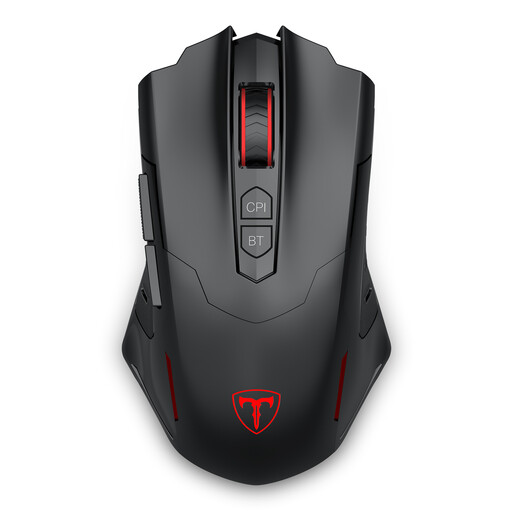
ET PC400 Wireless Gaming Mouse
Consider this if wireless connectivity and assignable team commands matter to you. Its title lists 2.4 GHz and Bluetooth modes, up to 8,000 DPI and seven programmable buttons. Check whether its red backlighting meets your preference, as well as how it is powered.
View on Joybuy
Frequently asked questions
Does RGB make mouse controls easier to use in a dark room?
Do not count on RGB alone to make controls easier to identify during play. Logitech G and Razer describe lighting features for the G502 X PLUS and Basilisk V3 Pro 35K, but their lighting specifications do not establish that effect; choose a layout whose buttons you can reach reliably.
Should I choose wired or wireless for co-op shooters?
Choose wireless if you value a cable-free desk enough to manage its power needs; choose wired if continuous power and avoiding battery management matter more. SCAN UK describes high-end wireless mice as competitive with wired models, so do not assume the connection alone determines gaming performance.
Do I need software for a programmable RGB mouse?
Check software support before buying if you intend to remap buttons, adjust lighting or save profiles. Logitech G documents those types of settings in G HUB, but available controls and operating-system support must be checked for the exact mouse.


