What matters when choosing
Decide whether the scarce connection is a wall socket, a computer USB port or both. Then consider how many game actions you would genuinely want on the mouse.
| Concern |
What to check |
Who this matters to |
| Avoiding routine charging |
Check whether the exact mouse uses replaceable batteries, a rechargeable battery or a cable. For wireless use, check whether Bluetooth is available or a 2.4 GHz receiver needs a computer USB port. |
If spare wall sockets are scarce, I would rather keep compatible batteries on hand than schedule another charging session; around 42% of consumers put charging independence first. |
| Mapping adventure-game actions |
Check the placement and customisation of the controls, plus mouse-software and game support for your intended shortcuts. |
When I repeatedly open a map, inventory or journal, reachable shortcuts matter more to me than unused buttons; around 33% of consumers prioritise shortcut capacity. |
| Avoiding battery management |
Confirm that a suitable computer port is free and that the cable reaches comfortably across your desk. |
At a fixed desk, I would accept a cable rather than charge or replace mouse batteries; around 25% of consumers make a simple wired setup their primary concern. |
Brands to consider
These brands illustrate different power and control arrangements in the named mouse lines; a brand name alone does not establish the features of another model.
Logitech G
The G305 LIGHTSPEED is relevant if you want wireless play without routine recharging.
- Logitech G specifies up to 250 hours from one AA battery for the G305 LIGHTSPEED.
- You still need replacement batteries and a way to recycle spent ones; the stated endurance applies to this model, not every Logitech G mouse.
Razer
The Basilisk models offer a choice between AA-powered wireless control and a wired desk setup.
- Razer specifies Bluetooth, 2.4 GHz wireless and nine customisable controls for the Basilisk V3 X HyperSpeed; its wired Basilisk V3 line offers additional programmable controls.
- Choose by exact model: a wired Basilisk needs a computer USB connection, and a stated feature on one variant does not establish it on another.
Corsair
The KATAR ELITE WIRELESS is relevant if you want wireless use with Bluetooth and a wired fallback.
- Corsair specifies 2.4 GHz wireless, Bluetooth and USB wired modes for the KATAR ELITE WIRELESS.
- Its rechargeable battery still needs periodic charging; check whether its compact shape suits your grip.
Joybuy product choices
These choices include wired mice for a desk with a suitable computer connection and a rechargeable wireless option for players who can charge periodically. If avoiding charging altogether is essential, check the mouse’s power design rather than treating any wireless model as equivalent to a replaceable-AA one.
 No image available
Lexip Gaming Pu94 Wired Mouse
Consider this wired option if avoiding mouse charging matters more than keeping your desk cable-free. Check that you have a USB-A port, and confirm that your puzzle game accepts joystick inputs before choosing it for those controls.
View on Joybuy
 No image available
ONIKUMA CW905 Wired Gaming Mouse
Its wired design suits a setup where a cable is acceptable. If adventure-game shortcuts are the reason for choosing it, confirm which buttons can be remapped and that its connector fits your computer.
View on Joybuy
 No image available
Razer Cobra Wired Gaming Mouse – Minecraft Edition
This wired edition suits a computer setup where a cable is acceptable. Confirm the number and placement of remappable controls if you plan to assign several puzzle-adventure actions.
View on Joybuy
 No image available
Rapoo VT7 MAX Wireless Gaming Mouse – White
Consider this rechargeable option if you want wireless play and can accommodate periodic charging. Its product name lists 10 programmable buttons and a 53 g weight. The stated up-to-750-hour battery figure is conditional on 1000 Hz operation and a driver update that enables low-power mode; its receiver also needs a computer USB port.
View on Joybuy
 No image available
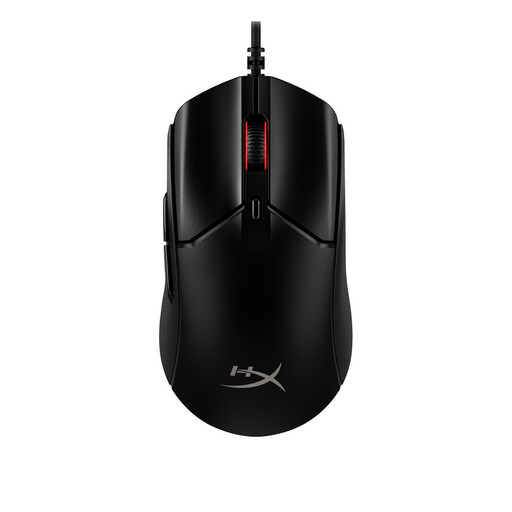
HyperX Pulsefire Haste 2 Wired Gaming Mouse – Black
This wired model suits a desk with a free computer USB port. If pointer adjustment or mapped shortcuts matter to you, check the regional sensitivity settings and the controls available for assignment on this exact variant.
View on Joybuy
Frequently asked questions
Does a wireless gaming mouse solve a shortage of plug sockets?
A replaceable-AA wireless mouse avoids routine charging, but a rechargeable wireless mouse does not. Logitech specifies up to 250 hours from one AA battery for the G305 LIGHTSPEED. If computer USB ports are scarce too, check whether the exact mouse and computer can connect over Bluetooth rather than through a receiver.
Does a wired gaming mouse need a wall socket?
A wired mouse does not need a separate mouse-charging socket, but it does need a suitable computer connection. Razer identifies the Basilisk V3 35K as wired; allow for its cable and check that a computer USB port is free.
Are extra mouse buttons useful in puzzle adventures?
Extra buttons are useful if your game accepts mappings for actions you use often, such as opening a map or inventory. Check both the mouse’s customisation software and the game’s input settings before choosing a model for its button count.
What should I do with spent mouse batteries in the UK?
Take spent batteries to an appropriate collection point rather than putting them in household rubbish, as GOV.UK advises. If a mouse has a battery you cannot remove, check the appropriate electrical-product recycling route for the whole device.


