Reviewers short of plug sockets
If you review footage for long stretches, decide whether you would rather keep a mouse cable on the desk or plan around wireless charging. Check your available USB ports separately from your wall sockets.


If avoiding a charging interruption is your priority, a wired gaming mouse is a sensible choice even when wall sockets are scarce: it draws power through the computer and leaves a cable on the desk. Choose wireless when cable freedom matters more, but check the USB receiver and charging arrangements; for competitive play, RTINGS advises using a dedicated receiver rather than Bluetooth.
If you review footage for long stretches, decide whether you would rather keep a mouse cable on the desk or plan around wireless charging. Check your available USB ports separately from your wall sockets.
If you repeatedly use review, editing or in-game commands, count the mappings you need and check whether the mouse buttons are comfortable to reach. Confirm how the required software applies or stores those mappings.
If the same mouse must serve competitive play and analysis, consider grip fit and connection mode alongside button count. RTINGS advises a dedicated USB receiver rather than Bluetooth for gaming.
Work out whether the scarce connection is a wall socket, a computer USB port or both. That distinction changes the choice between a wired mouse and either wireless route.
Choose when: You want to avoid mouse charging and can accommodate a cable while reviewing footage.
Trade-off: You retain the desk cable and need an available computer USB port.
Choose when: Cable-free movement and a shape that suits your competitive grip take priority over numerous shortcuts.
Trade-off: You must plan charging and allow for a receiver connection.
Choose when: You want wireless movement and several controls, with fewer planned charging breaks.
Trade-off: The longest battery claim may apply to a different connection mode from the one you use for gaming. SteelSeries distinguishes the Aerox 5 Wireless’s maximum claim from its default 2.4 GHz runtime.
| Concern | What to check | Who this matters to |
|---|---|---|
| Charging interruptions | Check available wall sockets and USB ports. For wireless mice, compare battery claims in the connection mode you intend to use. | If a mouse runs flat during a long review, I need to stop and recharge it; around 40% of consumers put uninterrupted use first. |
| Review shortcuts | Count the commands you will map, check button reach and confirm the software and profile behaviour you need. | When I repeat the same review commands, I want controls I can reach without disrupting my grip; roughly 30% of consumers put shortcut access first. |
| Competitive handling | Assess shape and weight for your grip; for wireless gaming, check for a dedicated USB receiver. | If I also play competitively, grip fit and a suitable gaming connection matter more to me than the highest button count; around 30% of consumers prioritise handling. |
A wired mouse does not need charging, while a wireless mouse still needs a charging arrangement and, for receiver-based use, a computer USB port.
Count wall sockets and USB ports separately before deciding whether a cable or a receiver is easier to accommodate.
SteelSeries distinguishes the Aerox 5 Wireless’s maximum battery claim from the 80+ hours it states for default 2.4 GHz operation.
Plan charging around the manufacturer’s figure for the mode you will actually use, rather than the largest figure on the product page.
Extra controls are useful only if you can reach the commands you map without compromising your grip. Weight alone does not tell you whether a shape will feel comfortable.
Check shape and button placement against your hand and grip, then compare connection mode and the controls you expect to use.
GOV.UK advises that unwanted batteries and electrical products should not go in household rubbish.
Use an appropriate battery or electrical-waste collection route when the mouse reaches the end of its useful life.
The cited G502 X models offer wired and LIGHTSPEED wireless options for people considering a control-heavy layout.
The Viper V3 Pro is a rechargeable wireless option for buyers balancing competitive handling with some programmable controls.
The Aerox 5 Wireless is relevant if you want wireless operation and more mapped controls than a minimal esports layout.
These mice cover wired setups that avoid charging and rechargeable wireless setups for cable-free play and footage review. Compare their controls and connection requirements with the ports and shortcuts you actually need.
 No image available
Consider it if you want a wireless mouse with controls for recurring review commands. Its product title specifies 53 g and 10 programmable buttons; the advertised battery figure is up to 750 hours at 1000 Hz. Check runtime at your intended polling rate and whether the low-power mode requires a driver update.
 No image available
Its wired design suits a review desk where avoiding mouse charging matters more than removing the cable. Check whether its right-handed joystick layout suits your grip and whether a USB-A port is available.
 No image available
Consider it when wireless competitive play takes priority and eight programmable controls cover your review shortcuts. Razer specifies 54 g; the Joybuy listing includes a wireless dongle and USB cable, but no USB wall adapter. Check battery runtime for your chosen settings and allow a USB port for the receiver.
 No image available
The product title specifies 56 g, 2.4 GHz wireless or wired use, and a magnetic charging base. If desk power is limited, check how the base is powered and whether its button layout and remapping software suit your review shortcuts.
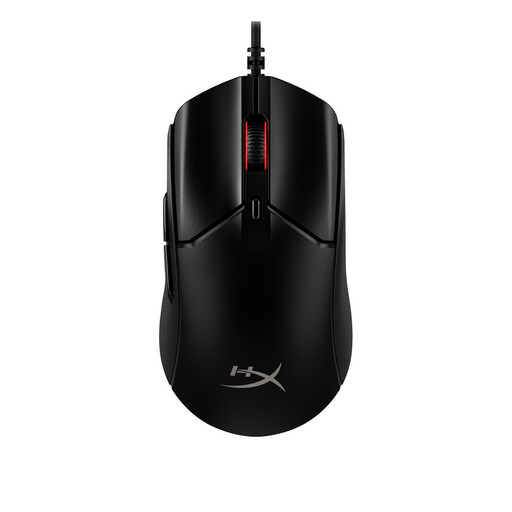 No image available
Wired operation avoids a mouse charging routine during review sessions. Consider the cable route on your desk, and check the mouse’s weight and available programmable controls if grip or shortcuts will decide your choice.
No: a wired mouse avoids mouse-battery charging, so it may be simpler when wall sockets are the constraint. If you choose wireless to remove the desk cable, also check where its receiver and charging cable will connect.
Use a dedicated USB receiver when competitive gaming responsiveness matters. RTINGS advises it over Bluetooth for gaming because Bluetooth has higher latency and is less reliable; make sure you have a suitable port.
Only when the claim applies to the connection mode and settings you intend to use. SteelSeries Support states 80+ hours for the Aerox 5 Wireless in default 2.4 GHz mode, so its longer maximum claim should not replace that mode-specific figure in your charging plan.
More buttons help only if you have repeatable commands to assign and can reach the controls comfortably. Compare your shortcut list with the layout, then check how the mouse software stores or applies your mappings.
Use an appropriate collection route for electrical products and batteries rather than household rubbish. GOV.UK advises keeping unwanted electrical products and batteries out of household rubbish; check your local collection options for the complete mouse and any removable battery.