Players with crowded RPG hotbars
If you regularly use many abilities, items or macros, a reachable thumb grid can put more of those commands under your mouse hand. Razer and Corsair both describe 12-button layouts in their MMO mouse ranges.


Choose an MMO-style mouse with a 12-button thumb grid if you regularly use enough RPG skills, items or macros to make those controls useful—and can reach them accurately. If you need only several remaps or prefer a less crowded grip, choose a conventional multi-control mouse; check its fit, software and connection mode before buying.
If you regularly use many abilities, items or macros, a reachable thumb grid can put more of those commands under your mouse hand. Razer and Corsair both describe 12-button layouts in their MMO mouse ranges.
Button placement, shape and manageable movement matter more to you than the largest control count. Corsair offers a movable thumb panel on the Scimitar Elite Wireless SE; Logitech G specifies a 102 g chassis for the G502 X LIGHTSPEED. Neither detail establishes how a mouse will fit your hand.
If you want RPG remaps without using a 12-button grid in every game, consider a conventional multi-control layout or interchangeable side plates. Logitech G describes 13 customisable controls on the G502 X LIGHTSPEED, while Razer offers swappable plates on the Naga V3 Pro.
Choose it when: You regularly need many RPG commands within thumb reach.
Trade-off: Adjacent buttons must remain distinguishable with your grip; a larger control set also takes time to configure.
Choose it when: Several remaps are enough and you prefer a less crowded side grip.
Trade-off: Without a dedicated thumb grid, a large RPG hotbar may still require more keyboard input.
| Concern | What to check | Who this matters to |
|---|---|---|
| Accessible RPG controls | Count the commands you would map, then check whether you can distinguish and reach the side buttons and save the intended mappings. | If I use a crowded skill bar, I want my frequent abilities and items within reach without mispressing neighbouring buttons. Around 42% of consumers put accessible RPG controls first. |
| Comfort over long sessions | Compare shape, dimensions and weight with your current mouse; check thumb-panel position and hand orientation. | During a long session, I need a grip that lets me reach my controls comfortably, even if that means fewer buttons. Comfortable fit comes first for around 33% of consumers. |
| Connections and mixed use | Check the exact model’s wired, 2.4 GHz and Bluetooth options, plus receiver, charging and software requirements. | When I switch between RPGs, other games and desktop tasks, I want suitable connections without committing to a permanent thumb grid. Around 25% of consumers prioritise that flexibility. |
A dense grid helps only if you can identify and reach its buttons with your usual grip. Corsair’s Scimitar Elite Wireless SE has a movable thumb panel, making panel position worth checking.
Compare its dimensions with your current mouse, check the applicable return terms and begin by mapping your most-used commands.
For the Scimitar Elite Wireless SE, Corsair describes its 2.4 GHz connection for gaming and Bluetooth for everyday computing tasks.
Check the manufacturer’s recommended gaming connection for your exact mouse, along with the USB port or Bluetooth support your setup needs.
Software remapping does not change which side carries the thumb buttons. Razer makes a separate Naga Left-Handed Edition with a left-handed shape and 12-button thumb grid.
If you mouse left-handed, confirm the model’s hand orientation and button placement in its specifications and images.
Slough Borough Council advises keeping electrical items marked with the crossed-out wheeled-bin symbol separate from general waste for reuse or recycling.
Check your local council’s electrical-waste collection options or ask a retailer about take-back.
The Naga range includes thumb-grid options for control-heavy RPG play, interchangeable side plates on the Naga V3 Pro and a separate left-handed model.
The Scimitar Elite Wireless SE is aimed at players who want a 12-button thumb grid that can be moved to suit their reach.
The G502 X LIGHTSPEED offers RPG remapping in a conventional layout rather than a 12-button MMO thumb grid.
These mice offer conventional gaming-mouse controls for RPG players considering remaps without a dedicated 12-button thumb grid. Check each model’s reachable buttons and setup requirements against the commands you actually use.
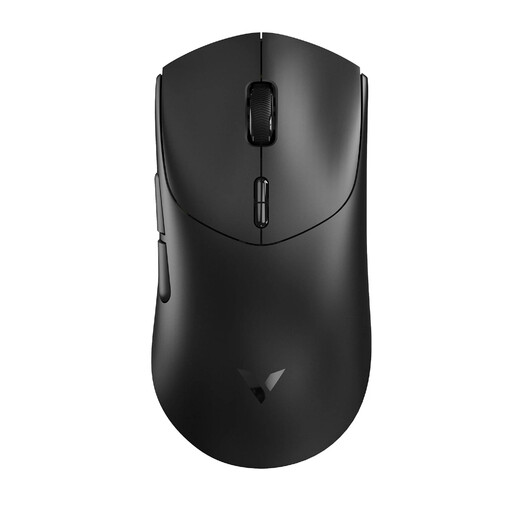 No image available
Consider this mouse if you want to map several RPG commands without a 12-button thumb grid. Its listing describes 10 programmable buttons and macros, 2.4 GHz wireless and a 53 g weight; check whether the side buttons suit your thumb reach.
 No image available
Consider this model if you want RPG remapping alongside wired, 2.4 GHz and Bluetooth connection options. Its listing describes six buttons and macro recording; decide whether six buttons cover your commands, and confirm the exact weight if it matters to your grip.
 No image available
A wired option if you want a modest set of RPG controls rather than an MMO thumb grid. Programmable controls are described for the CW905; confirm the remapping process and software compatibility if you need custom profiles or macros.
 No image available
Consider this model if programmable controls and a 2.4 GHz wireless connection suit your RPG setup. Check the number and placement of its buttons against your intended mappings, and confirm Bluetooth support if you need that connection.
 No image available
A wired, symmetrical option if you want configurable controls without a dedicated MMO grid. Check its programmable-button count against your RPG commands and confirm the exact weight if that affects your choice.
No: a 12-button grid is useful when you regularly use enough abilities, items or macros to justify it and can press the buttons accurately. If several remaps cover your needs, a conventional multi-control mouse may give you a less crowded grip.
For the Scimitar Elite Wireless SE, Corsair recommends its 2.4 GHz connection for gaming and describes Bluetooth as suited to everyday computing. Follow the guidance for the exact mouse you choose and check what your computer can connect to.
Start by mapping commands you can press reliably, then test those assignments in-game before filling every available button. Check whether your chosen mouse requires configuration software and whether it can retain the profiles you intend to use.
Keep electrical items marked with the crossed-out wheeled-bin symbol separate from general waste for reuse or recycling, as Slough Borough Council advises. Check your local council’s electrical-waste arrangements or ask a retailer about take-back options.