Start with a shape that suits your grip and the actions you use while learning a multiplayer map. A lighter, simpler mouse is worth considering for repeated swipes, while accessible side buttons matter more if you bind map, ping or communication commands to the mouse. At a home-office desk, weigh a cable-free setup against charging and receiver use before comparing sensor figures.
Who is this choice for?
Aim-practice map learners
If your practice involves repeated turns, tracking opponents and retracing routes, moving mass and grip fit may matter more to you than a crowded button layout. Scan UK identifies comfort and shape as important buying considerations.
Shortcut-driven tactical players
If you want map, ping, utility or communication commands within reach of your mouse hand, consider where the side buttons sit as well as how many there are. SteelSeries lists a five-button side panel on the Aerox 5 Wireless.
Home-office dual-use players
If the same desk serves work and gaming, consider how the mouse fits your hand over both tasks, whether you want a cable on the desk and how readily you can charge a wireless model.
What matters when choosing?
Check grip and handedness first, then decide whether movement, mouse-bound shortcuts or day-to-day desk use is your main priority. Treat polling and sensor figures as specifications of particular models, not a substitute for assessing fit.
| Concern |
What to check |
Who this matters to |
| Repeated aim movement |
Compare stated weight, shape and grip fit; decide whether you need side buttons within easy reach. |
If I practise quick turns and tracking repeatedly, I want a mouse I can move comfortably without giving up a suitable grip. Roughly 42% of consumers would put aim movement first. |
| Map and utility shortcuts |
Identify the commands you would bind, then check the exact model's button positions and programmability. |
When map, ping or communication commands interrupt my keyboard movement, I want buttons I can reach without changing my grip. Shortcut access would be the primary concern for around 33% of consumers. |
| Home-office comfort |
Check handedness and grip shape; for wireless models, consider charging, the receiver and what comes in the box. |
Because I use the desk for work as well as practice, I need a shape and connection arrangement I can live with across both tasks. Around 25% of consumers would prioritise that everyday fit. |
Buying pitfalls
-
Choosing by DPI or polling rate before checking shape
Palm, claw and fingertip grips place the hand differently on a mouse. Scan UK advises paying close attention to comfort; a manufacturer's sensor figures cannot tell you whether a particular body suits your hand.
Identify your grip and handedness, then compare body shapes before using sensor specifications to narrow the choice.
-
Buying extra buttons without planned bindings
SteelSeries specifies nine programmable buttons on the Aerox 5 Wireless, but additional controls are useful only if you can reach them reliably and have commands worth moving from the keyboard.
List the map, ping, utility or communication actions you would assign, and inspect the side-button layout against your grip.
-
Assuming a wireless listing includes every charging accessory
The Joybuy listing for the Razer Viper V3 Pro describes an included wireless dongle and USB cable, but says a USB wall adapter is not included. Bundle contents can affect how you plan to charge and connect the mouse.
Before ordering, confirm the exact model, current availability, included accessories and warranty terms on its product page.
If you intend to charge from a wall socket and do not have a suitable USB adapter, you will need one separately.
Relevant brands to consider
Razer
The Viper and DeathAdder lines offer different shapes to consider when grip and handedness influence the choice.
- Razer specifies a 54 g body, USB-C charging and up to 95 hours of battery life for the Viper V3 Pro.
- The Viper V3 Pro's right-handed symmetrical shape still needs to suit your own hand and grip; its specifications do not establish that fit.
Logitech G
The PRO X SUPERLIGHT line is relevant if you prefer a lightweight competition-style wireless mouse without a large side-button panel.
- Logitech G lists the PRO X SUPERLIGHT 2 at 60 g, with HERO 2 tracking and up to 8 kHz LIGHTSPEED polling.
- If several mouse-bound map or communication commands are essential, check whether its simpler control layout gives you enough accessible buttons.
SteelSeries
The Aerox 5 Wireless is relevant when reachable mouse shortcuts are a more important part of play than a stripped-back layout.
- SteelSeries specifies a 66 g body and nine programmable buttons, including a five-button side panel.
- Check whether that panel suits your grip and whether the honeycomb shell fits your cleaning preferences.
Corsair
The M75 Wireless is relevant if configuring side buttons for right- or left-handed use is a priority.
- Corsair describes swappable magnetic side buttons for either hand on the M75 Wireless.
- Corsair specifies this model at 89 g, so decide whether its handedness options matter more to you than a lower stated weight.
Joybuy product choices
These gaming mice offer different starting points for map practice at a home-office desk: some emphasise low stated weight or programmable controls, while one offers a wired connection without a charging routine. Compare the exact model's shape and connection with your own setup.
 No image available
Rapoo VT7 MAX Wireless Gaming Mouse, White
Consider this model if you want a light mouse for repeated movement and buttons for selected game commands.
Its listing states 53 g, ten programmable buttons and an 8 kHz wireless polling specification. The stated battery life of up to 750 hours applies at 1,000 Hz after a driver update enables low-power mode; check which settings you intend to use.
Check the body dimensions against your hand and grip before ordering.
View on Joybuy
 No image available
AJAZZ AJ159 APEX Wireless Gaming Mouse with Charging Base
Consider this model if you want a stated 56 g mouse with a charging base for your desk.
The product name specifies a PAW3950 sensor, 30K DPI, 8 kHz polling and 2.4 GHz wireless or wired connection. Its title and description differ on the number of connection modes, so confirm the exact modes if Bluetooth matters to you.
Check the battery-life information if charging frequency will affect your choice.
View on Joybuy
 No image available
Razer Viper V3 Pro Wireless Gaming Mouse, Black
Consider this mouse if repeated aim movements are your priority and its right-handed symmetrical shape suits your grip.
Razer specifies a 54 g body for the Viper V3 Pro. The product listing names a Focus Pro 35K Sensor Gen-2 and up to 8 kHz polling; those figures do not establish personal fit or a gameplay advantage.
Check the exact bundle contents and seller-provided compliance information before buying for wireless use in Great Britain.
View on Joybuy
 No image available
ASUS TUF Gaming M4 Wireless Gaming Mouse, Black
Consider this wireless model if you want to assess a mouse for both desk work and map practice.
Check its shape and connection options against your setup. If weight or battery upkeep is decisive, confirm the weight with your chosen battery fitted and the battery-life information before ordering.
View on Joybuy
 No image available
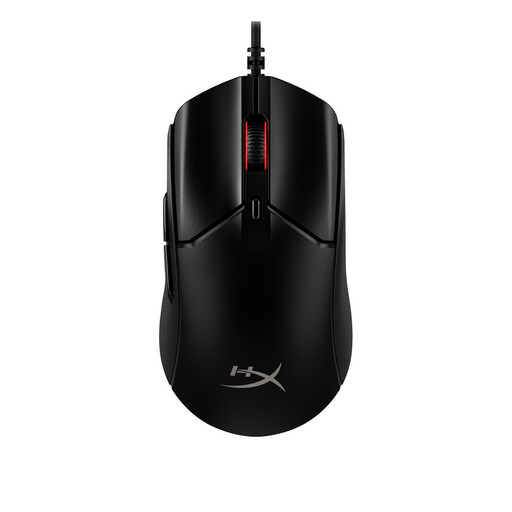
HyperX Pulsefire Haste Black Wired Gaming Mouse 2
Consider this wired mouse if you prefer a cable connection and do not want a wireless charging routine at your desk.
Allow for the cable when arranging your practice space. If low weight or a particular polling specification drives your choice, confirm the figures for this exact model before ordering.
View on Joybuy
Common questions
Should I choose a wired or wireless mouse for a home-office desk?
Choose wireless if a cable-free desk matters more to you than managing charging and a receiver; choose wired if you prefer a cable connection without a battery routine. In either case, check that the shape suits your grip during both work and practice.
Are more programmable buttons useful for learning a multiplayer map?
They are useful if you have specific commands you can reach and remember without disturbing your grip. Decide whether map, ping, utility or communication actions belong on the mouse before choosing a dense side-button layout.
What should I check when buying a wireless mouse for use in Great Britain?
Check the exact product identity and the seller's compliance information for the wireless model you intend to buy. The Office for Product Safety and Standards describes Great Britain's Radio Equipment Regulations 2017 as addressing equipment safety, electromagnetic compatibility and protection of the radio spectrum; a product listing alone should not be treated as a compliance determination.
What comes with the Razer Viper V3 Pro on Joybuy?
The Joybuy listing describes a HyperPolling wireless dongle and USB cable, but says no USB wall adapter is included. Confirm the current bundle contents, availability and warranty terms for the exact listing before ordering.


