Choose a mouse with accessible programmable buttons if repeated replay commands are your main frustration; favour a lightweight esports mouse if competitive aiming matters more than shortcut capacity. A large screen alone does not require a particular DPI or polling rate. Check the button layout, grip, connection options and battery conditions against the way you review and play.
Who is this for?
Replay-shortcut users
If you repeatedly navigate timelines, change cameras or mark moments, reachable buttons may save trips back to the keyboard. Check that your replay software or game accepts the bindings you want; CORSAIR specifies 16 programmable buttons and an adjustable 12-button side panel on its SCIMITAR ELITE WIRELESS SE.
Competitive aim-first players
If replay review supports your competitive play, a lower-weight mouse may matter more to you than a dense side-button layout. Logitech G specifies 60 g for the PRO X SUPERLIGHT 2, while Razer specifies 54 g for the Viper V3 Pro; neither figure establishes how a mouse will fit your grip.
Long-session desk users
If you spend extended periods reviewing footage or playing, assess grip fit, desk layout and your charging routine as well as mouse specifications. The Health and Safety Executive notes that overuse or improper use of display-screen equipment can contribute to fatigue and upper-limb problems.
What matters when choosing?
Start with the task that most often interrupts your review or play, then check whether the mouse’s shape and connection options suit your desk.
| Concern |
What to check |
Who this matters to |
| Replay shortcuts |
Check how many buttons you can reach without changing grip and whether your replay software accepts their assigned commands. |
If I keep switching cameras or navigating a timeline, I want recurring commands close to my thumb. Around 33% of consumers put replay-command access first. |
| Long-session comfort |
Assess shape and size for your grip, plus the space available to move the mouse at your desk. |
During extended reviews, I need a grip and desk arrangement I can keep using comfortably; for around 42% of consumers, that is the primary concern. |
| Competitive handling |
Compare weight and shape, then assess wireless mode and polling options against your PC, game and monitor. |
If reviewing replays feeds directly into competitive play, I care most about how the mouse handles while aiming. That is the leading need for around 25% of consumers. |
Buying pitfalls
-
Choosing by maximum DPI or polling rate alone
A polling-rate figure describes how often the mouse reports input; it does not tell you whether its buttons make replay navigation easier or whether its shape fits your hand. Razer associates higher polling with smoother visuals when paired with a high-refresh-rate monitor.
Decide whether shortcuts, grip or competitive responsiveness are your priority before giving a headline sensor figure weight in the decision.
-
Assuming a lightweight esports mouse has enough replay shortcuts
Low weight and shortcut capacity answer different needs. For comparison, CORSAIR specifies 16 programmable buttons and an adjustable side panel on the SCIMITAR ELITE WIRELESS SE; check the actual button layout on any lighter alternative rather than assuming it offers similar access.
List the replay actions you use most and confirm that the physical buttons and available mappings support them without disrupting your grip.
-
Treating maximum battery life as your expected runtime
Connection mode and settings can change the conditions behind a manufacturer’s figure. CORSAIR, for example, states up to 150 hours over 2.4 GHz and up to 500 hours over Bluetooth for the SCIMITAR ELITE WIRELESS SE, both with RGB off.
Read the conditions for your intended connection and lighting settings, and decide whether charging during desk use works for you.
A shorter runtime under your chosen settings can mean more frequent charging or cable use.
-
Confusing change-of-mind returns with fault remedies
A retailer’s voluntary change-of-mind policy is separate from remedies for a faulty or misdescribed mouse. Coventry City Council Trading Standards advises that a faulty item can usually be refunded within 30 days.
Check the seller’s change-of-mind terms before opening and configuring the mouse, while keeping fault remedies distinct from that policy.
Brands to consider for these mouse styles
Logitech G
The PRO X SUPERLIGHT 2 is a lightweight wireless option to examine when competitive handling takes priority.
- Logitech G specifies a 60 g design and a HERO 2 sensor for this model.
- Check its button layout and shape against your replay shortcuts rather than assuming a lightweight design also provides a large side-button array.
Razer
The Viper V3 Pro is another lightweight esports option for buyers who put aiming ahead of extensive replay controls.
- Razer specifies a 54 g design, a Focus Pro 35K optical sensor and 8 kHz HyperPolling.
- Razer links higher polling to high-refresh-rate displays; a physically large screen alone does not make 8 kHz necessary.
SteelSeries
The Aerox 5 Wireless is worth examining if moving between compatible devices is part of your desk routine.
- SteelSeries specifies 2.4 GHz wireless, Bluetooth 5.0 and a 66 g design.
- Its stated battery life of up to 180 hours is a manufacturer maximum; check the conditions for the connection and settings you intend to use.
CORSAIR
The SCIMITAR ELITE WIRELESS SE addresses replay reviewers who want many commands within reach.
- CORSAIR specifies 16 programmable buttons and an adjustable 12-button side panel.
- The button-heavy layout requires configuration and may handle differently from a minimalist esports mouse; assess reach and grip for yourself.
Joybuy product choices
These mice offer different starting points for replay controls, wireless desk use and competitive play. Compare their stated features with the commands, connections and grip you actually need.
 No image available
Rapoo VT7 MAX wireless gaming mouse, white
Consider this model if you want shortcut controls alongside a lightweight wireless mouse; confirm that its button mappings work in your replay application.
The listing names 10 programmable buttons, a 53 g weight and up to 8K wireless polling. Its battery claim is up to 750 hours at 1000 Hz, with a driver update required to unlock low-power mode; runtime under other settings may differ.
View on Joybuy
 No image available
AJAZZ AJ200 AI MC wireless gaming mouse with charging dock
Consider this option if you want to check several connection modes for a desk shared with other compatible devices.
The title lists Bluetooth, 2.4 GHz and USB-C modes, a PAW3311 sensor and 24,000 DPI. Check the exact weight before comparing handling: the title states 63 g, while another listing description states 65 g. Confirm that any button remapping works with your replay application.
View on Joybuy
 No image available
AJAZZ AJ159 APEX wireless gaming mouse with magnetic charging base
This model is an option to examine if lightweight handling for competitive play is more important to you than a confirmed large shortcut-button layout.
The title states 56 g and 8 kHz polling. Check the connection modes and DPI for this variant before buying, as the listing descriptions differ from the title on those details; also check the number and reach of any remappable buttons.
View on Joybuy
 No image available
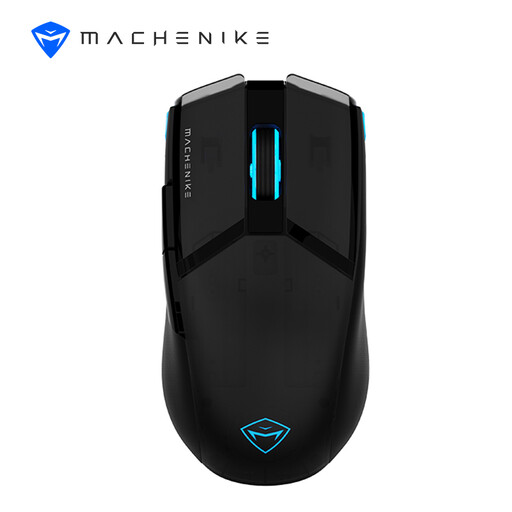
MACHENIKE M7 Pro PAW3395 wireless gaming mouse
Consider this mouse if you want to investigate a wireless option for a fixed PC or laptop desk setup.
The title names a PAW3395 sensor and 26,000 DPI. Before choosing it for aiming or frequent replay commands, confirm its weight, polling rate, physical button layout and mapping compatibility.
View on Joybuy
 No image available
ONIKUMA CW905 wired gaming mouse
This wired option may suit a fixed desk if basic thumb-button navigation is enough for your replay routine.
The listing describes forward and back buttons and adjustable DPI. Check whether its buttons can be remapped for your replay application before treating them as programmable shortcuts; the cable also needs to suit your desk layout.
View on Joybuy
Frequently asked questions
Do I need an 8 kHz mouse for replays on a large screen?
No particular polling rate follows from screen size alone. Razer says higher polling sends input more frequently and associates its benefits with a high-refresh-rate monitor; assess it against your competitive-play setup rather than treating it as a replay-review requirement.
Are extra buttons or a lighter mouse more useful for replay review?
Extra buttons are more relevant if repeated replay commands are your main obstacle; a lighter mouse is worth prioritising if competitive handling matters more. CORSAIR specifies 16 programmable buttons on the SCIMITAR ELITE WIRELESS SE, while Logitech G specifies 60 g for the PRO X SUPERLIGHT 2 and Razer specifies 54 g for the Viper V3 Pro. Check grip fit and the commands your software accepts before choosing.
Which wireless connection should I use at a replay-review desk?
Choose a mode supported by the devices you actually use and check its charging routine and model-specific settings. SteelSeries specifies 2.4 GHz wireless and Bluetooth 5.0 for the Aerox 5 Wireless; CORSAIR specifies 2.4 GHz wireless, Bluetooth and USB connectivity for the SCIMITAR ELITE WIRELESS SE. Follow the relevant model instructions for pairing and configuration.
What if a mouse I buy is faulty?
Fault remedies are separate from a retailer’s change-of-mind policy. Coventry City Council Trading Standards says a faulty item can usually be refunded within 30 days; remedies later on depend on the circumstances. Keep a record of the fault and check the applicable remedy rather than relying on the seller’s voluntary returns terms.


