What to prioritise
In a shared bedroom, decide whether disturbing someone else limits your choice before weighing shortcut controls, hand fit and desk connections. Consider each factor as a possible first priority, rather than assuming one mouse will resolve them all.
| Concern |
What to check |
Who this matters to |
| Low disturbance |
Look for an explicit quiet- or silent-click statement for the exact model, and check its return terms if click sound could decide the purchase. |
When someone sleeps or works beside me, I need clicks that will not interrupt them; around 33% of consumers put low disturbance first. |
| Shortcut control |
Count usable programmable controls and confirm that the configuration software and design application accept your intended mappings. |
Repeated view and tool commands pull me away from designing, so I want the controls I use most within mouse reach; around 27% of consumers prioritise shortcuts. |
| Long-session comfort |
Compare the exact mouse dimensions, shape and handedness with your grip; a weight figure alone cannot establish fit. |
If I spend a long session adjusting a model, a shape that feels awkward matters more to me than an additional control; roughly 20% of consumers place hand fit first. |
| Desk and device flexibility |
Check the available wired, Bluetooth and 2.4 GHz modes, the receiver and ports required, and the power source. |
Moving between a desktop and laptop on a crowded desk makes cable management my main concern; about 20% of consumers prioritise connection flexibility. |
Joybuy product choices
These gaming mice cover different parts of the shared-bedroom decision: configurable controls, connection choices, a seller’s silent-click claim and a wired option. Check the exact model’s click behaviour, fit and software requirements against the task you prioritise.
 Image unavailable
AJAZZ AJ200 AI MC Wireless Gaming Mouse with Charging Dock
Consider this model if you want connection choices at a shared desk and plan to check whether its button mapping works with your design application.
The product name specifies wired USB-C, 2.4G and Bluetooth modes, a PAW3311 sensor and 24000 DPI. If a roommate may be disturbed, check click sound for this exact model rather than inferring it from its gaming features.
Joybuy
 Image unavailable
RAPOO Mice-VT9PRO-4K – White
For shortcut-focused design work, check whether this model’s available controls and configuration software can handle the commands you repeat.
The selected variant is white. Confirm the battery arrangement for your intended connection mode and assess click sound separately if someone else uses the room.
Joybuy
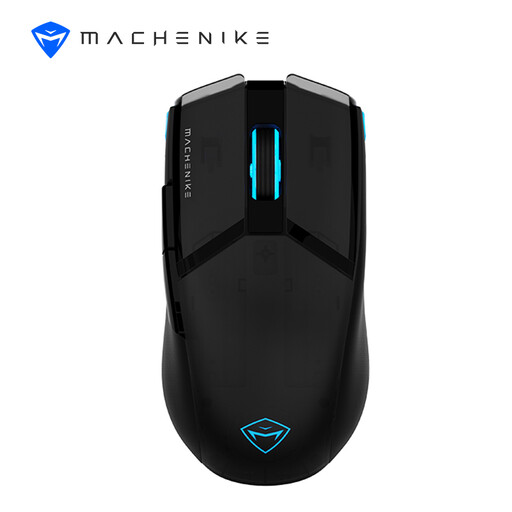 Image unavailable
MACHENIKE M7 Pro PAW3395 Dual-Mode Gaming Mouse
This is a model to consider if you want a wireless option for the desk but also need to check how its controls will fit your design workflow.
The product name specifies a PAW3395 sensor and 26000 DPI. Confirm the button layout, hand fit and click sound before treating it as a match for long sessions in a shared room.
Joybuy
 Image unavailable
ET Wireless Gaming Mouse with 5 Adjustable DPI Settings
For late sessions near another person, the seller describes this model’s left and right clicks as silent; judge that claim against your room’s needs and the applicable return terms.
The product name lists five adjustable DPI settings and LED backlighting. If you use a Mac, check the stated side-button limitation, and confirm the lighting behaviour if light spill matters.
Joybuy
 Image unavailable
Razer Cobra Wired Gaming Mouse – Minecraft Edition
Consider the wired Razer Cobra if keeping a cable on the desk suits your setup and you want to assess its controls for repeated design commands.
Check Razer Synapse support for your operating system and application. If you work while someone else sleeps, assess click sound and whether the mouse’s lighting can be disabled.
Joybuy
Common questions
Will a gaming mouse automatically be quiet enough for a shared bedroom?
No: wireless connectivity, sensor specifications and gaming branding do not establish click volume. Logitech G describes tactile switches on the G502 X LIGHTSPEED and Razer describes crisp mechanical switches on the Basilisk V3 X HyperSpeed, but those descriptions cannot tell you how the clicks will sound to someone nearby. If noise is decisive, check an exact-model quiet-click claim and the seller’s return conditions.
Do I need software to assign spacecraft-design shortcuts?
For the advanced mappings described by Logitech G and Razer, plan to use their configuration software: Logitech G identifies G HUB for G502 X LIGHTSPEED settings, while Razer uses Synapse for the Basilisk V3 X HyperSpeed’s Hypershift layer. Check support for your operating system and whether your design application accepts the commands you intend to assign.
Should I use Bluetooth or a 2.4 GHz USB receiver?
Choose the mode that fits your devices and the way you work. Razer presents 2.4 GHz HyperSpeed as the Basilisk V3 X HyperSpeed’s low-latency connection and Bluetooth as its longer-battery-life option; its quoted maximum battery figures differ by mode. Check your USB ports, whether the receiver is included and how you will switch devices.
What should I do with a gaming mouse at the end of its life?
Look for an appropriate reuse or electrical-equipment recycling route rather than treating the mouse as ordinary household waste. UK Government guidance explains that the Waste Electrical and Electronic Equipment Regulations 2013, as amended, underpin measures for recovering, reusing and recycling electrical equipment and components.
Are return terms identical for every Joybuy gaming mouse?
Do not assume that terms shown for one mouse apply to another. Before ordering, check the exact product page for its seller, return conditions and any requirements that matter if the shape or click sound does not suit your shared room.


