What matters when choosing?
Decide how many commands you actually want under your thumb, then assess whether the layout is comfortable and how you will connect and configure the mouse.
Fixed thumb grid
Choose it when: You want a dedicated panel for many tactical commands and can locate close-packed buttons by feel.
Trade-off: A fixed grid leaves you with that dense layout when another game needs fewer shortcuts.
Interchangeable side plates
Choose it when: You want to change control density between tactical RPGs and other games.
Trade-off: Switching layouts adds setup, and extra buttons have little value unless you configure and learn them.
Conventional programmable layout
Choose it when: You want a few recurring actions on the mouse rather than a full thumb keypad.
Trade-off: A large command set may still require keyboard shortcuts.
| Concern | What to check | Who this matters to |
|---|
| Shortcut access |
Count the actions you want on the mouse; inspect the programmable controls and their physical arrangement. |
If I regularly call up skills and items, I want those commands within reach without mistaking one button for another. Around 42% of consumers put shortcut access first. |
| Thumb reach and layout |
Examine button spacing and position for your grip; check whether a side panel adjusts or can be swapped. |
During longer sessions, I need a layout my thumb can manage comfortably, even if that means fewer bindings. Layout and reach come first for around 33% of consumers. |
| Connection and profiles |
Check the intended gaming connection, charging arrangement and whether configured profiles can be stored on the mouse. |
When I switch setups or games, I want my connection and saved commands ready without rebuilding them each time. Around 25% of consumers prioritise that convenience. |
Joybuy mouse choices
These mice offer conventional gaming-mouse layouts for players considering a smaller set of tactical shortcuts rather than a dedicated 12-button thumb grid. Check each model’s actual button placement before deciding how many commands you could comfortably assign.
 No image available
Rapoo VT7 MAX Wireless Gaming Mouse, White
Consider this model if you want several tactical commands assigned to a wireless mouse. Its title specifies 10 programmable buttons and macro support; check where those buttons sit relative to your thumb.
The listed weight is 53 g. The stated battery duration is an upper limit, not a promise for every connection and settings combination.
View on Joybuy
 No image available
AJAZZ AJ200 AI MC Wireless Gaming Mouse with Charging Dock
This model may suit a setup where connection choice and a charging dock matter alongside tactical shortcuts. The title lists Bluetooth, 2.4 GHz and USB-C modes.
Confirm the number of controls you can remap before relying on it for a larger command set. If weight affects your grip choice, confirm the figure for this variant.
View on Joybuy
 No image available
ONIKUMA CW905 Wired Gaming Mouse
Consider a wired mouse if you would rather avoid charging as part of your gaming setup. For tactical shortcuts, check which CW905 buttons can be assigned commands and whether their positions work for your grip.
View on Joybuy
 No image available
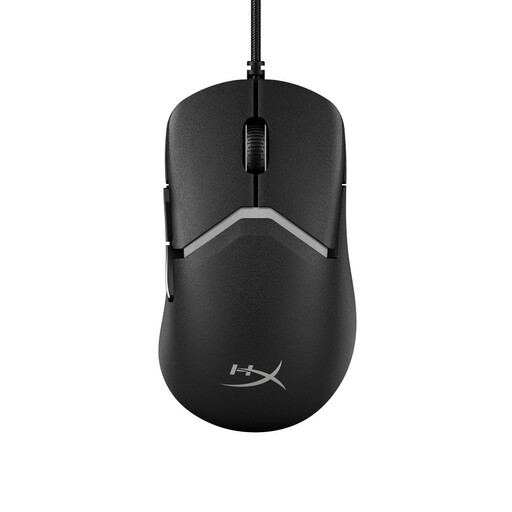
HyperX Pulsefire Saga Pro Wireless Gaming Mouse
This wireless model is worth assessing if you want a conventional mouse for a small set of recurring actions. Check the number and arrangement of its assignable buttons against the commands you use most.
View on Joybuy
 No image available
Razer Cobra Wired Gaming Mouse – Minecraft Edition
Consider this wired variant if you need only a modest set of mouse shortcuts. Check its button placement and software support for your intended operating system before planning your bindings.
View on Joybuy
Common questions
Do I need a 12-button thumb grid for tactical RPGs?
No. A 12-button grid makes sense when you want many commands under your thumb and can operate closely spaced buttons reliably. If you use fewer shortcuts, compare the physical controls on a conventional programmable mouse instead; Logitech G specifies 13 customisable controls for the G502 X LIGHTSPEED, but they are not a 12-button thumb grid.
Can a wireless mouse work for tactical RPGs?
Yes, provided its connection and charging routine suit your setup. Check the exact model’s intended gaming mode: Corsair documents 2.4 GHz, Bluetooth and USB wired operation for the Scimitar Elite Wireless, and describes Bluetooth as suited to everyday computing and office applications.
How should I start assigning tactical shortcuts?
Start with a small set of actions you use repeatedly, then add bindings once you can find each button consistently. If you use a Corsair Scimitar Elite Wireless, Corsair says its three onboard-profile slots can store configured button assignments alongside other settings.
What if an online mouse purchase does not suit me?
For a UK distance purchase, GOV.UK says customers can tell the trader they wish to cancel within 14 days of receiving an item. Check the applicable return steps before ordering, and describe a faulty, damaged or misdescribed mouse to the trader as that problem rather than treating it solely as a change-of-mind return.
Where can I take an unwanted gaming mouse?
Look for an appropriate electrical-equipment collection or reuse route rather than putting the mouse in ordinary household waste. GOV.UK describes designated collection facilities that take some household electrical waste for treatment, reuse and recycling; your local council can direct you to a suitable facility.


