What matters when choosing?
Start with the shortcuts you want on the mouse, then check whether you can reach those buttons comfortably. If your headphones use a USB receiver or cable, include that connection when counting available ports.
| Concern | What to check | Who this matters to |
|---|
| Reachable command mapping |
Count the commands you want off the keyboard; check programmable-button placement and how assignments are saved. |
I regularly use skills and menus and want their controls within easy reach of my thumb. Around 36% of consumers put reachable command mapping first. |
| Comfort over long sessions |
Check handedness, shape and weight, then assess side-button reach with your usual grip. |
During a lengthy turn-based session, I need to click and navigate menus without struggling to reach a button. For around 29% of consumers, comfortable fit and reliable reach are the main concern. |
| Wireless use and lower weight |
Confirm the supported connection modes and charging method; allow a USB port if you plan to use a receiver. |
I prefer moving the mouse without a desk cable, provided it still has enough controls for my shortcuts. Cable-free use and lower moving weight come first for around 21% of consumers. |
| Straightforward setup |
Check that the available controls cover your shortcuts and that the configuration software works on your PC. |
I keep most actions on the keyboard and would rather configure only the mouse buttons I will use. Around 14% of consumers prioritise that simpler setup. |
Command-focused model comparison
This composite ordering considers the models’ stated programmable-control counts alongside documented adjustment and profile features for tactical command mapping. It is not an overall performance ranking; a lighter mouse with fewer controls may suit a player who keeps most shortcuts on the keyboard.
| Rank | Mouse | Main specifications | Why it appears here | Platform |
|---|
| 1 | Corsair SCIMITAR ELITE WIRELESS MMO Gaming Mouse (EU) | 16 programmable buttons; adjustable 12-button side panel; three onboard profile slots. | Corsair specifies the largest button count in this comparison, though using the grid comfortably takes practice. | Corsair UK |
| 2 | Logitech G502 HERO | 11 programmable buttons; onboard profiles; adjustable weights; wired. | Logitech G documents a conventional layout with substantial remapping and profile options. | Logitech G UK |
| 3 | Razer Basilisk V3 | 10+1 programmable buttons; configurable scroll wheel. | Razer documents several command controls and scroll-wheel configuration in this model. | Razer UK |
| 4 | SteelSeries Aerox 5 Wireless | Nine programmable buttons; stated weight of 66 g. | SteelSeries pairs a moderate control count with its stated lower-weight wireless design. | SteelSeries |
| 5 | Razer Viper V3 Pro Wireless Gaming Mouse | Eight programmable controls; stated weight of about 54 g. | Joybuy lists a lighter option for players who leave most tactical commands on the keyboard; it is not the Basilisk V3. | Joybuy |
Gaming mice on Joybuy
These models cover different approaches to tactical RPG controls: a lighter wireless mouse with buttons stated in its title, a command-focused wireless model, and a dual-mode mouse for a setup where most commands remain on the keyboard. Check the precise layout and your hand fit before choosing.
 No image available
Rapoo VT7 MAX Wireless Gaming Mouse, White
Consider this model if you want a lighter wireless mouse for a moderate set of recurring commands. Its title states 10 programmable buttons, a 53 g weight and 8K wireless polling; check whether the button positions suit your grip.
The stated battery life is up to 750 hours at 1000 Hz and requires a driver update for low-power mode. Do not assume that figure applies at the 8K setting.
View on Joybuy
 No image available
ASUS ROG SPATHA X Wireless Gaming Mouse
Consider this model if you want to assess a command-focused wireless layout. Check that its side buttons are comfortable to distinguish and reach, and confirm the connection and charging arrangements against your PC and headphone setup.
If mouse weight matters during long sessions, check it for this exact variant before ordering.
View on Joybuy
 No image available
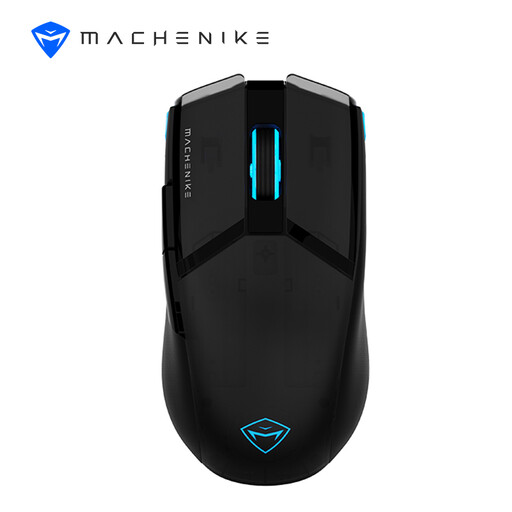
MACHENIKE M7 Pro PAW3395 Dual-Mode Wireless Gaming Mouse
This is worth examining if you keep most tactical commands on the keyboard and want a dual-mode wireless mouse. Its title names a PAW3395 sensor and 26000 DPI; neither figure establishes how many shortcuts you can put on the mouse.
Check the exact programmable-button count, weight and button reach against your intended setup.
View on Joybuy
Frequently asked questions
How many programmable buttons do I need for a tactical RPG?
Count the actions you repeatedly want to move off the keyboard, then choose a layout whose buttons you can reach reliably. Logitech G specifies 11 programmable buttons for the G502 HERO, while Corsair specifies 16 for the SCIMITAR ELITE WIRELESS; its 12-button thumb panel is useful only if you intend to learn and use that many bindings.
Should I connect a gaming mouse by Bluetooth, receiver or cable?
Use a connection mode supported by the exact mouse and suited to your gaming setup. For the SCIMITAR ELITE WIRELESS, Corsair documents 2.4 GHz, Bluetooth and wired operation, but describes Bluetooth as better for everyday computing; check that you have a USB port for the receiver or cable if that is how you plan to play.
Will my button assignments stay on the mouse?
They can on models that store the relevant profiles onboard, but check exactly what the chosen mouse retains. Logitech G says G502 HERO profiles can be saved to the mouse, and Corsair documents three onboard profile slots for the SCIMITAR ELITE WIRELESS.
What should I check before ordering a mouse for use in Great Britain?
Confirm the exact model, included accessories and applicable product-marking information with the seller. Read its warranty and change-of-mind terms separately from your remedies for faulty goods under the Consumer Rights Act 2015; a voluntary returns policy does not replace those statutory remedies.


