Work out whether you need to free a computer USB port, avoid using a socket for charging, or both. If your computer has Bluetooth, a Bluetooth mouse powered by a replaceable AA battery can address both constraints; a rechargeable wireless mouse still needs a charging plan, while a wired mouse avoids battery upkeep only if one USB port can remain occupied. For tower-defence shortcuts, compare reachable programmable controls as well as the connection method.
Who each setup suits
Players preserving ports and sockets
If you need a USB port for another device and have little room for routine charging, look for Bluetooth connectivity and a replaceable-battery option. Check that your computer has working Bluetooth before relying on this arrangement.
Shortcut-focused tower-defence players
If you repeatedly select towers or trigger mapped game actions, accessible programmable controls may matter more to you than avoiding every cable. Compare button placement and configuration software, not just the stated button count.
Players who prefer a wired setup
If a USB port can stay occupied, a wired mouse avoids charging and battery replacement. You still need a cable route that works on your desk and enough reachable controls for your usual commands.
Choosing a connection and controls
For tower-defence play with limited sockets, settle the connection and power question before choosing how many commands you want on the mouse.
Bluetooth with a replaceable AA battery
Choose it when: Your computer has Bluetooth and you want to preserve a USB port without routinely connecting a charging cable.
Trade-off: Batteries need replacing, and the Logitech G309 LIGHTSPEED example has six programmable buttons rather than the nine or more listed for the wired examples here.
Rechargeable wireless with more controls
Choose it when: You want multiple assignable controls and can make room for periodic charging; Bluetooth can preserve a receiver port if both the mouse and computer support it.
Trade-off: Charging remains part of the setup. Razer lists 11 programmable buttons for the Basilisk V3 Pro 35K, but compatible wireless-charging accessories are separate.
Wired multi-button mouse
Choose it when: One USB port can remain dedicated to the mouse and you would rather avoid battery upkeep.
Trade-off: The cable and USB connection remain in use throughout play; extra buttons are useful only if you can comfortably reach and configure them.
| Concern |
What to check |
Who this matters to |
| Keeping sockets free |
Check Bluetooth on both the mouse and computer, then check whether power comes from a replaceable battery or requires charging. |
If my USB ports and charging sockets are already needed elsewhere, I want the mouse to work without claiming either during play. Around 42% of consumers put preserving those connections first. |
| Reaching game commands |
Compare programmable-button count and placement, and confirm that the configuration software supports your intended bindings. |
When I repeatedly select towers or use mapped actions, I want those commands within comfortable reach rather than a crowded layout. Roughly 33% of consumers prioritise accessible shortcuts. |
| Avoiding battery upkeep |
Check that a USB port can stay available and that the cable can be routed comfortably across your desk. |
I would rather leave one port occupied than monitor charging or replace batteries between games. About 25% of consumers put avoiding battery upkeep first. |
Buying mistakes to avoid
-
Assuming wireless means no USB receiver
A wireless mouse may connect through a 2.4 GHz USB receiver. It frees a receiver port through Bluetooth only when the mouse has Bluetooth, the computer supports it and that mode is selected.
Check the exact connection modes and your computer’s Bluetooth capability before ordering.
-
Assuming wireless charging needs no planning
A rechargeable mouse still needs a way to charge. Razer’s stated battery life for the Basilisk V3 Pro 35K also varies with wireless settings, so a headline duration may not describe your intended setup.
Check the charging method and the conditions attached to any battery-life figure. Confirm which compatible charging accessories are supplied with the particular bundle.
A compatible dock or charging puck may be a separate accessory, and either arrangement takes space in the charging setup.
-
Choosing by button count alone
More programmable buttons offer more possible bindings, but a control that is awkward for your grip may be hard to use reliably during play.
Compare the physical layout and software support, then decide which game actions you can comfortably map.
Brands to consider
Logitech G
The G309 LIGHTSPEED is a reference point for players considering Bluetooth alongside a replaceable AA battery.
- Logitech G lists Bluetooth and LIGHTSPEED connectivity with six programmable buttons for this model.
- Six buttons may be too few if you want many mouse-accessible shortcuts; POWERPLAY charging requires a compatible setup rather than being a universal included option.
Razer
The Basilisk models provide different connection choices for players who want numerous programmable controls.
- Razer lists Bluetooth, HyperSpeed Wireless, wired use and 11 programmable buttons for the Basilisk V3 Pro 35K; it lists 10+1 programmable buttons for the wired Basilisk V3.
- The Pro model needs a charging plan, while the wired Basilisk V3 keeps a USB port occupied.
SteelSeries
The wired Rival 5 is another control-focused option when a computer USB port can remain available.
- SteelSeries lists nine programmable buttons for the Rival 5.
- Its wired connection will not free a USB port; check whether its button positions suit your grip and bindings.
Joybuy mice for these setups
These mice offer different ways to approach the same desk constraint: consider Bluetooth where preserving a receiver port matters, or a wired or receiver-based mouse where a USB port can remain in use. Match the connection and control layout to your computer and usual tower-defence commands.
 No image available
ASUS TUF Gaming M4 Wireless — Black
Consider this wireless model if preserving a receiver port is your priority, but confirm its Bluetooth mode works with your computer before relying on that arrangement.
Check the battery contents and operating-system support for your particular setup before ordering.
Joybuy
 No image available
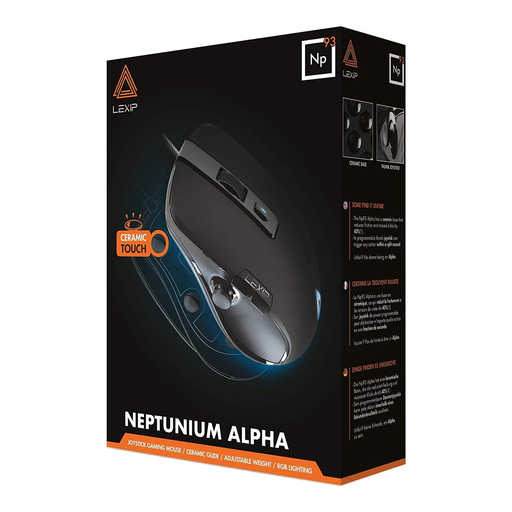
Lexip NP93 Alpha Gaming Mouse
Consider this for shortcut-led play if you can leave a USB port occupied. Check whether its thumb-control layout is comfortable and whether its software can map the game commands you intend to use.
Joybuy
 No image available
Rapoo VT7 MAX Wireless Gaming Mouse — White
Its named 10 programmable buttons make it worth considering when shortcut capacity matters and you can accommodate a wireless receiver and charging. The product title states up to 750 hours of battery life; that figure applies at 1,000 Hz with a driver update to unlock low-power mode, so plan around the settings you will actually use.
Check button placement for your grip. This model should not be treated as a Bluetooth way to free a receiver port.
Joybuy
 No image available
AJAZZ AJ200 AI MC Wireless Gaming Mouse
Consider its named Bluetooth, 2.4 GHz and USB-C connection options if you want to choose between preserving a receiver port and using another mode. Bluetooth requires a compatible computer, and rechargeable use still requires a charging arrangement.
The product title describes a charging dock; confirm the exact bundle contents and variant details before buying.
Joybuy
 No image available
Razer Cobra Wired Gaming Mouse — Minecraft Edition
Choose a wired setup like this only if a USB port can remain occupied during play. If you want dedicated tower-defence shortcuts, confirm the programmable-button count and physical layout before deciding.
Joybuy
Common questions
Will a Bluetooth gaming mouse free a USB port?
Yes, if the computer has working Bluetooth and you connect the mouse in Bluetooth mode rather than through a USB receiver. Logitech G lists both Bluetooth and LIGHTSPEED connectivity for the G309 LIGHTSPEED, so check which mode you plan to use.
Does a rechargeable mouse make sense when plug sockets are scarce?
It can if you have a practical way to charge it periodically. Bluetooth may free a receiver port while you play, but it does not remove the charging requirement; for the Basilisk V3 Pro 35K, check Razer’s charging options and whether a compatible dock is part of the particular bundle.
Are more programmable buttons always useful for tower defence?
No. Extra buttons give you more possible bindings only if you can reach them comfortably and configure the actions you use. Compare the layout and software alongside the count: Logitech G lists six programmable buttons for the G309 LIGHTSPEED, SteelSeries lists nine for the Rival 5, and Razer lists 10+1 for the wired Basilisk V3.
What should I do if a mouse bought from a UK trader is faulty?
Contact the selling trader promptly and keep your proof of purchase. The UK Consumer Rights Act 2015 provides a short-term right to reject qualifying faulty goods with a 30-day time limit; when that period begins and which remedy applies depend on the statutory conditions and your circumstances. Other remedies may remain relevant after the short-term period.


