For turn-based tactics, choose a mouse that fits your hand and has enough accessible buttons for the commands you will actually bind, rather than choosing by maximum DPI alone. A wired model suits a fixed student-room desk; if you also use a laptop elsewhere, a wireless model with both Bluetooth and 2.4 GHz offers more connection options, though battery upkeep and the exact button layout still matter.
Who is this for?
Shortcut-focused tactics players
If you play mostly at one desk, you may want mouse bindings for recurring camera, map or interface commands. Button capacity varies:the product information lists 11 programmable buttons for the Logitech G502 Hero, while Razer specifies five for the DeathAdder Essential. The useful number is the number you can reach and remember.
Laptop-and-desk students
If your mouse moves between a student-room desk and a laptop, connection options may matter more than a dense button layout. Razer and SteelSeries describe wireless models with Bluetooth and 2.4 GHz options; check which modes the exact mouse offers and whether your laptop can use them.
Long-session comfort seekers
For extended planning sessions, shape and button placement deserve attention before sensor figures. Razer describes the DeathAdder Essential as right-handed, and SteelSeries describes an ergonomic form for the Rival 3 Wireless. Neither description establishes how a mouse will fit your hand.
What matters when choosing?
For turn-based tactics in a student room, decide which commands need mouse buttons, then choose a connection method for the places you play and check the shape against your grip.
| Concern |
What to check |
Who this matters to |
| Usable shortcuts |
Count the commands you would bind. Check button placement, remapping software for the exact model and whether your game accepts the intended assignments. |
If I repeatedly use the same map or interface commands, I want buttons I can reach without learning an unnecessary layout. Around 33% of consumers put practical shortcut access first. |
| Flexible connections |
Confirm whether the exact model offers Bluetooth, a 2.4 GHz receiver or both; check its battery arrangement if you move it between setups. |
Moving between a room desk and a laptop makes it useful to connect without rearranging my workspace. For around 25% of consumers, that flexibility is the primary need. |
| Hand comfort |
Check handedness, dimensions and whether your grip can reach the side buttons comfortably; an ergonomic description cannot establish individual fit. |
During a long planning session, I need a shape I can handle comfortably more than another sensor setting. Hand fit comes first for around 25% of consumers. |
| Low upkeep |
Decide whether you prefer a cable or a battery-powered mouse, and check the battery type and replacement routine of any wireless model. |
If the mouse stays at my desk, I would rather avoid keeping track of batteries than gain a connection option I rarely use. Around 17% of consumers prioritise that simpler routine. |
Buying pitfalls
-
Choosing by maximum DPI alone
A maximum DPI figure does not establish whether a mouse fits your hand or makes its buttons useful for turn-based commands.
Set a sensitivity you can control in your system and game, then compare shape, connection method and reachable controls.
-
Assuming an ergonomic shape will fit
Razer and SteelSeries describe ergonomic forms for particular mice, but comfort depends on your hand and grip.
Check handedness, dimensions, button reach and the retailer's return terms before committing to a shape.
-
Forgetting battery upkeep
A lighter battery configuration can change how long a wireless mouse runs. SteelSeries says the Rival 3 Wireless can operate on one or two AAA batteries; using one lowers weight but reduces maximum battery life.
Check the battery system of the exact model and whether keeping spare or rechargeable cells suits your routine. For UK disposal, GOV.UK directs consumers to take spent batteries to an appropriate recycling collection point.
-
Assuming wireless improves tactics by itself
Wireless connectivity can make moving between setups easier, but it does not establish that a mouse's shape or controls suit your game.
If you play at one desk, compare button layout and hand fit with a wired model before deciding whether cable-free use matters to you.
Brands to consider for these mouse types
Logitech G
Its G502 Hero and G305 Lightspeed illustrate different button-layout and connection choices, rather than a single approach that suits every desk.
- The product information lists 11 programmable buttons for the G502 Hero and six for the wireless G305 Lightspeed.
- Check whether you would use the G502 Hero's extra controls; do not assume the G305 has Bluetooth or that either shape suits your grip.
Razer
The DeathAdder Essential, Orochi V2 and DeathAdder V2 X HyperSpeed cover distinct wired and wireless needs.
- Razer specifies five independently programmable buttons for the right-handed DeathAdder Essential, an under-60 g design with dual-mode connectivity for the Orochi V2, and seven programmable buttons with Bluetooth and 2.4 GHz options for the DeathAdder V2 X HyperSpeed.
- These specifications do not establish personal comfort. Check the exact shape, battery arrangement and variant before choosing.
SteelSeries
The Rival 3 Wireless is relevant if you want Bluetooth and 2.4 GHz options with a choice of battery configurations.
- SteelSeries specifies both wireless modes, and its support guidance says the mouse can use one or two AAA batteries.
- One battery lowers weight but reduces maximum battery life; the stated ergonomic form still needs an individual fit check.
Joybuy product choices
These mice offer different ways to serve a student-room tactics setup: wired desk use, wireless shortcut access, or a choice of connections when moving between a desk and laptop. Compare each model's actual controls and connections rather than treating a shared gaming label as the same feature set.
 No image available
Razer DeathAdder V3 Ergonomic Gaming Mouse
Consider this for a fixed desk if a simpler button layout meets your shortcut needs. Check the right-handed shape against your grip before choosing it for long sessions.
Joybuy
 No image available
Rapoo VT7 MAX Wireless Gaming Mouse, White
Consider this if you want several mouse-bound commands without a cable. Its product name specifies 10 programmable buttons and a 53 g weight; check its receiver connection and hand fit if you plan to carry it between setups.
Joybuy
 No image available
AJAZZ AJ200 AI MC Tri-Mode Gaming Mouse with Charging Dock
Consider this when switching between a laptop and desk setup. The product name specifies Bluetooth, 2.4 GHz and USB-C modes; confirm the dock contents for this variant, and check the exact weight if it affects your choice.
Joybuy
 No image available
ONIKUMA CW905 Wired Gaming Mouse
Consider this for a desk-based setup if you prefer a cable to battery upkeep. If shortcut assignments are central to your choice, confirm which buttons the exact model lets you remap and what software they require.
Joybuy
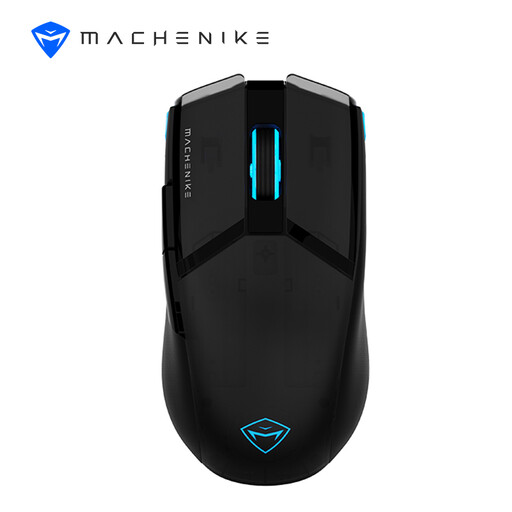 No image available
MACHENIKE M7 Pro PAW3395 Dual-Mode Gaming Mouse
Consider this if you want to choose between a wired connection and 2.4 GHz wireless use at your desk. Confirm the number of assignable buttons, software compatibility and hand fit before relying on it for tactics shortcuts.
Joybuy
Frequently asked questions
Do I need an MMO-style mouse for turn-based tactics?
No, unless you have enough recurring commands to make its extra buttons useful. Razer specifies five programmable buttons for the DeathAdder Essential; the product information lists 11 for the Logitech G502 Hero; map out your intended bindings and check whether you can reach the controls comfortably.
Should I choose wired, 2.4 GHz wireless or Bluetooth?
Wired suits a mouse that stays at one desk and avoids battery management; a dual-mode wireless mouse offers more options if you also use a laptop. SteelSeries and Razer specify Bluetooth and 2.4 GHz options for particular models, so confirm both the exact mouse's modes and your laptop's connection options.
What should I check about wireless mouse batteries?
Check the exact model's battery type and how its configuration affects use. SteelSeries says the Rival 3 Wireless accepts one or two AAA batteries: one lowers weight but reduces maximum battery life. If you plan to use rechargeable cells, confirm compatibility in the product documentation.
How should I dispose of an old mouse or its batteries in the UK?
Take electrical waste and spent batteries to an appropriate recycling collection point rather than putting them in household rubbish. GOV.UK gives this guidance for electrical products and batteries; check your local collection arrangements for the mouse and remove any replaceable batteries for separate recycling.


