Few spare wall sockets do not, by themselves, make a wireless mouse the simpler choice: a wired mouse uses a computer USB port and avoids mouse-battery charging, while wireless use brings a battery routine and may still need a USB receiver. For long zoo-building sessions, choose a shape that suits your grip, then weigh cable clutter against charging needs and decide how many accessible controls you would use.
Who this choice affects
Players with few spare sockets
If you build and manage a virtual zoo for hours at a time, compare a wired mouse’s computer USB connection with the battery and charging arrangements of wireless models. Neither requires a dedicated charging dock simply because you play for long sessions.
Builders who use shortcuts
If you regularly remap commands or adjust sensitivity, check whether the controls are reachable with your grip and whether the intended assignments need configuration software. Logitech G lists 11 programmable buttons for the wired G502 HERO; the number alone does not tell you whether their placement will suit your hand.
Players focused on hand comfort
For extended planning sessions, start with shape and your usual grip rather than a headline DPI figure. SCAN UK’s gaming-mouse buying guide identifies shape and grip as key comfort considerations.
What to consider when choosing
Decide whether a computer USB port and cable are acceptable before choosing a wireless connection. Qi charging is an option on certain wireless mice, not a separate way to avoid checking the charging device’s power requirements.
| Concern |
What to check |
Who this matters to |
| Power and ports |
Check free computer USB ports, the wireless battery arrangement and whether any charging accessory needs power. |
If I have few spare wall sockets, I want a mouse I can keep using without adding an awkward charging routine. Around 43% of consumers put power and setup simplicity first. |
| Accessible shortcuts |
Check the exact model’s control layout and the software needed for your intended assignments. |
When I frequently change tools or settings while building, I want controls I can reach without disrupting my grip. Shortcut access is the main concern for roughly 29% of consumers. |
| Grip and movement |
Check shape, handedness and whether a cable would bother you on your desk. |
During a long management session, I want the mouse to feel manageable in my usual grip. For about 28% of consumers, comfort comes before extra controls or the power arrangement. |
Buying pitfalls
-
Confusing wall sockets with computer USB ports
A wired mouse connects to the computer, while a 2.4 GHz wireless mouse may need a USB receiver. Having a spare mains socket does not resolve a shortage of computer ports.
Count both kinds of connection. If USB ports are scarce, check whether the mouse and your intended computer both support Bluetooth and whether you want to use that mode.
-
Assuming a Qi charging pad comes with the mouse
Corsair says the DARK CORE RGB PRO SE can charge with a Qi-compatible device; compatibility does not establish what is in a particular retail box.
Check the bundle, pad compatibility and the pad’s own power requirements before planning around Qi charging.
If you do not already have a compatible charging device, using this feature may require an additional accessory.
-
Choosing button count before checking fit
Extra controls are less useful if their placement conflicts with your grip during a long session. SCAN UK advises starting with mouse shape and how you hold it.
Consider your usual palm, claw or fingertip grip, then check handedness, thumb-rest placement and access to the side controls.
-
Putting old electrical equipment in household rubbish
GOV.UK guidance says electrical products and batteries carrying the crossed-out wheelie-bin symbol should not go in household rubbish.
Use an appropriate electrical-waste or battery collection route, following local instructions for the mouse and any removable batteries.
Brands to consider
Logitech G
Its G502 models illustrate the choice between a wired connection and wireless operation with multiple configurable controls.
- Logitech G lists 11 programmable buttons for the wired G502 HERO and 13 programmable controls for the G502 X LIGHTSPEED; G HUB is used to configure controls.
- The wired G502 HERO needs a computer USB connection. For a wireless variant, check the exact charging arrangement and box contents before buying.
Razer
The right-handed Basilisk V3 X HyperSpeed is worth considering if you want a choice between 2.4 GHz wireless and Bluetooth on a compatible device.
- Razer lists nine customisable controls for this model and advertises battery life of up to 285 hours.
- Treat that battery figure as Razer’s claim rather than an expected runtime for every setup; check the battery arrangement, usage conditions and control placement.
Corsair
The DARK CORE RGB PRO SE is relevant if you want 2.4 GHz wireless, Bluetooth and wired modes, particularly when Qi charging already fits your desk setup.
- Corsair lists eight programmable buttons and says this model can charge through USB-C or a Qi-compatible charging device.
- Check whether the intended Qi pad is compatible, how it receives power and what the particular retail bundle includes.
Gaming mice on Joybuy
These wired and wireless mice offer different ways to manage cable clutter and charging during virtual-zoo building. Check computer USB access and hand fit alongside the controls you intend to use.
 No image available
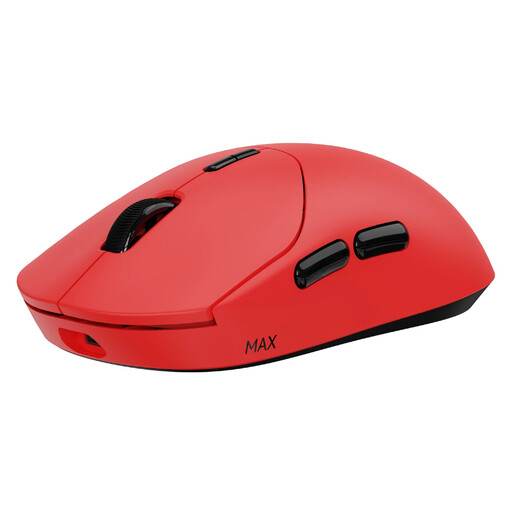
RAPOO VT2 MAX Wireless Gaming Mouse, Red
Consider this wireless model if you want to avoid a mouse cable while keeping configurable shortcuts within reach.
The product title lists a 53 g weight and 10 programmable buttons. Its advertised battery life of up to 750 hours applies at 1000 Hz and requires a driver update to enable low-power mode; check that arrangement, receiver access and grip fit against your setup.
View on Joybuy
 No image available
Lexip Gaming Pu94 Wired Mouse
Choose the wired route if avoiding a mouse-charging routine matters more than removing its cable. Check that your computer has a suitable free USB port and that the shape works with your grip for long sessions.
View on Joybuy
 No image available
Razer Cobra Wired Gaming Mouse – Minecraft Edition
This wired variant suits a setup where you would rather use a computer USB connection than manage mouse charging. If weight or remapped controls will affect your choice, confirm the exact weight and button layout for this edition before buying.
View on Joybuy
 No image available
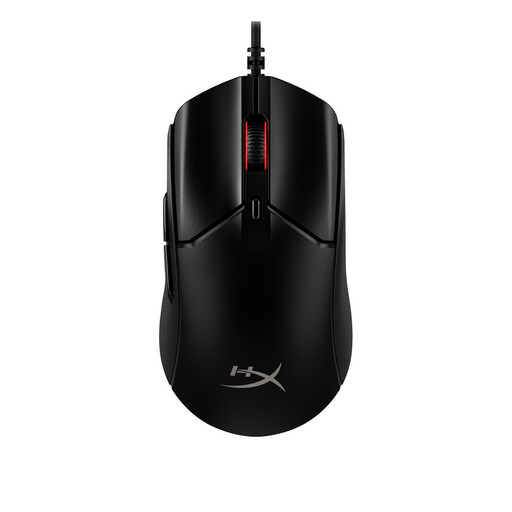
HyperX Pulsefire Haste 2 Wired Gaming Mouse, Black
This wired option avoids a mouse-battery routine if a cable and computer USB connection suit your desk. If you plan to customise controls, check that HyperX NGENUITY works with your intended computer and that the available assignments meet your needs.
View on Joybuy
 No image available
HyperX Pulsefire Fuse Wireless Gaming Mouse
Consider this model if removing the mouse cable matters more than avoiding battery charging. Its wireless setup uses a computer USB receiver; check port access, the charging routine and right-handed fit, and confirm software compatibility if you intend to remap controls.
View on Joybuy
Common questions
Does a wireless gaming mouse need a free wall socket?
Not necessarily: charging arrangements vary, and some mice can charge through a computer USB connection. A 2.4 GHz receiver may still occupy a computer USB port, while a Qi charging device has its own power and compatibility requirements.
Is a wired mouse simpler when plug sockets are scarce?
It can be if your computer has a suitable free USB port and you do not mind a cable. A wired mouse avoids a mouse-battery charging routine, but it will not solve a shortage of computer USB ports.
Should I choose Bluetooth or 2.4 GHz wireless?
Choose the mode supported by both your exact mouse and computer, then check the manufacturer’s guidance for your intended use. Bluetooth needs a compatible host; 2.4 GHz operation may need a USB receiver, so the two modes do not place the same demands on your available ports.
How should I dispose of an old mouse or its removable batteries?
GOV.UK advises that electrical products and batteries carrying the crossed-out wheelie-bin symbol should not go in household rubbish. Follow local collection instructions for electrical equipment and use an appropriate battery collection route for removable batteries.


