Small-desk wheel users
If a wheel, keyboard or shifter shares your desk, the monitor’s stand or mounting plan matters as much as its screen diagonal.


Start with the space left after fitting your wheel and controls: a compact 23.8-inch Full HD LCD suits a tight setup, while a 27-inch QHD LCD gives you more image detail if its stand fits. Match the refresh rate to the frames your game system can deliver through your chosen connection. Consider OLED or a curved screen after weighing static on-screen elements and desk depth.
If a wheel, keyboard or shifter shares your desk, the monitor’s stand or mounting plan matters as much as its screen diagonal.
If you want road and cockpit detail alongside fluid motion, compare 27-inch QHD models with the frame rates your system achieves in the rally game you play.
If you are considering OLED or a particularly high refresh rate, weigh those display characteristics against prolonged static HUD or desktop use and your system’s output.
Measure the space with your controls installed before choosing a screen size. Then compare resolution and refresh rate with your game system and connection; treat panel technology and curvature as further choices.
| Concern | What to check | Who this matters to |
|---|---|---|
| Desk fit | Measure usable width and depth with the wheel fitted; compare the stand footprint or a compatible VESA mounting plan. | If my wheel and shifter take up the desk, I need the monitor to fit without displacing the controls. Around 40% of consumers put physical fit first. |
| Detail and motion | Compare Full HD with QHD at the screen size you can accommodate, then check the stated refresh rate and adaptive-sync support. | I want to make out road and cockpit detail while keeping rally-stage motion fluid. Roughly 30% of consumers prioritise that balance. |
| System and connection | Check in-game frame rates at your intended settings and the refresh mode available through your device’s port and cable. | If my system cannot supply the frames or the connection caps the mode, a higher panel maximum has less value to me. About 20% of consumers make output compatibility their primary concern. |
| Display technology | For OLED, consider prolonged static HUD or desktop use; for a curved model, check its base depth. | I would choose OLED or curvature for the viewing experience only after deciding that its care or space trade-off suits my setup. Around 10% of consumers put those display preferences first. |
A 240Hz or 280Hz monitor cannot show that many distinct game frames each second if the system produces fewer. Monitor refresh rate is distinct from the frame rate delivered by the PC.
Check representative frame rates in your rally game at the resolution and settings you intend to use.
Connection limits can differ on the same monitor. Dell lists QHD at up to 180Hz over DisplayPort for the Alienware AW2725DM, but QHD at up to 144Hz over its listed HDMI mode.
Check the exact monitor mode alongside your device’s output port and the cable you plan to use.
A fixed HUD, telemetry display or desktop layout makes image retention worth considering during prolonged static-heavy use. RTINGS identifies burn-in as an ongoing concern in its accelerated testing; that is not a prediction for an individual monitor in ordinary mixed use.
Consider how long the same elements stay on screen and follow the manufacturer’s panel-care guidance.
A 27-inch screen may leave too little room for a wheel even when the panel itself appears to fit. BenQ specifies a 252.5mm stand depth and 100×100mm VESA mounting for the EX2710Q, illustrating the dimensions to compare.
Measure the desk with your controls installed, then check the chosen monitor’s stand and mounting specifications.
Using an arm instead of the supplied stand may require a compatible mount and a suitable place to attach it.
These model lines illustrate different screen-size and panel choices; check the specifications of the particular monitor you are considering.
AOC’s listed models span a compact Full HD option and a larger QHD option for different desk-space priorities.
Alienware has a 27-inch QHD Fast IPS model and a 26.7-inch-viewable QHD QD-OLED model with different refresh-rate specifications.
The LG UltraGear 27GS95QE-B is a 27-inch QHD OLED option for readers considering that panel type.
The EX2710Q provides published stand and mounting dimensions, while the EX2710R is a separate curved-screen option.
These QHD monitors suit readers considering a roughly 27-inch screen for rally practice, including LCD and OLED options. Check each model’s physical fit and your game system’s output before choosing; this selection does not establish that every screen will fit a small desk.
 No image available
Consider this OLED model if a 27-inch screen fits beside your controls and you want a high refresh-rate ceiling. Its title specifies QHD, 240Hz and 0.03ms response time. Check stand clearance and your system’s frame rate; prolonged static HUD or desktop use also warrants attention to panel care.
 No image available
This is another OLED route if you can accommodate a 26.5-inch screen and want QHD resolution. Its title specifies 2560×1440, 240Hz and 0.03ms response time. Check the stand dimensions with your wheel fitted, as well as game frame rates and panel-care guidance for static content.
 No image available
Consider this LCD model when a 27-inch QHD screen fits and you want to balance image detail with a high refresh rate. Its title states a 180 refresh rate, 0.5ms response time and Adaptive Sync. Check the stand footprint and the refresh mode available through your chosen connection.
 No image available
This LCD option is relevant if you have space for 27-inch QHD and want a higher refresh-rate ceiling. Its title specifies 2560×1440 and 220Hz. Confirm the stand or mounting dimensions and the refresh mode supported by your system and chosen input.
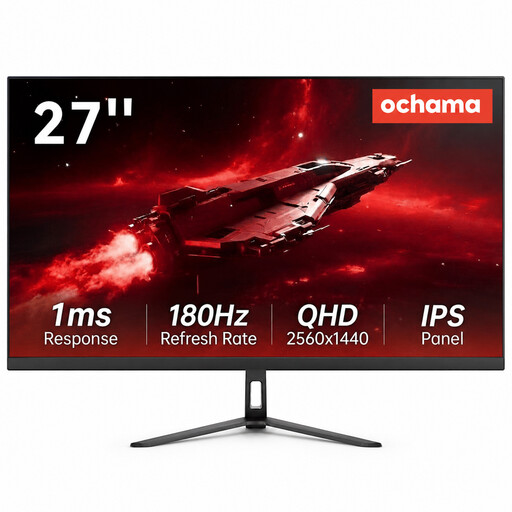 No image available
Consider this LCD model if a 27-inch QHD display fits your rally desk. Its title states an IPS panel and 180Hz refresh rate. Check the stand footprint, input-specific refresh limits and whether the advertised keyboard is included in the offer you select.
A 23.8–24-inch screen is the more compact route, but the stand still needs checking. Choose 27 inches only after measuring the space left by your wheel and other controls against that model’s stand dimensions or a compatible mounting plan; BenQ, for example, specifies a 252.5mm-deep stand for the EX2710Q.
No: the monitor cannot display more distinct game frames than your system produces. Refresh rate and game frame rate are different, so check performance in the rally game you play at your intended resolution and settings.
Not necessarily; the available mode depends on the particular monitor and connection. Dell lists QHD at up to 180Hz over DisplayPort for the Alienware AW2725DM, compared with QHD at up to 144Hz over its listed HDMI mode. Check both your monitor and source device before choosing a cable.
OLED remains an option, but prolonged static-heavy use makes image retention a relevant trade-off. RTINGS identifies burn-in as a concern in accelerated testing involving static content; that does not predict the outcome for a particular monitor in ordinary mixed use. Consider your usage pattern and follow the model’s panel-care guidance.