For a close seating position at a small desk, start by considering a roughly 24-inch high-refresh monitor that you can see and position comfortably while following changing road-surface cues. A 27-inch QHD screen offers more pixels for inspecting the line, but choose one only if it fits your desk and viewing position and your gaming device can deliver the resolution and frame rate you want. In either case, check variable refresh rate (VRR), connection support and response behaviour rather than relying on the headline refresh rate alone.
Who these choices suit
Close-seated small-desk racers
If you sit directly in front of the screen, a compact display is a sensible starting point for keeping the whole image in view. RTINGS identifies smaller 24-inch monitors as suitable for this seating position; check the stand footprint as well as the panel size.
Wet-condition line readers
If you are following changing road texture, reflections and braking markers, look beyond the refresh-rate figure. RTINGS explains that slow pixel response can produce blur or inverse ghosting, while VRR can synchronise the display with a changing source frame rate.
Detail-first racers with more desk clearance
If a 27-inch screen fits your desk and viewing distance, QHD gives you more native pixels than Full HD for examining the road and reference points. Check what frame rate your gaming device can deliver at QHD before choosing a high-refresh model.
What matters when choosing
For one monitor used to learn wet racing lines at a small desk, weigh motion readability, physical fit and image detail against your own primary need.
Compact Full HD screen
Choose it when: You sit close and need to scan the whole track image without making room for a larger panel.
Trade-off: Full HD has fewer native pixels than QHD for examining fine detail.
27-inch QHD screen
Choose it when: You have enough desk clearance and viewing distance and want more pixels for inspecting the racing line.
Trade-off: The larger screen takes more physical and visual space; check your gaming device’s frame rate at QHD.
| Concern |
What to check |
Who this matters to |
| Motion readability |
Refresh rate at your intended resolution; VRR over your chosen connection and measured response behaviour where available. |
When road-surface cues change quickly, I want moving references to remain readable rather than choosing by the Hertz figure alone. Around 42% of consumers put motion readability first. |
| Desk fit and viewing position |
Available width and depth, dimensions with the stand, and the adjustment or mounting options you need. |
If I sit close to a wheel and screen, I need to see the whole display comfortably without crowding the desk. Desk fit comes first for around 33% of consumers. |
| Detail for inspecting the line |
Full HD versus QHD resolution, your viewing distance and your device’s expected frame rate at the chosen settings. |
I can make room for a larger screen and want more pixels to examine the road and reference points. For around 25% of consumers, that detail is the primary concern. |
Buying pitfalls
-
Choosing by the highest refresh-rate number alone
Refresh rate is only one part of how motion looks. RTINGS notes that response behaviour affects blur and inverse ghosting, while VRR relates the display’s refresh to the source frame rate.
Check your game’s likely frame rate, the intended resolution and connection, and independent motion measurements before choosing a higher-refresh model.
-
Treating every “1ms” claim as equivalent
Manufacturers may quote different response metrics, including MPRT and grey-to-grey (GtG), sometimes for particular settings. Those figures are not interchangeable measurements of real-world motion.
Check the metric and mode for the exact model, then look for measured response and overshoot results if motion clarity will decide your purchase.
-
Picking 27-inch QHD before measuring the desk
A larger screen provides more physical display area but can take up too much space or be harder to scan when you sit close.
Measure your clear desk area, wheel-base clearance and normal viewing distance. If considering a monitor arm, confirm the monitor’s mounting pattern and the arm’s load rating.
-
Assuming a visible product page means immediate availability
A listing can remain visible when an item cannot currently be ordered.
Check the live availability, seller, warranty terms and exact model on the product page before placing an order.
Relevant brands to consider
Dell
Dell’s S2425HSM is a compact option for a close-seated setup rather than a larger QHD route.
- Dell UK specifies a 23.8-inch Full HD display with 144Hz refresh and built-in speakers; its product information also describes stand adjustment.
- Its Full HD resolution provides fewer native pixels than the 27-inch QHD models discussed here.
MSI
MSI has relevant compact curved Full HD and larger flat QHD models for different desk and detail priorities.
- MSI specifies the 27-inch MAG 274QF at 2560 × 1440 and 180Hz; its 24-inch G2422C is specified as a curved Full HD 180Hz model.
- The G2422C’s quoted 1ms figure is MPRT, so do not compare it directly with another model’s GtG claim.
LG UltraGear
The LG UltraGear 27GS60QC-B is a curved QHD option for someone who has room for a 27-inch single-screen setup.
- LG UK specifies 2560 × 1440 resolution, 180Hz refresh and 1000R curvature for this model.
- Check whether its curved 27-inch form suits your close viewing position and available desk depth.
BenQ MOBIUZ
The EX270QM is a 27-inch QHD route for a setup where a high-refresh screen and adjustable positioning are priorities.
- BenQ specifies 240Hz refresh and 100mm of height adjustment for the EX270QM.
- Check the desk fit and your game’s frame rate before treating its 240Hz specification as a reason to choose it.
Joybuy product choices
These choices include compact Full HD screens and larger QHD or dual-mode UHD/FHD monitors. Compare their fit and your device’s output before deciding which route suits your small-desk racing setup.
 No image available
MSI MAG 275UPD E14 27-inch UHD/FHD Dual Mode monitor
Consider this if you have space for a 27-inch screen and want to choose between resolution and refresh-rate modes.
The stated Dual Mode options are UHD at 144Hz or Full HD at 288Hz, with Adaptive Sync. Check that your device and connection support the mode you intend to use, and measure your viewing distance before choosing a 27-inch display.
View on Joybuy
 No image available
Samsung Odyssey G6 S27DG612 27-inch QHD OLED monitor
This is a larger-screen option if QHD detail matters to you and your desk can accommodate a 27-inch display.
Its stated refresh rate is 240Hz. Check the frame rate and connection your device can provide at QHD, and allow enough viewing distance to scan the whole screen comfortably.
View on Joybuy
 No image available
KOORUI MG24A12FV2 24-inch curved Full HD monitor
Consider this compact option if a curved screen suits your close seating position.
The product title specifies a VA panel, 1500R curve, 180Hz refresh, Adaptive Sync, tilt adjustment and VESA compatibility. Confirm its connections for your device before ordering.
View on Joybuy
 No image available
HKC G27H2DPro 27-inch QHD Fast IPS monitor
This model is worth considering if you want a larger pixel canvas for studying the line and can fit a 27-inch screen.
The stated resolution is 2560 × 1440, with a 220Hz refresh rate. Check the refresh rate your device can deliver at QHD over your intended connection.
View on Joybuy
 No image available
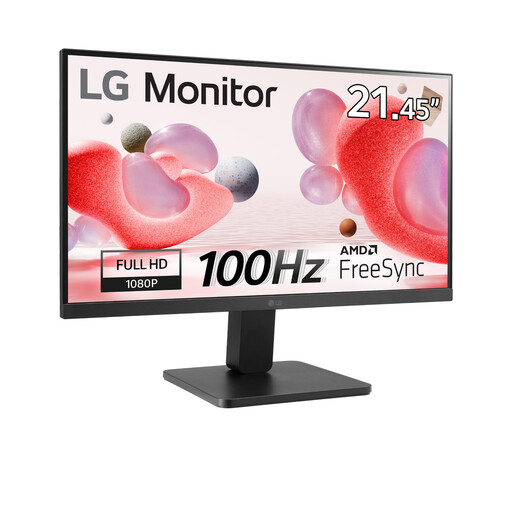
LG 22-inch Full HD VA monitor
If a 24-inch screen crowds your desk, this 22-inch model offers a smaller display to assess for your seating position.
Its stated specifications include 100Hz refresh and HDMI. That refresh-rate figure is below the higher-refresh options here, so check whether it meets your motion priorities and is available over your intended connection.
View on Joybuy
Common questions
What monitor size should I consider for a small racing desk?
Start with a roughly 24-inch screen if you sit directly in front of it, then consider 27 inches only if the desk and viewing distance allow it. RTINGS identifies smaller 24-inch monitors as suitable for direct, close seating; measure the full monitor dimensions with its stand before buying.
Is 180Hz automatically better than 144Hz for reading a wet racing line?
No: the difference you can use depends on the frames your game device delivers and on the monitor’s response behaviour. Check the refresh rate and VRR support at your chosen resolution and connection, and look at independent motion measurements where available.
Can I compare two monitors’ “1ms” claims directly?
Not unless the figures use comparable methods and settings. A quoted MPRT value is not the same measurement as GtG; check the stated mode and look for measured pixel response and overshoot when motion clarity matters to your choice.
What should I check before relying on VRR?
Confirm that the exact monitor, gaming device and connection support a compatible VRR mode at the resolution and refresh rate you plan to use. RTINGS explains that VRR synchronises monitor refresh with the source frame rate, which can help when that frame rate changes.


