Choose the monitor around the view you want in your space simulation and the resolution your PC can deliver. A 34-inch ultrawide keeps the native pixel count below the larger-format options discussed here; a 45-inch 5120 × 2160 screen prioritises vertical detail, while a 49-inch 5120 × 1440 screen prioritises horizontal span. Check the game’s aspect-ratio and cockpit-interface behaviour, the complete PC-to-monitor connection, physical fit and OLED care before committing.
Who these monitors suit
Cockpit-view immersion seekers
If a wide, curved view is the reason for setting aside a games room, decide how much horizontal span you want before choosing a diagonal size. LG, Samsung and ASUS describe relevant 34-inch and 45-inch ultrawide models and a 49-inch 32:9 model, but the intended game still needs to make useful use of that width.
Detail-first explorers
If fine detail and room for cockpit instruments matter more than the widest possible view, compare vertical resolution as well as width. LG specifies 5120 × 2160 for its 45GX950A; plan around the PC signal needed for that native mode.
HUD-heavy long-session players
If instruments or maps remain visible for long sessions, include OLED care and the exact model’s warranty terms in your decision. ASUS lists OLED Care Pro and a three-year warranty including panel burn-in for the ROG Strix OLED XG34WCDG; those model-specific provisions are not a guarantee against every panel issue.
What to check before choosing
34-inch ultrawide
Choose when: You want a curved 21:9 cockpit view without moving to a 5120-pixel-wide native resolution; ASUS and Dell list 34-inch 3440 × 1440 OLED examples.
Accept: The screen is less expansive than the 45-inch and 49-inch formats, and OLED use still calls for panel care.
45-inch 5K2K ultrawide
Choose when: Vertical detail takes priority; LG specifies a 5120 × 2160 native mode for the 45GX950A.
Accept: That native mode has more pixels to render than either 3440 × 1440 or 5120 × 1440, and the large curved screen needs suitable desk or mount space.
49-inch 32:9 super-ultrawide
Choose when: An uninterrupted horizontal cockpit view is your priority and the intended game and interface work well at 32:9; Samsung specifies a 5120 × 1440 example.
Accept: A 1440-pixel-tall view has less vertical room than 5120 × 2160, and game menus and HUD placement need checking individually.
| Concern |
What to check |
Who this matters to |
| Usable cockpit view |
Check the game’s 21:9 or 32:9 support and HUD layout; measure the available desk or mount space. |
If I want the cockpit to fill my view, extra width only helps when the instruments remain comfortable to use. Around 36% of consumers put that usable view first. |
| PC and resolution fit |
Match the intended native resolution and refresh mode to the GPU output, monitor input and cable. |
I would rather know that my PC can run the display mode I intend to use before choosing a denser screen. That connection and resolution fit is the main concern for around 29% of consumers. |
| Persistent HUD and OLED care |
Read the exact model’s care instructions and warranty terms; plan how static interfaces will be managed. |
When cockpit instruments stay in place for long sessions, I need a panel-care routine I am willing to follow. Around 21% of consumers make that their primary concern. |
| Motion during fast play |
Check the refresh mode available through the chosen input and whether the PC can sustain suitable game performance. |
Quick turns and combat make smooth motion more important to me than additional screen scale. Around 14% of consumers prioritise that need. |
Buying pitfalls
-
Choosing 32:9 before checking the game
A monitor’s 32:9 specification cannot tell you whether a particular simulation places its menus, cut-scenes and cockpit instruments comfortably across the screen.
Check the exact game and settings at your intended resolution before making screen width the deciding factor.
-
Treating two 5120-pixel-wide screens as equivalent
LG specifies 5120 × 2160 for its 45GX950A, while Samsung specifies 5120 × 1440 for the cited Odyssey OLED G95SD. Their shared horizontal pixel count does not give them the same vertical space.
Compare the full native resolutions: decide whether more vertical room for detail and instruments or a wider 32:9 layout matters more to you.
-
Buying for refresh rate alone
The mode you can use depends on the selected resolution and the connection from the PC through the cable to the monitor; an advertised maximum is not a promise about in-game frame rate.
Check the exact model’s input specifications alongside your GPU outputs and intended game settings.
-
Assuming an OLED protection feature removes the need for care
ASUS describes care functions for its XG34WCDG, but persistent cockpit elements still make panel-care habits and warranty conditions relevant.
Use the supplied care functions, avoid leaving a static cockpit unattended where practical, and read the warranty for the exact model before buying.
Relevant brands to consider
LG UltraGear
LG’s 45GX950A represents the large, detail-focused 21:9 route.
- LG specifies a 45-inch 5120 × 2160 OLED display, 165Hz native mode and a 330Hz lower-resolution dual mode.
- Check whether your PC can drive your chosen mode and whether the curved display fits the desk or mount.
Samsung Odyssey
Samsung’s 49-inch Odyssey OLED G95SD represents the 32:9, 5120 × 1440 route.
- Samsung specifies a 240Hz refresh rate for this model.
- Confirm that the simulation and its interface suit 32:9; this resolution has 1440 vertical pixels, not 2160.
ASUS ROG
The ROG Strix OLED XG34WCDG is a 34-inch 3440 × 1440 ultrawide option.
- ASUS lists a 175Hz maximum refresh rate, OLED Care Pro and a three-year warranty including panel burn-in for this model.
- Its care features do not remove the need to manage a persistent HUD; check the applicable warranty terms.
Dell Alienware
Dell’s Alienware AW3426DW is a 34-inch 3440 × 1440 QD-OLED option for shoppers considering high-refresh ultrawide play.
- Dell specifies a 280Hz refresh rate and an adjustable stand for this model.
- Its 34-inch format will not give the physical span of the cited 45-inch or 49-inch routes.
MSI
MSI’s MAG 341CQP QD-OLED X28 is another 34-inch 3440 × 1440 route.
- MSI specifies 280Hz, HDMI 2.1, DisplayPort 1.4a and USB-C DisplayPort Alt Mode for this exact model.
- Choose its 34-inch format for the view it provides, rather than expecting the scale of a 45-inch or 49-inch panel; check the connection needed for your intended mode.
Joybuy monitors for these setups
These monitors offer different ways to build a curved simulation-room view, from a 34-inch ultrawide to wider 49-inch formats. Compare each one’s stated resolution with your PC and intended game; a 49-inch screen alone does not establish comfortable 32:9 support.
 No image available
LG UltraGear 34GX900A-B 34-inch OLED monitor
Consider this if a 34-inch OLED screen suits the cockpit view you want. Its listed refresh rate is 240Hz; check the PC connection for your intended mode, and review OLED care and warranty terms for persistent HUD use.
View on Joybuy
 No image available
Lenovo R34w-30 34-inch UWQHD gaming monitor
Consider this 34-inch UWQHD option if you want an ultrawide simulation view. Confirm its exact pixel resolution and aspect ratio, then check the PC-to-monitor connection for the mode you plan to use.
View on Joybuy
 No image available
Acer X Predator X49X 49-inch QD-OLED monitor
Consider this for a wide cockpit layout if your game works well at 32:9. The product name specifies 5120 × 1440, a 1800R curve and 240Hz; confirm the required input and cable, desk or mount fit, and OLED-care terms.
View on Joybuy
 No image available
CRUA 49-inch curved 5120 × 1440 VA monitor
Consider this VA-panel option if a 49-inch 32:9 view suits your game. Its product name specifies a 1500R curve and 165Hz; check HUD placement, physical clearance and the signal path for the intended mode.
View on Joybuy
 No image available
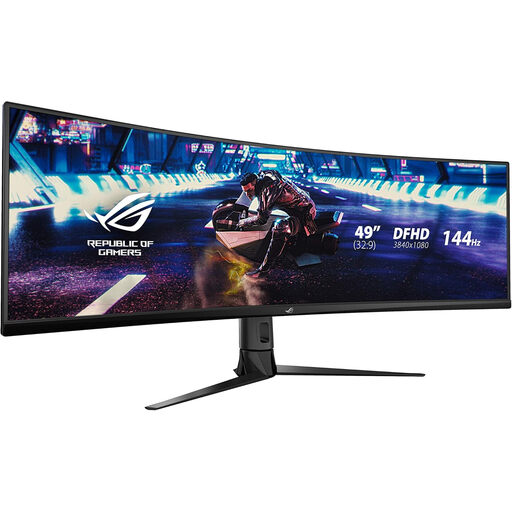
ASUS ROG Strix XG49VQ DFHD curved monitor
Consider this curved DFHD option if a wide cockpit view matters more to you than the vertical resolution of a 5120 × 1440 display. Its product name specifies 144Hz; check the exact game layout, available space and PC connection before choosing it.
View on Joybuy
Frequently asked questions
Is a 49-inch 32:9 monitor the right choice for every space simulator?
No. Choose a 32:9 screen for its horizontal span only after checking how your particular game handles that aspect ratio, its menus and its HUD. Samsung specifies 5120 × 1440 for the cited Odyssey OLED G95SD, which also gives it less vertical resolution than LG’s 5120 × 2160 45GX950A.
What do I need to run a monitor at its advertised refresh rate?
Check that the monitor input, graphics-card output and cable support the intended resolution and refresh mode together. Then check game performance separately: a monitor’s stated refresh rate does not establish the frame rate your PC will produce.
How should I use an OLED monitor with a persistent cockpit HUD?
Use the model’s supplied panel-care functions and avoid leaving an unchanged cockpit screen unattended where practical. ASUS lists OLED Care Pro and a three-year warranty including panel burn-in for its XG34WCDG; read the terms for the exact monitor you choose rather than treating a protection feature as a guarantee.
What should I do with an old monitor when replacing it in the UK?
Ask the retailer how to use its electrical-waste take-back route when buying a replacement. GOV.UK guidance describes retailer take-back of waste electrical equipment of the same type as the item purchased; confirm the arrangements for handing over your old monitor with that retailer.


