Competitive squad players
If tracking moving opponents is your priority, compare the refresh mode you can actually run, response-time measurements and variable refresh rate compatibility.


For squad survival matches, start by comparing QHD monitors with a high refresh rate, variable refresh rate support and an input that can deliver the mode you intend to use. A contrast-focused Mini LED model may suit dark-scene priorities, while a higher-refresh OLED is worth considering if your system can make use of its stated mode and you are comfortable following its panel-care guidance. Check the exact port limits and stand adjustments before choosing.
If tracking moving opponents is your priority, compare the refresh mode you can actually run, response-time measurements and variable refresh rate compatibility.
If you often play night maps or move through dark interiors, consider contrast-oriented display options alongside their motion specifications.
If several devices share your desk, check each input’s refresh limit, your devices’ supported modes and the stand adjustments you need.
Decide which need takes priority in your squad matches, then check whether your device and chosen connection can deliver the monitor’s stated mode.
Consider it when: you want QHD detail and a high-refresh specification without making OLED your starting point.
Allow for: a lower stated refresh ceiling than the cited 480Hz OLED model; the available rate can also depend on the input.
Consider it when: dark scenes make a contrast-focused design important to your choice.
Allow for: model-specific motion and viewing-angle behaviour; a panel label alone cannot settle either question.
Consider it when: your competitive priority and PC frame rates make that native refresh mode relevant.
Allow for: OLED panel care. ASUS says its protection features reduce burn-in risk, not eliminate it.
| Concern | What to check | Who this matters to |
|---|---|---|
| Motion clarity | Check native refresh at the resolution you will use, the response-time metric and variable refresh rate compatibility with your device. | When opponents move quickly, I want to follow them without distracting blur. Around 36% of consumers put motion clarity first. |
| QHD detail | Check for 2560 × 1440 resolution and the refresh mode available at that resolution through your chosen input. | I want detail in distant parts of the scene while keeping a high-refresh option. Roughly 29% of consumers prioritise that balance. |
| Dark-scene contrast | Compare the exact panel and backlight design, then check the model’s viewing-angle and panel-care considerations. | Dark interiors matter enough to me that contrast affects which display I consider. About 21% of consumers make it their primary concern. |
| Connections and setup | Check refresh limits by port, device and cable compatibility, and the stand adjustments you need. | I switch between devices and need a monitor that fits my desk and connections. Approximately 14% of consumers put that setup need first. |
BenQ specifies up to 144Hz over HDMI and 180Hz over DisplayPort for the EX271Q. Its headline rate does not describe both connections.
Match the monitor’s per-port specification to your PC or console output and cable before choosing a mode.
AGON by AOC lists both a QHD 180Hz Fast IPS model and a QHD 180Hz Fast VA model with Mini LED backlighting. Those labels do not establish every aspect of motion or viewing-angle behaviour.
Compare specifications for the exact model, including resolution, refresh rate, response metric, variable refresh rate support and connections.
ASUS describes its OLED Care+ features and heatsink as reducing burn-in risk, not removing it.
Read the care guidance for the OLED model you are considering, particularly if your use involves long periods with static desktop or game-interface elements.
GOV.UK identifies the Waste Electrical and Electronic Equipment Regulations 2013, as amended, as the framework for handling electrical waste in the UK.
When replacing a monitor, use an appropriate electricals-recycling or retailer take-back route.
Its QHD 180Hz examples offer different panel approaches for players weighing motion specifications against dark-scene priorities.
The PG27AQDP is a QHD OLED option for players specifically considering a native 480Hz refresh rate.
The EX271Q is relevant when per-input refresh limits and a multi-device desk setup shape the decision.
These monitors offer different screen sizes and stated resolution-and-refresh combinations for squad play. Choose by the mode, screen format and connection that suit your own setup rather than treating every listed refresh rate as available through every input.
 No image available
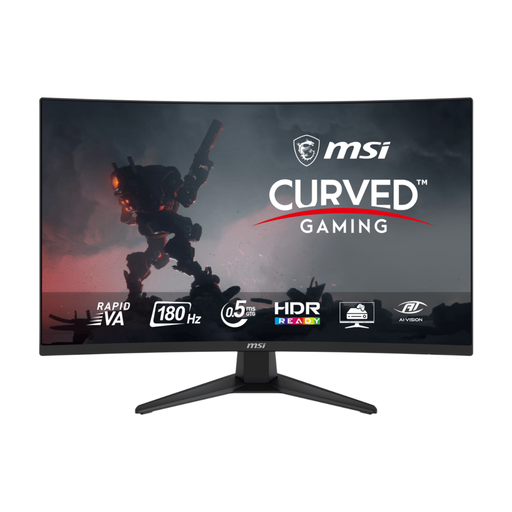
Consider this if you want a larger curved screen with a stated high-refresh mode for squad matches.
The product name specifies WQHD, 180Hz and a 0.5ms response time; confirm the response metric and the refresh mode available through your chosen connection.
 No image available
Consider this larger OLED option if its screen format suits your games and desk.
The product name specifies QHD and 240Hz. Check its exact resolution, screen format, per-input modes and OLED care guidance before deciding.
 No image available
Consider this model if choosing between a higher-resolution mode and a higher-refresh mode is central to your setup.
Its product name specifies 4K at 240Hz or Full HD at 480Hz, plus a stated 0.03ms response time. The 480Hz figure is for Full HD, not 4K; check which modes your device, port and cable can use.
 No image available
Consider this if you want a 27-inch QHD OLED rather than a larger display for your squad setup.
The product name specifies 240Hz and a 0.03ms response time. Confirm its refresh mode by input and read its OLED care guidance.
 No image available
Consider this if a wider screen fits both your games and the space available on your desk.
The product name specifies WQHD and 240Hz. Check the exact screen format and per-input modes, and follow the model’s guidance on avoiding extended static images.
Start with a QHD 180Hz option if its resolution and available refresh mode fit your setup; consider a 480Hz model when your competitive priorities and PC frame rates make that mode useful. AGON by AOC specifies QHD 180Hz models, while ASUS specifies native QHD 480Hz for the PG27AQDP. Check the resolution and input used for any higher-refresh mode rather than comparing the numbers alone.
Not necessarily: the limit depends on the exact monitor and input. BenQ specifies up to 144Hz over HDMI and 180Hz over DisplayPort for the EX271Q, so check your intended device, cable and port together.
No; check the exact monitor’s supported variable refresh rate modes and whether they work with your device and connection. The Video Electronics Standards Association defines tests for its AdaptiveSync certification programme, but a general compatibility description does not establish identical behaviour across monitors.
Use an appropriate electricals-recycling or retailer take-back route rather than putting the monitor in general waste. GOV.UK identifies the Waste Electrical and Electronic Equipment Regulations 2013, as amended, as the UK framework supporting electrical-equipment recovery, reuse and recycling.