
24/7 Customer Support

Free returns

Same-day & Next-day Delivery

Quality Guaranteed

Unlock Your Welcome Offers: FREE Delivery | Up to 80% OFF | Free 30-day JoyPlus trial
Download the APP
Choosing a new gaming monitor can feel like navigating a minefield of technical jargon. With terms like refresh rates, response times and panel types being thrown around, it’s easy to feel overwhelmed. Are you a competitive player needing every millisecond of advantage, or a casual gamer looking for an immersive world to explore? The right display can transform your experience, but finding it shouldn't be a chore.
As a Joybuy Product Recommendation Officer, my role is to cut through the clutter. This guide is designed to give you clear, practical advice on what to look for in a PC gaming monitor and to highlight a few standout options that deliver on performance and value for different types of users in 2026.
Before diving into specific models, let's demystify the most important specifications. Focusing on these three areas will help you narrow down your options and find a monitor that truly suits your needs.
These two specifications are crucial for smooth, clear motion.
This is all about how detailed and immersive your game world will look.
Finally, ensure the monitor works with your setup and delivers the visual quality you expect.
Based on our analysis of the current market, here are three monitors that offer a compelling combination of features, performance and value for different users.
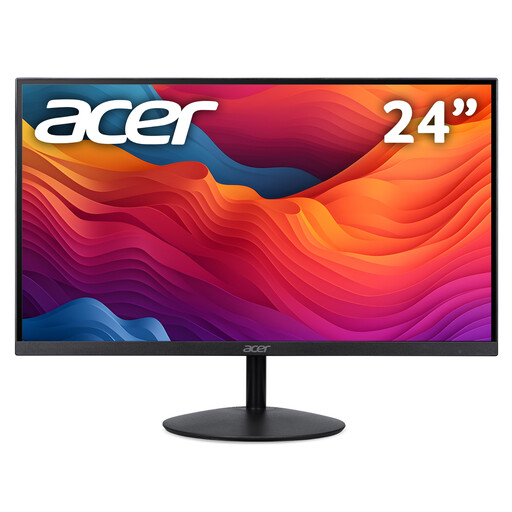
Why It Stands Out: The Acer SA242YP1 proves that you don't need to spend a fortune to get a high-performance gaming experience. It packs a 144Hz refresh rate and a rapid 1ms response time into a sleek, 23.8-inch IPS display. The ZeroFrame design makes it an excellent choice for multi-monitor setups, while the IPS panel ensures colours remain vibrant and consistent.
Pros:
Who is it for: This monitor is ideal for gamers entering the world of high-refresh-rate gaming or anyone seeking a high-value Full HD monitor that excels at both gaming and everyday tasks.
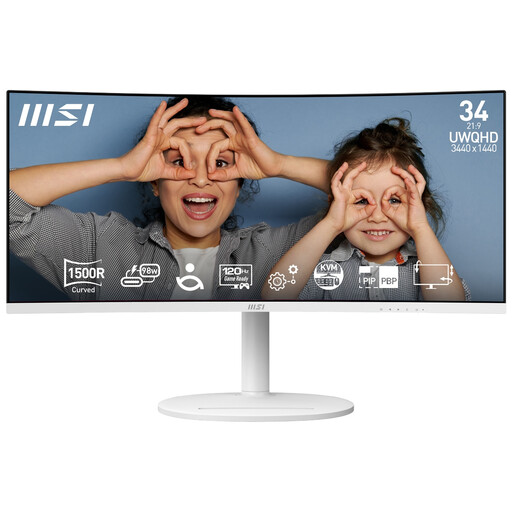
Why It Stands Out: The MSI Modern MD342CQPW is a masterclass in versatility. This 34-inch ultrawide monitor combines a cinematic 1500R curve with a sharp UWQHD (3440x1440) resolution, making it perfect for immersive gaming and expansive productivity. Its standout feature is the single-cable USB-C connection, which can transmit video and deliver up to 98W of power to your laptop, creating a clean and efficient workspace.
Pros:
Who is it for: This is a superb choice for hybrid users who split their time between work and play. It’s for the professional who needs screen real estate during the day and the gamer who wants to get lost in cinematic worlds at night.
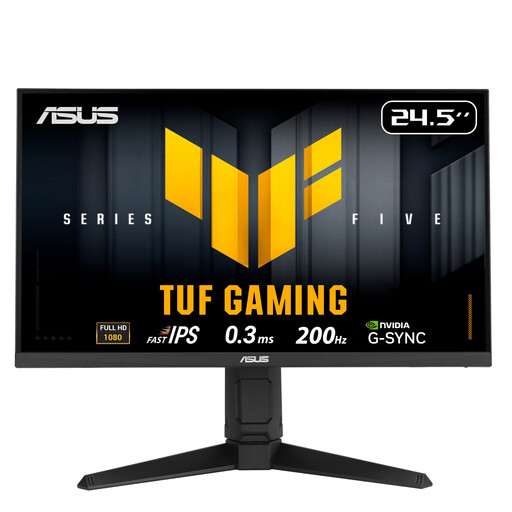
Why It Stands Out: Built for the competitive arena, the ASUS TUF Gaming VG259QL5A is a pure esports monitor. It focuses on one thing: speed. The 24.5-inch Fast IPS panel delivers an incredibly fast 200Hz refresh rate and a near-instantaneous 0.3ms response time. This combination, along with ASUS's ELMB technology, ensures that motion is exceptionally clear, giving players a distinct advantage in fast-paced titles.
Pros:
Who is it for: This monitor is for the serious, competitive gamer. If you play titles like Valorant, CS2 or Apex Legends and demand the highest level of responsiveness and motion clarity, this is a formidable option.
If these recommendations aren't quite what you're looking for, don't worry. Every setup is unique, and the right monitor for you might have a different size, resolution or feature set. To see a wider selection of displays suitable for gaming, productivity and general use, feel free to browse our full collection.
Explore our complete range of Office Computer Monitors to find your perfect match.
For most gamers, the answer is a definite yes. Moving from a standard 60Hz display to a 144Hz monitor provides a significantly smoother and more responsive feel, not just in games but also in everyday desktop use. In fast-paced games, this fluidity can provide a tangible competitive advantage by making it easier to track moving targets.
Absolutely. Many modern gaming monitors are excellent choices for consoles. To take full advantage of the 120fps modes on a monitor for PS5 or Xbox Series X, you will need a display that supports a 120Hz refresh rate over its HDMI port. Always check the monitor's specifications to confirm console compatibility and the supported resolutions at that refresh rate.
A curved gaming monitor is designed to wrap the image around your field of view, which can create a more immersive experience and may reduce eye strain on larger screens. This is particularly effective on an ultrawide monitor. Flat screens remain a popular choice, especially for creative work where geometric accuracy is important. Ultimately, the choice between flat and curved often comes down to personal preference and desk space.