
24/7 Customer Support

Free returns

Same-day & Next-day Delivery

Quality Guaranteed

Unlock Your Welcome Offers: FREE Delivery | Up to 80% OFF | Free 30-day JoyPlus trial
Download the APP
Choosing a new gaming monitor can feel like navigating a minefield of technical jargon and marketing hype. With so many specifications to consider, it’s easy to end up with a screen that doesn’t suit your setup or, worse, paying a premium for features you’ll never use. As a Joybuy Product Recommendation Officer, my role is to help you cut through the jargon and focus on what truly matters for your gaming and productivity needs.
Before you add any PC monitor to your basket, let’s look at three common pitfalls that UK buyers often fall into and how you can sidestep them to make a smarter purchase.
The "Higher Numbers are Always Better" Myth: It's tempting to assume that the monitor with the highest refresh rate and resolution is automatically the superior choice. Marketers often push a 4K monitor with a 240Hz refresh rate as the ultimate goal. However, this combination demands immense power from your graphics card. If your PC can only produce 100 frames per second in your favourite game, a 240Hz screen offers no additional benefit over a 144Hz monitor and you've simply overspent. The key is to match the monitor's capabilities to your PC or console's actual performance.
Misleading "HDR" Labels: High Dynamic Range (HDR) promises brighter highlights, deeper blacks and more vibrant colours. While true HDR is transformative, many affordable monitors feature an "HDR Ready" or basic HDR monitor label without meeting any official certification. These often provide a negligible improvement over a standard display. For a noticeable difference, look for specific certifications like DisplayHDR 400 or higher, which guarantee a minimum standard of brightness and colour gamut.
Ignoring the Panel Technology: Beyond size and speed, the underlying panel technology—primarily IPS, VA or TN—is one of the most critical factors. A VA panel might offer great contrast for cinematic games but could exhibit noticeable ghosting in fast-paced shooters. An IPS panel typically provides superior colour accuracy and viewing angles, making it a great all-rounder, but may have a lower contrast ratio than a VA panel. Choosing the wrong type for your primary use can lead to daily frustration.
To avoid the traps above, focus on balancing these three core areas. Getting this right ensures you get the performance you need without wasting your budget.
This is the most important trade-off in choosing a gaming monitor.
For competitive gamers playing fast-paced titles like Valorant or Call of Duty, a 1080p or 1440p monitor with a high refresh rate (165Hz+) is often the priority. For those who prefer visually stunning single-player games on a powerful PC or a PS5, a 4K monitor at 60Hz or 120Hz might be a better fit.
Screen tearing occurs when your graphics card's frame output is out of sync with your monitor's refresh rate, creating a distracting horizontal line. Adaptive Sync technology solves this.
Nearly any modern gaming monitor should have some form of adaptive sync. It’s a non-negotiable feature for a smooth experience.
The physical characteristics of the monitor define your viewing experience.
Based on these practical criteria, here are a few monitors that align with specific user needs, helping you avoid common purchasing mistakes.
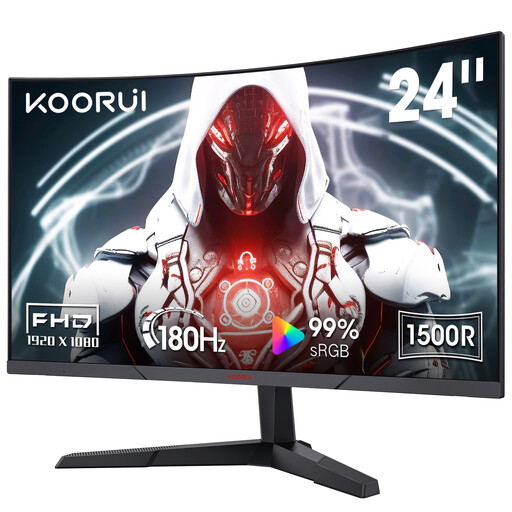
Why This Fits Their Persona: This monitor is ideal for UK gamers on a budget who prioritise speed over everything else. The 1080p resolution is easy for mid-range graphics cards to handle, allowing you to take full advantage of the high refresh rate in competitive titles.
It smartly avoids the "higher numbers" trap by focusing on a high 180Hz refresh rate at an achievable 1080p resolution, rather than an unusable 4K spec for its target audience.
Excellent price-to-performance with a 180Hz refresh rate and 1ms response time. The VA panel provides a high 3000:1 contrast ratio for deep blacks.
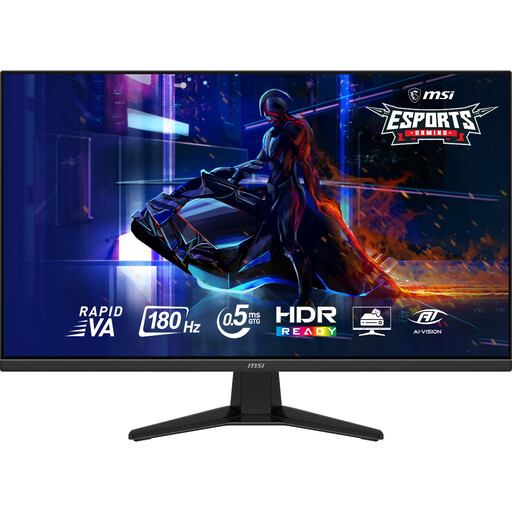
Why This Fits Their Persona: This is for the user with a hybrid setup for both work and play. The 32 inch screen and 1440p resolution provide ample screen real estate for productivity, while the 180Hz refresh rate and fast response time deliver a high-end gaming experience.
It hits the sweet spot between resolution and refresh rate, avoiding the trap of choosing one extreme. The Rapid VA panel is a modern solution that addresses the ghosting concerns of older VA technology.
A superb balance of features: large 32-inch size, crisp 2K monitor resolution and a very fast 180Hz refresh rate. It also supports console 1440p/120Hz modes.
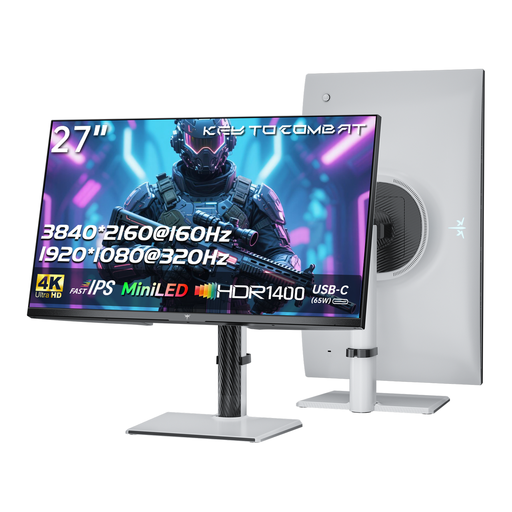
Why This Fits Their Persona: This is for the UK user who wants outstanding visual fidelity for both high-end gaming and creative work. The combination of MiniLED backlighting and a high HDR rating delivers a premium viewing experience that standard monitors cannot match.
It sidesteps the misleading HDR trap by offering a genuine, high-performance solution with MiniLED technology and a very high HDR1400 rating, providing true-to-life contrast and brightness.
Features a 4K Fast IPS panel for incredible detail and colour, a high 160Hz refresh rate and a built-in KVM switch for controlling multiple PCs. The 65W Type-C port can power a laptop with a single cable.
We have compiled a complete, real-time list of products that fully satisfy these strict selection criteria and UK safety regulations.
Whether a curved monitor is better is largely a matter of personal preference. For many users, particularly with screens 27 inches or larger, the curve enhances immersion by wrapping the image around their field of view. This is especially effective in simulation and racing games. However, for professional work that involves straight lines, such as graphic design or spreadsheets, some people find a traditional flat screen more comfortable.
A well-made PC monitor should provide reliable service for 5 to 8 years. The component most likely to degrade is the backlight, which can cause the screen to dim over time. You can help prolong its lifespan by avoiding continuous use at maximum brightness and enabling the built-in power-saving modes. All monitors sold in the UK are required to meet specific safety and durability standards.
While a monitor with a dedicated G-Sync module offers a premium, validated experience, it is not an absolute necessity. Many modern displays are now G-Sync Compatible. These are essentially FreeSync monitors that NVIDIA has tested and certified to deliver a variable refresh rate experience without tearing or stuttering. This provides a wider range of options, often at a more accessible price point. Always check the manufacturer's specifications to confirm compatibility.