Detail-first zoo builders
If you spend long sessions placing paths, habitats and scenery, you may value readable management menus and a clear view of the park more than an exceptionally high refresh rate.


A 27-inch QHD monitor with variable refresh and at least 144Hz is a sensible starting point for building and managing a detailed virtual zoo, provided your PC can run the game at your chosen settings and resolution. A curved VA screen is a preference-led alternative to a flat IPS model; neither a monitor’s refresh-rate figure nor a game’s recommended PC specification guarantees an in-game frame rate.
If you spend long sessions placing paths, habitats and scenery, you may value readable management menus and a clear view of the park more than an exceptionally high refresh rate.
If you also play fast-moving games, balance the detail you want at QHD against the frame rates your PC can produce. A monitor’s refresh capability and the game’s frame rate are different things.
If you prefer a curved view of your park, check the screen’s size, stand and desk fit as carefully as its display specifications.
Start with the detail you need to see and the resolution your PC can handle. Then check the available connections, refresh rate and physical fit.
| Concern | What to check | Who this matters to |
|---|---|---|
| Readable building detail | Compare a 27-inch QHD screen at 2560 × 1440 with your desk distance and preferred text size. Check the panel’s viewing characteristics rather than assuming every QHD screen uses IPS. | When placing paths and working through management menus, I want to see the scene and its controls clearly; roughly 33% of consumers put readable detail first. |
| PC and display capability | Check your graphics card, intended game settings and display output. Match the monitor’s resolution and port-specific refresh rate to what your PC can use. | If my PC struggles at the settings I prefer, a higher Hz figure will not create extra game frames; around 27% of consumers make PC-performance matching their primary concern. |
| Viewing preference and desk fit | Decide whether you prefer a flat or curved screen, then check its dimensions, stand adjustment and mounting options. | I want a single-screen view that feels comfortable without crowding my desk; about 20% of consumers place viewing preference and physical fit first. |
| Useful rather than unused capability | Check the refresh rate available through the input you will use and any conditions for an overclocked mode. Compare warranty and optional cover terms separately. | If I mainly build and manage a zoo, I would rather prioritise capabilities I can use than chase a headline refresh rate; roughly 20% of consumers put that choice first. |
The connection can change what is available. Dell lists the Alienware AW2725DM at up to QHD 144Hz through HDMI, but up to QHD 180Hz through DisplayPort 1.4.
Check the exact monitor’s port specifications against your PC output and the cable you intend to use.
Refresh rate describes how often the display can update, not how many frames your PC renders. A PC producing 100 frames per second cannot make full use of a 240Hz monitor.
Look for performance information for your graphics card, game, resolution and preferred settings before prioritising a higher refresh rate.
Frontier Support publishes recommended PC specifications for Planet Zoo, but those specifications do not establish the frame rate you will get at QHD or 4K, with particular settings or in a large park.
Use the requirements as a starting point, then check game-specific performance for your hardware and intended resolution.
ASUS lists tilt and VESA 100 × 100mm mounting for the TUF Gaming VG27WQ3B, but no height adjustment on its supplied stand.
Measure your desk space and check whether the supplied adjustment will place the screen at a comfortable height.
For that ASUS model, an arm or alternative stand may be needed if you require height adjustment.
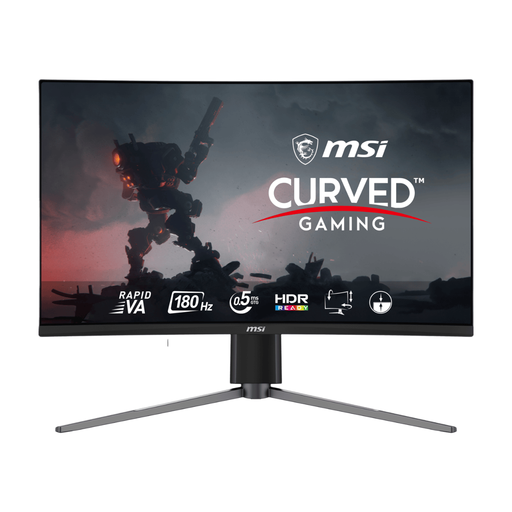
The MSI MAG 27CQ6F is a 27-inch curved WQHD model for buyers considering a single-screen QHD setup.
The LG 27GS75QN-B is a 27-inch QHD IPS option for buyers considering a different panel type.
The Alienware AW2725DM is a flat 27-inch QHD Fast IPS model whose input choice matters for high refresh.
The ASUS TUF Gaming VG27WQ3B is a 27-inch QHD curved Fast VA model for buyers who prefer a curved view.
These QHD gaming monitors include 27-inch and larger curved or IPS options. For zoo-building, compare the screen size and viewing style with your desk, then check which refresh rate your PC and chosen connection can use.
 No image available
Consider this model if you want a curved, single-screen view while building and managing your zoo.
Its stated specifications include a Rapid VA panel and 180Hz refresh rate. MSI lists Adaptive-Sync for the MAG 27CQ6F; check the connection and cable needed for your intended settings.
 No image available
Consider this larger curved screen if your desk and viewing distance can accommodate 32 inches.
The product name specifies 2560 × 1440 QHD resolution, a 165Hz refresh rate, Adaptive Sync and VESA 100 × 100mm mounting. Check which input supports the refresh rate you intend to use.
 No image available
Consider this 27-inch IPS option if readable QHD building views and variable refresh matter to you.
Its product name lists 180Hz and Adaptive Sync. Check the refresh rate available through your PC’s output and cable; the screen’s rating does not establish your game’s frame rate.
 No image available
Consider this 27-inch QHD model if you also want to assess a higher refresh-rate option for other games.
The product name specifies 2560 × 1440 resolution and 220Hz. Check the monitor’s port specifications and your PC’s game performance before treating that figure as useful for your setup.
 No image available
Consider this QHD screen if you play other games that might make use of a high-refresh display as well as building a zoo.
The product name lists 320Hz and Adaptive-Sync. Confirm the supported resolution and refresh rate for your chosen input and cable, and check whether your PC can produce the frames you want.
It can make displayed movement smoother when your PC produces enough frames, but readable building detail may matter more if zoo management is your main use. It helps to distinguish a monitor’s refresh rate from the frame rate the PC actually delivers, so check performance at your intended resolution and settings.
Use whichever connection supports your target settings on both the monitor and PC. Dell lists the Alienware AW2725DM at up to QHD 144Hz through HDMI and QHD 180Hz through DisplayPort 1.4; LG says the 27GS75QN-B needs a DisplayPort 1.4-capable graphics card and cable for its optional 200Hz overclock mode.
Check the product information against the rules applicable where the monitor is sold. GOV.UK says CE marking continues to be recognised alongside UKCA for applicable goods placed on the Great Britain market, covering England, Scotland and Wales. Northern Ireland has different arrangements, so check the guidance applicable there rather than applying the Great Britain position automatically.
Contact the trader about the fault and keep your order confirmation and a record of the problem. GOV.UK provides consumer-rights guidance for goods bought online or in person; a remedy for a faulty product is a separate question from a retailer’s change-of-mind policy.
Use an electrical-waste collection or retailer take-back route where available rather than treating the monitor as ordinary rubbish. GOV.UK explains that waste electrical and electronic equipment rules support the recovery, reuse and recycling of electrical products and components.