For text-led interactive fiction in a bright room, start with a stated matte or anti-glare finish, a brightness specification and a screen you can position away from reflections. A 27-inch QHD IPS monitor is a practical starting point if you prefer simpler text sizing; consider 4K if finer text and more workspace matter to you and you are willing to adjust scaling. Check your computer's connections before treating USB-C or a high refresh rate as a reason to choose a particular model.
Who should prioritise which features?
Bright-room, text-first players
If you spend most of a game reading passages, dialogue and choices, look for a stated matte or anti-glare finish, a brightness specification and ways to position the screen away from reflected light. Dell UK specifies these features for the S2725DS; the specifications of other models need checking individually.
Readers who keep notes alongside the game
If you want finer type or space for a game window and reference material, a 27-inch 4K display may suit your layout. Check that your computer supports its native resolution and that your preferred scaling keeps menus comfortable to read. LG UK identifies the 27U730A-B as a 27-inch 4K IPS model.
Laptop-and-desk players
If you move a laptop between desks, USB-C video, power delivery and a hub may matter more than a higher refresh rate. Confirm what your laptop's USB-C port supports and how much charging power it needs. BenQ UK lists a USB-C hub and 65 W power delivery for the GW2790QT.
What should you check before buying?
For interactive fiction in a bright room, assess reflections and text size at your usual desk before deciding how much you value extra connections or gaming features.
| Concern |
What to check |
Who this matters to |
| Reflections and brightness |
Look for a stated matte or anti-glare finish and a brightness figure in cd/m². Check whether the screen can face away from windows or lamps. |
When light falls across the display, I want to read dialogue without relying on brightness alone. Around 46% of consumers put reflection control and readable brightness first. |
| Text size and workspace |
Compare screen size and resolution, then try your preferred game text and operating-system scaling at your normal viewing distance. |
For long passages alongside notes, I want comfortable type without losing the layout I use. Roughly 36% of consumers place text clarity and workspace first. |
| Desk fit and connections |
Check stand adjustment, your computer's video outputs and, if relevant, USB-C video support and charging requirements. |
When switching between a laptop and other games, I need a connection that works with my computer and room to reposition the screen. About 18% of consumers chiefly prioritise desk fit and connection flexibility. |
Buying pitfalls to avoid
-
Choosing by refresh rate alone
A high refresh rate does not tell you whether reflections will obscure text or whether the stand lets you change the viewing angle.
Check coating, stated brightness, resolution and positioning first. Then decide what refresh rate you want for any other games you play.
-
Assuming 4K will always be easier to read
At 27 inches, a 4K display offers more pixels than QHD, but its default interface text may be smaller than you prefer.
Compare QHD and 4K using your usual seating distance and text-scaling settings, including any font controls in the game.
-
Assuming USB-C will connect and charge any laptop
A USB-C socket alone does not establish that your laptop can send video through it or that the monitor supplies enough power.
Check your laptop's USB-C video specification and charging requirement against the exact monitor's connection and power-delivery details.
If the available power is insufficient, you may need to keep using the laptop's separate charger.
-
Ignoring the position of an anti-glare screen
An anti-glare finish does not eliminate a bright window or lamp reflected directly towards the panel.
Check whether the stand or a compatible monitor arm will let you turn or raise the screen to avoid direct reflections.
Relevant brands for reference
These model examples show different specifications to compare; the features do not apply to every monitor from the same brand.
Dell
The S2725DS is a reference point for comparing stated bright-room and positioning features on a 27-inch QHD monitor.
- Dell UK specifies 2560 × 1440 resolution, 350 cd/m² typical brightness, an anti-glare hard coating, 100 Hz refresh and height, tilt, swivel and pivot adjustment for the S2725DS.
- Check the exact model rather than assuming other Dell monitors share those specifications.
BenQ
The GW2790QT is a QHD option to examine if a laptop-friendly desk connection is a priority.
- BenQ UK lists an integrated USB hub and 65 W USB-C power delivery for the GW2790QT.
- Check the GW2790QT's brightness and screen finish separately before choosing it for your room, as well as your laptop's USB-C video and charging requirements.
LG
LG's 27U631A-B and 27U730A-B provide QHD and 4K specifications to compare for text size and desk layout.
- LG UK lists the 27U631A-B as a 27-inch QHD IPS, 100 Hz USB-C model and the 27U730A-B as a 27-inch 4K IPS model with USB-C 90 W power delivery.
- Check brightness, screen coating, stand adjustment and the required port capability on the exact variant you are considering.
Joybuy monitors to consider
These QHD and WQHD monitors are choices to examine for text-led play at a desk. Compare each one with your room lighting, preferred text size and connection needs; a gaming specification alone cannot settle bright-room readability.
 No image available
ASUS ProArt PA278CV IPS WQHD monitor
Consider this WQHD model if a text-led desk setup is your priority. Check its screen finish, stated brightness and stand adjustment against the light and reflections at your desk.
View on Joybuy
 No image available
MAG 272QP QD-OLED X50 27-inch WQHD monitor
Its 2560 × 1440 resolution is relevant if you want a QHD game window at your desk. The title lists a 500 Hz refresh rate, which need not drive a choice for text-led play; assess bright-room legibility and screen position separately.
If you plan to connect a laptop by USB-C, confirm video support and whether the available charging power meets its requirements.
View on Joybuy
 No image available
MAG 274QP QD-OLED X24 27-inch WQHD monitor
The title specifies 2560 × 1440 resolution and 240 Hz refresh. If bright-room reading is the main use, check whether the screen's SDR brightness suits your lighting and whether you can position it away from direct reflections.
View on Joybuy
 No image available
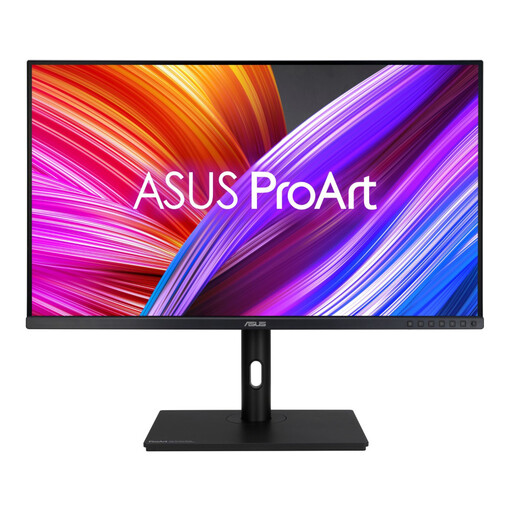
ASUS ProArt PA328QV IPS WQHD monitor
Consider this WQHD model if you want to assess a larger desk display for story text and notes. Check the text size at your usual viewing distance and make sure you can position the screen around your room's reflections.
View on Joybuy
 No image available
AOC Q32V4 31.5-inch IPS monitor
If you prefer a physically larger display for reading, compare this 31.5-inch model's text size at your normal seating distance. Check whether its stated brightness suits your room and whether its stand allows the position you need to avoid reflections.
View on Joybuy
Frequently asked questions
Do I need a very high refresh rate for interactive fiction?
No: for text-led interactive fiction in a bright room, screen reflections, readable text and comfortable positioning are more useful first checks than an extreme refresh rate. If you also play motion-heavy games, consider the refresh rate you want for those games separately; Dell UK lists the S2725DS at 100 Hz, for example.
Is QHD or 4K the better choice at 27 inches?
Choose QHD if you prefer to manage text size with less reliance on scaling; consider 4K if finer text and more workspace matter more to you and your computer supports the resolution. Try your preferred font size at your normal viewing distance. Dell UK lists the S2725DS at 2560 × 1440, while LG UK lists the 27U730A-B at 3840 × 2160.
Can one USB-C cable connect and charge my laptop?
Yes, if your laptop supports video output through its USB-C port and the monitor's power delivery meets its charging needs. BenQ UK specifies 65 W USB-C power delivery for the GW2790QT, and LG UK specifies 90 W for the 27U730A-B; check your laptop's requirements before relying on either connection.


