For narrative puzzles in a bright room, start with an explicitly non-glare or anti-glare screen, then choose resolution and connections to suit your games and devices. A non-glare 4K IPS monitor is a sensible route when reflections and fine clues are the priorities; an anti-glare OLED is worth considering if dark-scene contrast matters too, provided its typical brightness and your room layout also work for you. An exceptionally high refresh rate should not take precedence over those checks unless you also play faster games.
Who is this choice for?
Daylight-affected story players
If you play near a window or under strong room lighting, reflections may make clues harder to inspect. Check the screen finish and where you can position the monitor before focusing on refresh rate. BenQ UK identifies both direct and reflected light as causes of glare.
Detail-first PC puzzle players
When play involves reading notes, dialogue and small environmental cues, screen size and resolution deserve particular attention. Gigabyte, Dell and ASUS list 4K options at different sizes, so consider the available desk space alongside the detail you want to see.
Mixed PC-and-console players
If you switch between a PC and console, check the resolution and refresh-rate combination supported through the connection you will actually use. A port name alone does not tell you which mode your whole setup can deliver.
What matters when choosing?
Choose the screen finish for your lighting first. Then decide whether 4K detail or OLED dark-scene contrast matters more, and confirm that the monitor supports the output you want from your PC or console.
Non-glare 4K IPS
Consider it when: Reflections and fine clues are your main concerns; Gigabyte specifies both a non-glare surface and 3840 × 2160 resolution for the M32U.
Trade-off: The M32U has a stated 1000:1 typical contrast ratio, while its 31.5-inch screen needs room on the desk. Do not treat this route as interchangeable with OLED for dark-scene presentation.
Anti-glare OLED
Consider it when: You value dark-scene contrast as well as reflection control. LG specifies an anti-glare, low-reflection finish for its 27GS93QE-B.
Trade-off: That LG model is 2560 × 1440 rather than 4K, and its 275-nit typical brightness must be considered separately from its 1300-nit peak figure. Screen placement still matters in direct light.
| Concern |
What to check |
Who this matters to |
| Reflected light |
Look for an explicit non-glare or anti-glare finish, and consider where windows and lamps sit relative to the screen. |
If light falls across the display while I inspect a clue, I want to control reflections before pursuing a higher refresh rate. Roughly 36% of consumers would put reflection control first. |
| Clues and text |
Compare resolution with screen size and seating distance; confirm that your device can output the resolution you intend to use. |
Reading notes and spotting small scene details matters more to me than an exceptionally fast display mode. For around 29% of consumers, visual detail would be the primary concern. |
| Device connections |
Check the exact HDMI or DisplayPort connection and the supported resolution and refresh-rate mode for your PC or console. |
When I move between devices, I need each one to work in the display mode I plan to use. Device compatibility would come first for roughly 21% of consumers. |
| Dark-scene contrast |
Check the model’s screen finish and typical SDR brightness separately from any peak HDR figure. |
I care about shadowy scenes, but I still need to see them clearly with the room lights on. Around 14% of consumers would prioritise dark-scene contrast. |
Buying pitfalls
-
Treating peak HDR brightness as everyday brightness
LG gives the 27GS93QE-B different figures for typical and peak brightness. The peak figure does not describe its ordinary full-screen brightness in a lit room.
Compare typical SDR brightness and screen finish, then assess how much light reaches your proposed screen position.
-
Expecting refresh rate to fix glare
A high refresh-rate specification does not address light reflecting from the screen. BenQ UK also notes that glare can come from direct light or a large brightness difference between the display and its surroundings.
Check the surface treatment and plan monitor and lamp placement before making refresh rate the deciding factor.
-
Buying on the HDMI label alone
The useful question is whether the exact monitor supports your chosen device at the resolution and refresh rate you want. Gigabyte, for example, states 4K 120 Hz console support for the M32U.
Check the model’s supported modes, your device’s output and the required connection or cable together.
-
Choosing a large screen or arm without measuring
Gigabyte lists the M32U at 715.3 × 585.3 × 244.3 mm with its stand, weighing 10.35 kg with the stand. Its specified VESA pattern is 100 × 100 mm.
Measure your desk and check an arm’s load rating and mounting pattern before deciding how to position it.
An existing arm may need replacing if its mount or load rating does not fit.
Relevant brands to consider
Gigabyte
The M32U illustrates a non-glare 4K IPS option for a desk with room for a 31.5-inch display.
- Gigabyte specifies a non-glare surface, 350 cd/m² typical brightness, HDMI 2.1 and 4K 120 Hz console support for the M32U.
- Its stated 1000:1 typical contrast ratio should not be read as OLED-like black depth; measure the desk for its stand or a compatible mount.
LG UltraGear
The 27GS93QE-B illustrates an OLED route for consumers who want an explicitly anti-glare, low-reflection finish.
- LG specifies 2560 × 1440 resolution, 240 Hz and a stated 1.5M:1 contrast ratio for this model.
- LG’s 275-nit typical brightness and 1300-nit peak brightness describe different conditions; judge room suitability using more than the peak figure.
Alienware
Dell’s AW2725QF is a 27-inch 4K IPS option for story games and higher-refresh play in other genres.
- Dell specifies 4K operation up to 180 Hz, FHD operation up to 360 Hz, two HDMI 2.1 ports and DisplayPort 1.4.
- Before choosing it for a reflection-heavy position, check the exact model’s screen-surface treatment and typical SDR brightness.
ASUS ROG
The ROG Strix OLED XG27UCDMG offers a compact 4K OLED configuration for consumers considering both story games and high-refresh play.
- ASUS specifies a 26.5-inch-viewable 4K QD-OLED display, 240 Hz, HDMI 2.1, USB-C 90 W power delivery and OLED Care Pro.
- Check this model’s surface finish and typical SDR brightness before choosing it primarily for a bright room. OLED-care features are not a guarantee against image retention.
Joybuy product choices
These monitors offer different ways to approach story-led play in a bright room, from a 4K professional display to gaming OLED and larger-screen options. For each one, confirm the screen finish, typical brightness and device mode that matter to your setup rather than assuming that screen size or refresh rate settles the choice.
 No image available
ASUS ProArt Display PA32UCG-K, 32-inch 4K
Consider this professional-display option if 4K detail is central to how you play narrative puzzles. Its title specifies a 32-inch IPS Mini LED screen and 120 Hz refresh rate; check the exact screen finish, typical SDR brightness and supported connection mode for your setup. Confirm the HDMI version before relying on a particular console output mode.
View on Joybuy
 No image available
LG UltraGear 39GX900A-B, 39-inch OLED QHD
Consider this 240 Hz OLED model if you want a large-format screen for games that support your preferred layout. Check desk space, game display-format support, surface finish and typical SDR brightness; a peak HDR figure should not stand in for everyday bright-room visibility.
View on Joybuy
 No image available
LG UltraGear 34GX900A-B, 34-inch OLED WQHD
This 240 Hz OLED model offers a smaller large-format alternative to the 39-inch LG above. Check whether your puzzle games support the intended display format, then assess desk fit, surface finish and typical SDR brightness for the room where you will use it.
View on Joybuy
 No image available
AOC Q32V4, 31.5-inch IPS
Consider this larger IPS screen if screen area matters more to you than an exceptionally high refresh rate. Its title specifies Adaptive Sync and built-in speakers; confirm the exact resolution, surface finish and stand adjustments against your desk and detail needs.
View on Joybuy
 No image available
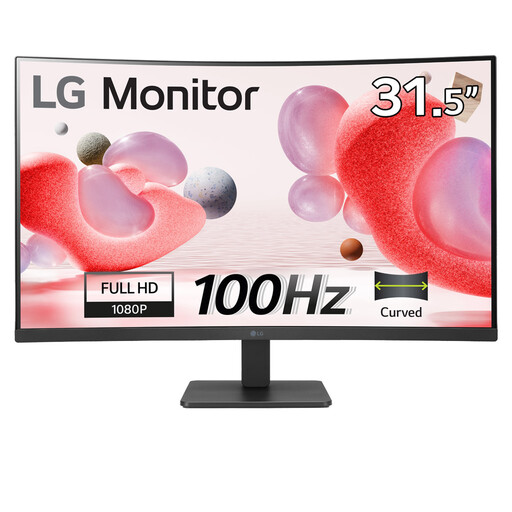
LG Electronics 32MR50C-B, 32-inch Full HD curved monitor
Consider this matte, anti-glare VA model if controlling reflections and having a larger screen matter more than 4K detail. Its title specifies 100 Hz, AMD FreeSync and HDMI; Full HD offers less stated pixel detail than the QHD and 4K options here. Check stand positioning and the connection mode your device needs.
View on Joybuy
Frequently asked questions
Should I choose OLED or IPS for narrative puzzles in a bright room?
Choose an explicitly non-glare IPS option when reflections and 4K detail lead your decision; consider OLED when you also value dark-scene contrast and the exact model has a suitable anti-glare or low-reflection finish. Check typical SDR brightness and screen placement for either route rather than relying on an OLED peak HDR figure.
Do narrative puzzle games need a 240 Hz monitor?
Not necessarily: reflection control, readable detail and compatibility with your gaming device are more immediate checks for slow-paced puzzles. A higher refresh mode may matter if you also play faster games, but confirm that your device can use the mode you intend to choose.
How can I reduce glare after setting up the monitor?
Move the display or light source to reduce light shining into your eyes or reflecting from the screen, then adjust display brightness for comfortable viewing. BenQ UK notes that glare can arise from direct light, reflections and a large brightness difference between the screen and its surroundings.
What if my new monitor develops a fault after delivery?
A fault is different from simply changing your mind about a purchase. GOV.UK says a trader may have to repair or replace an item if a customer discovers a fault after accepting it. Keep your order confirmation and check the seller’s process for reporting a fault.


